Netgear ProSAFE 10 Gigabit SFP+ Module SR AXM761 Install Guide
Summary
The AXM761 is a high-speed, full-duplex SFP+ optical module that enables reliable 10 Gigabit Ethernet connectivity using multimode fiber optics with NETGEAR managed switches. This manual serves as a comprehensive technical guide covering proper installation and removal procedures for network professionals. It details the product's performance specifications (IEEE 802.3ae), operational guidelines, required safety warnings, and regulatory compliance information, ensuring seamless integration into your high-capacity networking environment.
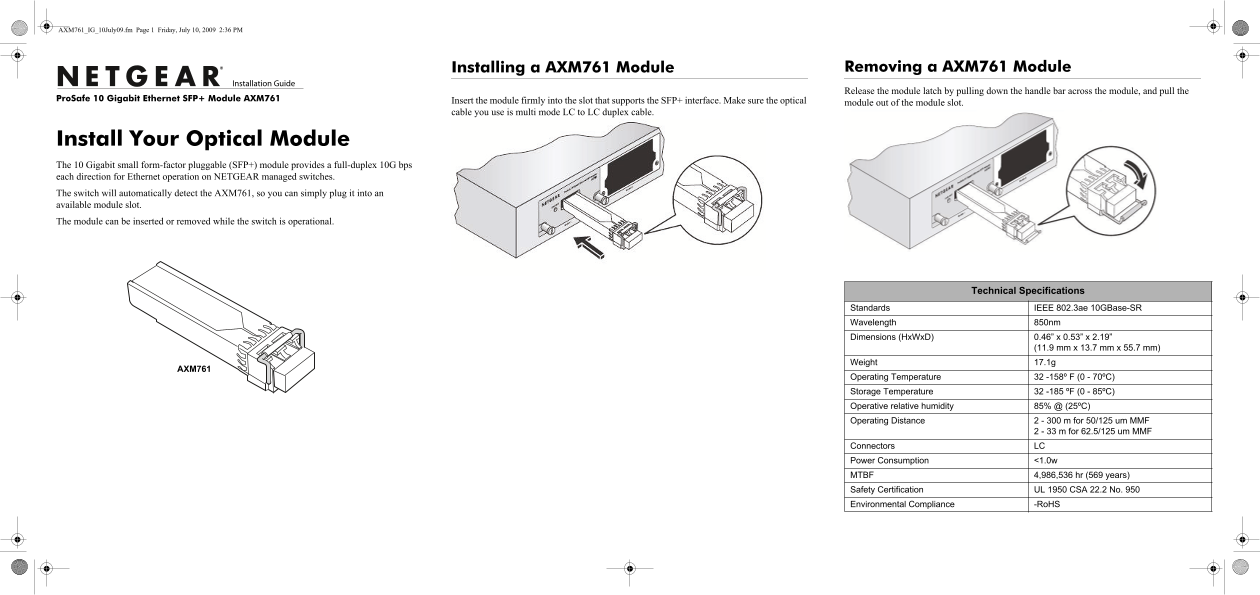
Page 1 Text Content
AXM761_IG_10July09.fm Page 1 Friday, July 10, 2009 2:36 PM
Installing a AXM761 Module Removing a AXM761 Module Release the module latch by pulling down the handle bar across the module, and pull the
e Pro Safe 10 Gigabit Ethernet SFP+ Module AXM761
Insert the module firmly into the slot that supports the SFP+ interface. Make sure the optical module out of the module slot. cable you use is multi mode LC to LC duplex cable.
Install Your Optical Module The 10 Gigabit small form-factor pluggable (SFP+) module provides a full-duplex 10G bps each direction for Ethernet operation on NETGEAR managed switches. The switch will automatically detect the AXM761, so you can simply plug it into an available module slot. The module can be inserted or removed while the switch is operational.
AXM761
Technical Specifications
Standards IEEE 802.3ae 10GBase-SR Wavelength 850nm Dimensions (Hx Wx D) 0.46” x 0.53” x 2.19”
(11.9 mm x 13.7 mm x 55.7 mm)
Weight 17.1g
AXM761
Operating Temperature 32 -158º F (0 - 70ºC) Storage Temperature 32 -185 ºF (0 - 85ºC) Operative relative humidity 85% @ (25ºC) Operating Distance 2 - 300 m for 50/125 um MMF
2 - 33 m for 62.5/125 um MMF
Connectors LC Power Consumption <1.0w MTBF 4,986,536 hr (569 years) Safety Certification UL 1950 CSA 22.2 No. 950 Environmental Compliance -Ro HS
Page Summary Contents For Netgear ProSAFE 10 Gigabit SFP+ Module SR AXM761 Install Guide
Manual Details
| Brand | NETGEAR |
|---|---|
| Pages | 2 |
| File Size | 407.57 KB |
| Published | June 06, 2026 |
Enter the captcha to get the download link:

Frequently Asked Questions
How do I remove or install the AXM761 module?
To remove it, pull down the handle bar across the module latch. To insert it, plug it firmly into the designed slot.
What type of cable must be used with this optical module?
You must use a multi mode LC to LC duplex cable for proper operation.
Does this device require registration after installation?
Yes, it is recommended to register your product using its serial number at www.NETGEAR.com/register.
What safety precaution should I take regarding the laser light?
Since it is a Class 1 laser product, avoid staring into the open aperture because invisible laser radiation may be emitted when no fiber cable is connected.