Delta HMI Omron C Series PLC Connection Manual
Summary
This manual provides comprehensive technical guidelines for the integration of Omron C Series PLCs with various Human-Machine Interfaces (HMIs) and control hardware. It details specific wiring configurations using both RS-232C and RS-422 protocols across multiple DOP series models, ensuring reliable system connectivity. The guide also serves as a crucial reference for memory mapping, defining every register type—including IR, HR, AR, LR, and DM areas—and corresponding address ranges required for accurate programming and robust industrial automation design. This resource is essential for control engineers and technicians implementing Omron PLC-based systems.
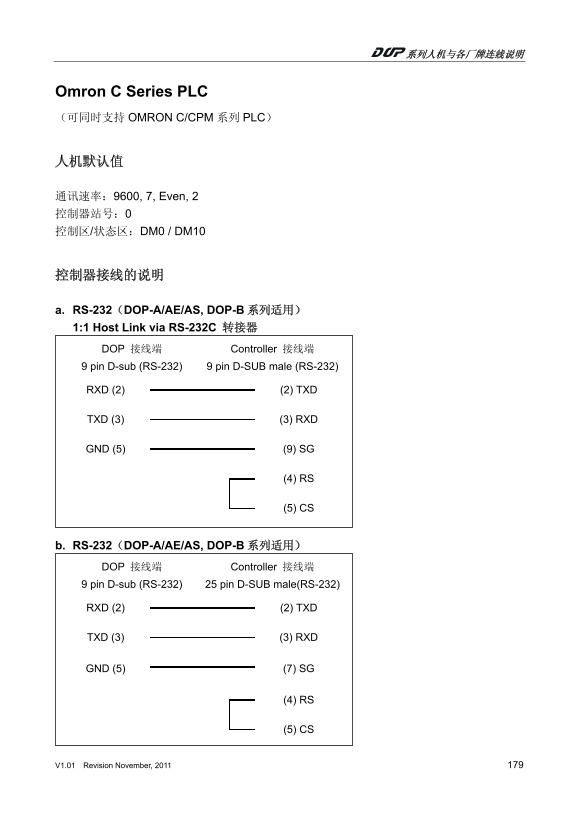
Page 1 Text Content
Omron C Series PLC (可同时支持 OMRON C/CPM 系列 PLC)
通讯速率:9600, 7, Even, 2 控制器站号:0 控制区/状态区:DM0 / DM10
a. RS-232(DOP-A/AE/AS, DOP-B 系列适用) 1:1 Host Link via RS-232C 转接器 DOP 接线端 Controller 接线端 9 pin D-sub (RS-232) 9 pin D-SUB male (RS-232)
RXD (2) (2) TXD
TXD (3) (3) RXD
GND (5) (9) SG
(4) RS
(5) CS
b. RS-232(DOP-A/AE/AS, DOP-B 系列适用) DOP 接线端 Controller 接线端 9 pin D-sub (RS-232) 25 pin D-SUB male(RS-232)
RXD (2) (2) TXD
TXD (3) (3) RXD
GND (5) (7) SG
(4) RS
(5) CS
V1.01 Revision November, 2011 179
Page Summary Contents For Delta HMI Omron C Series PLC Connection Manual
Manual Details
| Brand | Delta |
|---|---|
| Pages | 3 |
| File Size | 66.56 KB |
| Published | June 05, 2026 |
Enter the captcha to get the download link:

Frequently Asked Questions
What is the default communication speed for the controller?
The default communication rate is 9600, 7, Even, 2.
How should I connect an Omron PLC using RS-232 (DOP-A/AE/AS)?
Connect DOP-B to Controller via a 9 pin D-sub and ensure matching wiring for RXD, TXD, GND, etc.
What is the maximum addressable word area in the DM area?
The DM area supports addressing from DM0 up to DM9999.
Which communication protocol uses RS-422 connections when linking DOP-A/AE units?
RS-422 links for DOP-A/AE units require a 9 pin D-SUB male connection for both ends (RXD-, RXD+, TXD-, TXD+).