Delta HMI DOP-107CV DOP-107EV Hardware Installation Manual
Summary
The DOP-107 series is a robust 7" industrial Human Machine Interface (HMI) built for advanced control and monitoring within automation systems. This manual provides exhaustive technical documentation, covering all necessary installation procedures, detailed wiring diagrams (RS-232/485), hardware specifications, and electrical safety precautions. It is essential reading for engineers and technical professionals responsible for integrating, wiring, or maintaining industrial automated equipment that requires reliable visual control panels.
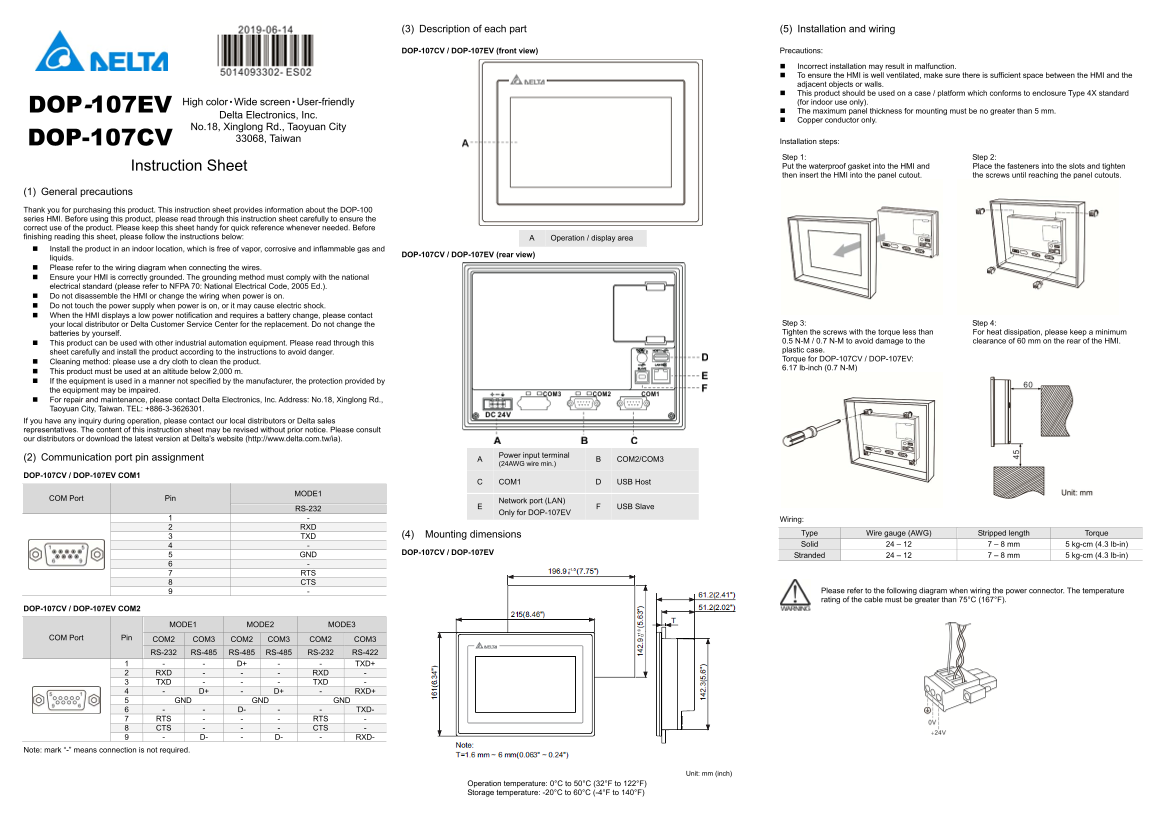
Page 1 Text Content
(3) Description of each part (5) Installation and wiring
DOP-107CV / DOP-107EV (front view) Precautions:
Incorrect installation may result in malfunction. To ensure the HMI is well ventilated, make sure there is sufficient space between the HMI and the adjacent objects or walls. This product should be used on a case / platform which conforms to enclosure Type 4X standard High color‧Wide screen‧User-friendly (for indoor use only).
DOP-107EV The maximum panel thickness for mounting must be no greater than 5 mm.
Delta Electronics, Inc.
Copper conductor only.
No.18, Xinglong Rd., Taoyuan City
DOP-107CV 33068, Taiwan
Installation steps:
Step 1: Step 2:
Instruction Sheet Put the waterproof gasket into the HMI and Place the fasteners into the slots and tighten
then insert the HMI into the panel cutout. the screws until reaching the panel cutouts.
(1) General precautions Thank you for purchasing this product. This instruction sheet provides information about the DOP-100 series HMI. Before using this product, please read through this instruction sheet carefully to ensure the correct use of the product. Please keep this sheet handy for quick reference whenever needed. Before finishing reading this sheet, please follow the instructions below: A Operation / display area Install the product in an indoor location, which is free of vapor, corrosive and inflammable gas and
DOP-107CV / DOP-107EV (rear view)
liquids. Please refer to the wiring diagram when connecting the wires. Ensure your HMI is correctly grounded. The grounding method must comply with the national electrical standard (please refer to NFPA 70: National Electrical Code, 2005 Ed.). Do not disassemble the HMI or change the wiring when power is on. Do not touch the power supply when power is on, or it may cause electric shock. When the HMI displays a low power notification and requires a battery change, please contact
your local distributor or Delta Customer Service Center for the replacement. Do not change the Step 3: Step 4: batteries by yourself. Tighten the screws with the torque less than For heat dissipation, please keep a minimum 0.5 N-M / 0.7 N-M to avoid damage to the clearance of 60 mm on the rear of the HMI.
This product can be used with other industrial automation equipment. Please read through this
plastic case.
sheet carefully and install the product according to the instructions to avoid danger.
Torque for DOP-107CV / DOP-107EV:
Cleaning method: please use a dry cloth to clean the product.
6.17 lb-inch (0.7 N-M)
This product must be used at an altitude below 2,000 m. If the equipment is used in a manner not specified by the manufacturer, the protection provided by the equipment may be impaired. For repair and maintenance, please contact Delta Electronics, Inc. Address: No.18, Xinglong Rd., Taoyuan City, Taiwan. TEL: +886-3-3626301. If you have any inquiry during operation, please contact our local distributors or Delta sales representatives. The content of this instruction sheet may be revised without prior notice. Please consult our distributors or download the latest version at Delta’s website (http://www.delta.com.tw/ia).
(2) Communication port pin assignment A Power input terminal
(24AWG wire min.) B COM2/COM3
DOP-107CV / DOP-107EV COM1
C COM1 D USB Host
COM Port Pin MODE1
Network port (LAN)
F USB Slave
RS-232
Only for DOP-107EV
1 - Wiring: 2 RXD
(4) Mounting dimensions Type Wire gauge (AWG) Stripped length Torque
3 TXD
4 - Solid 24 – 12 7 – 8 mm 5 kg-cm (4.3 lb-in)
DOP-107CV / DOP-107EV
5 GND Stranded 24 – 12 7 – 8 mm 5 kg-cm (4.3 lb-in) 6 - 7 RTS 8 CTS
9 - Please refer to the following diagram when wiring the power connector. The temperature rating of the cable must be greater than 75°C (167°F).
DOP-107CV / DOP-107EV COM2
MODE1 MODE2 MODE3
COM Port Pin COM2 COM3 COM2 COM3 COM2 COM3
RS-232 RS-485 RS-485 RS-485 RS-232 RS-422 1 - - D+ - - TXD+ 2 RXD - - - RXD - 3 TXD - - - TXD - 4 - D+ - D+ - RXD+ 5 GND GND GND 6 - - D- - - TXD- 7 RTS - - - RTS - 8 CTS - - - CTS - 9 - D- - D- - RXD-
Note: mark “-” means connection is not required.
Unit: mm (inch)
Operation temperature: 0°C to 50°C (32°F to 122°F) Storage temperature: -20°C to 60°C (-4°F to 140°F)
Page Summary Contents For Delta HMI DOP-107CV DOP-107EV Hardware Installation Manual
Manual Details
| Brand | Delta |
|---|---|
| Pages | 8 |
| File Size | 949.67 KB |
| Published | June 06, 2026 |
Enter the captcha to get the download link:

Frequently Asked Questions
What are the environmental requirements for installation?
Install in an indoor location, free of vapor, corrosive, or inflammable gases/liquids. It must also be used at an altitude below 2,000 m.
How should I ensure safe operation and maintenance?
Ensure the HMI is correctly grounded according to national electrical standards (NFPA 70). Do not disassemble or change wiring while powered on.
Does this series support communications other than RS-232?
Yes, it supports wired connections via COM1 (RS-485), COM2 (CAN/RS-485), and OUT ports for multi-standard communication.