HP Photosmart Plus e-All-in-One Printer Series - B210 Reference Guide
Summary
This essential guide provides comprehensive instructions for setting up, using, and maintaining your HP Photosmart all-in-one printer. Learn how to easily connect via Wi-Fi (including WPS setup) or USB. The manual also offers detailed troubleshooting steps for persistent printing errors, network connectivity issues, and initial software installation failures, helping new users successfully integrate their device into any home office environment.
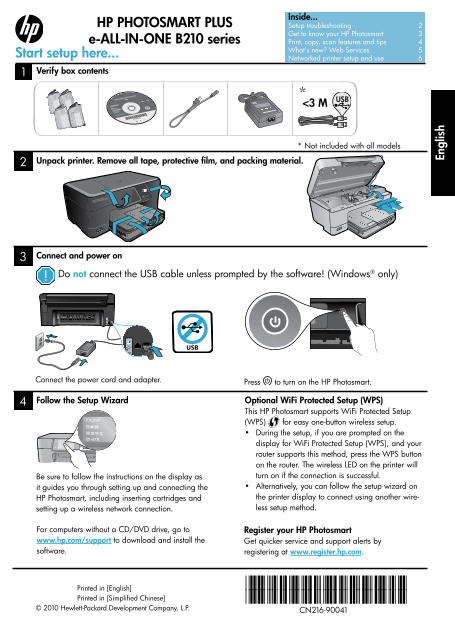
Page 1 Text Content
Inside...
HP PHOTOSMART PLUS Setup troubleshooting 2
Get to know your HP Photosmart 3
e-ALL-IN-ONE B210 series Print, copy, scan features and tips 4
What’s new? Web Services 5
Start setup here...
Networked printer setup and use 6
Verify box contents
* Not included with all models
Unpack printer. Remove all tape, protective film, and packing material.
Connect and power on
Do not connect the USB cable unless prompted by the software! (Windows® only)
Connect the power cord and adapter.
Press to turn on the HP Photosmart.
Follow the Setup Wizard Optional Wi Fi Protected Setup (WPS) This HP Photosmart supports Wi Fi Protected Setup (WPS) for easy one-button wireless setup. • During the setup, if you are prompted on the
display for Wi Fi Protected Setup (WPS), and your En gl is
Wi si
router supports this method, press the WPS button on the router. The wireless LED on the printer will Be sure to follow the instructions on the display as turn on if the connection is successful. it guides you through setting up and connecting the • Alternatively, you can follow the setup wizard on HP Photosmart, including inserting cartridges and the printer display to connect using another wire- setting up a wireless network connection. less setup method.
For computers without a CD/DVD drive, go to Register your HP Photosmart www.hp.com/support to download and install the Get quicker service and support alerts by software. registering at www.register.hp.com.
Printed in [English] *CN216-90041* Printed in [Simplified Chinese] *CN216-90041*
© 2010 Hewlett-Packard Development Company, L.P.
CN216-90041
Page Summary Contents For HP Photosmart Plus e-All-in-One Printer Series - B210 Reference Guide
Manual Details
| Brand | HP |
|---|---|
| Pages | 16 |
| File Size | 7.15 MB |
| Published | June 01, 2026 |
Enter the captcha to get the download link:

Frequently Asked Questions
How do I perform a basic power check if the printer won't turn on?
Ensure the power cord is firmly connected to both the printer and the adapter. If using an outlet, test it with another working appliance.
What is the recommended way to set up a wireless connection?
Use the optional WiFi Protected Setup (WPS) button or follow the setup wizard on the display for guided wireless configuration.
How do I troubleshoot printing issues after installation?
Power cycle all devices (router, printer, computer). If that fails, download and run the Network Diagnostic Utility from www.hp.com/go/wirelessprinting.
Do I need to keep my firewall or anti-virus software running during setup?
No; temporarily disable any security software like firewalls or anti-virus applications during installation, then re-enable them afterward.