Dell Dimension E520 Installation Diagrams
Summary
Dell Dimension desktop computer setup guide from 2006-2007. Covers monitor connection via DVI or VGA cable, keyboard and mouse attachment, network and modem cable connections, and power-on procedures. Includes system features diagram showing CD/DVD drive, microphone and headphone connectors, speaker ports, eight USB 2.0 connectors, and optional sound card. Also covers optional wireless network setup.
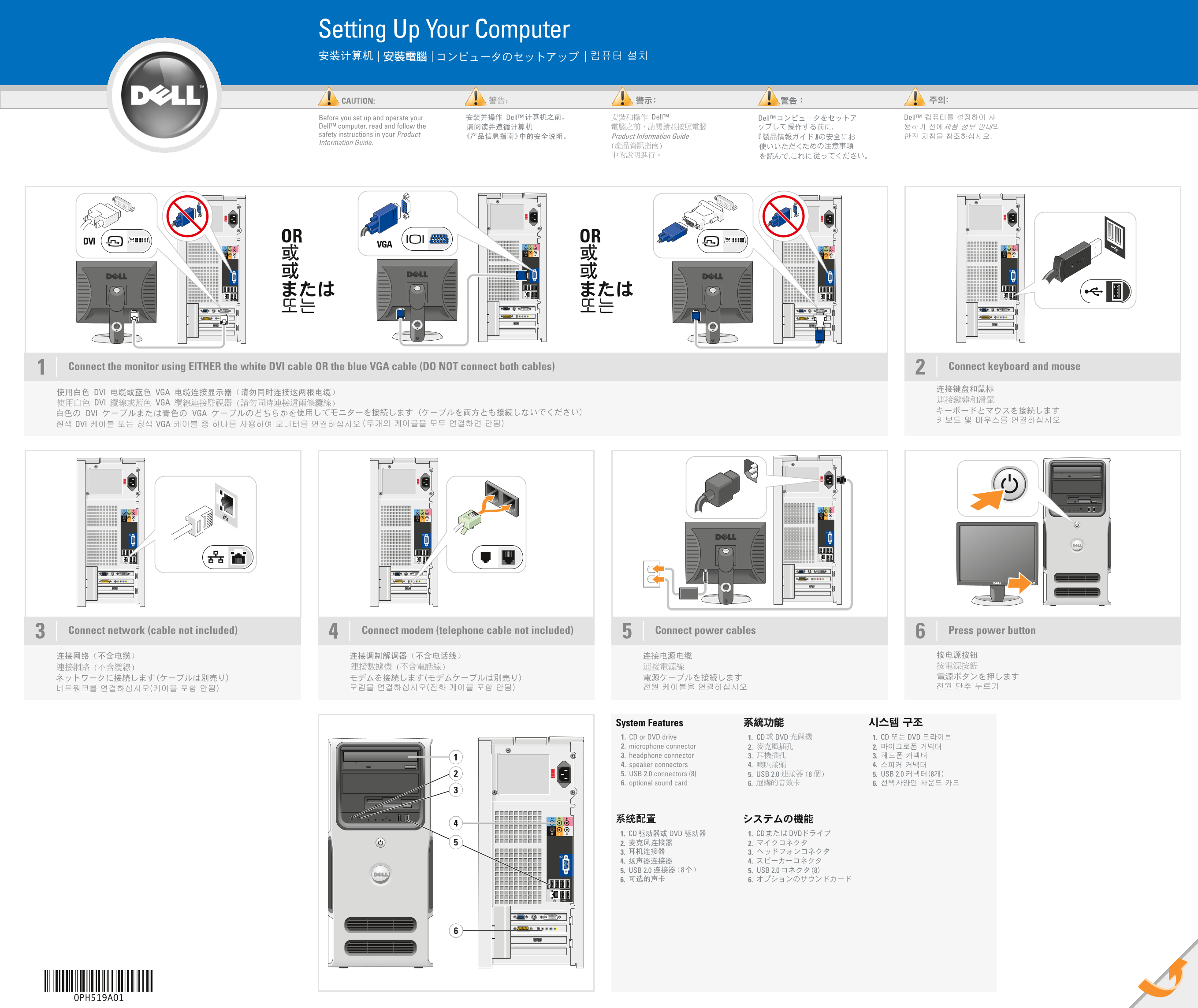
Page 1 Text Content
PH519cc1.qxd 04/01/2007 17:53 Page 1
Setting Up Your Computer
CAUTION: Before you set up and operate your Dell™ computer, read and follow the safety instructions in your Product Information Guide.
DVI OR OR
Connect the monitor using EITHER the white DVI cable OR the blue VGA cable (DO NOT connect both cables)1 Connect keyboard and mouse
Connect network (cable not included) Connect modem (telephone cable not included) Connect power cables Press power button3
System Features 1. CD or DVD drive 1. 1. 2. microphone connector 2. 2. 3. headphone connector 3. 3. 4. speaker connectors 4. 4. 5. USB 2.0 connectors (8) 5. 5. 6. optional sound card 6. 6.
0PH519A01
Page Summary Contents For Dell Dimension E520 Installation Diagrams
Manual Details
| Brand | Dell |
|---|---|
| Pages | 2 |
| File Size | 3.73 MB |
| Published | July 02, 2026 |
Enter the captcha to get the download link:

Frequently Asked Questions
How do I connect the monitor or peripherals?
Connect the monitor using EITHER the white DVI cable OR the blue VGA cable (DO NOT connect both cables).
What is required to set up a wireless network?
You need a wireless router, an internet service, and either a modem or a desktop computer with a built-in/USB wireless adapter.
Where can I find setup instructions for the device?
See your Owner’s Manual for detailed setup instructions.
How do I connect network peripherals?
Connect a modem using a telephone cable and either Ethernet or power cables.