Dell Dimension 3000 Installation Diagrams
Summary
Dell Dimension Desktop Setup Guide (2004). This visual setup poster provides step-by-step instructions for monitor connection, keyboard/mouse setup, network connection, modem connection, power connections, and startup. Features front/back computer component diagrams, optional speaker configuration for integrated vs. sound card audio, and references to support.dell.com and Windows XP Help for additional documentation.
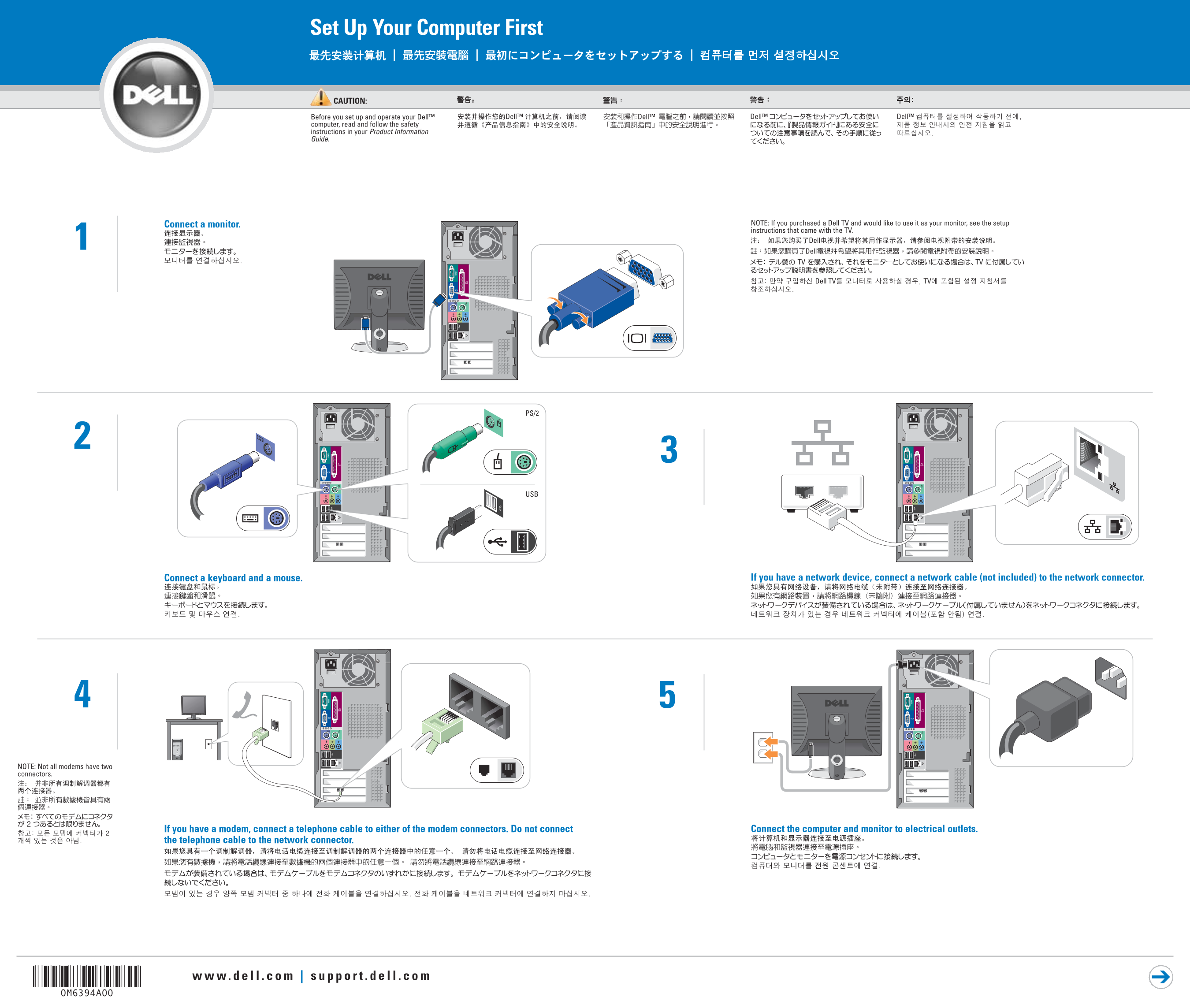
Page 1 Text Content
Set Up Your Computer First
CAUTION: Before you set up and operate your Dell™ computer, read and follow the safety instructions in your Product Information Guide.
Connect a monitor. NOTE: If you purchased a Dell TV and would like to use it as your monitor, see the setup instructions that came with the TV.
Connect a keyboard and a mouse. If you have a network device, connect a network cable (not included) to the network connector.
NOTE: Not all modems have two connectors.
If you have a modem, connect a telephone cable to either of the modem connectors. Do not connect Connect the computer and monitor to electrical outlets.
the telephone cable to the network connector.
Page Summary Contents For Dell Dimension 3000 Installation Diagrams
Manual Details
| Brand | Dell |
|---|---|
| Pages | 2 |
| File Size | 1.76 MB |
| Published | July 02, 2026 |
Enter the captcha to get the download link:

Frequently Asked Questions
What is the mandatory first step before setting up the computer?
You must read and follow the safety instructions located in your Product Information Guide.
Where should I connect my modem or network lines?
Connect the telephone cable to a modem connector. For networking, use a separate cable connected to the network connector.
How do I find help with setup or troubleshooting?
You can visit support.dell.com, or access the Dimension Help file by clicking Start button and navigating through the help menu.