Dell Dimension 4600 Installation Charts
Summary
Dell desktop computer setup guide (2003) covering PS/2 or USB keyboard/mouse connection, monitor connection, modem telephone cable and network cable setup, power connection, optional sound card configuration with integrated sound cap warning, and Dell Solution Center access for the Tell Me How help file.
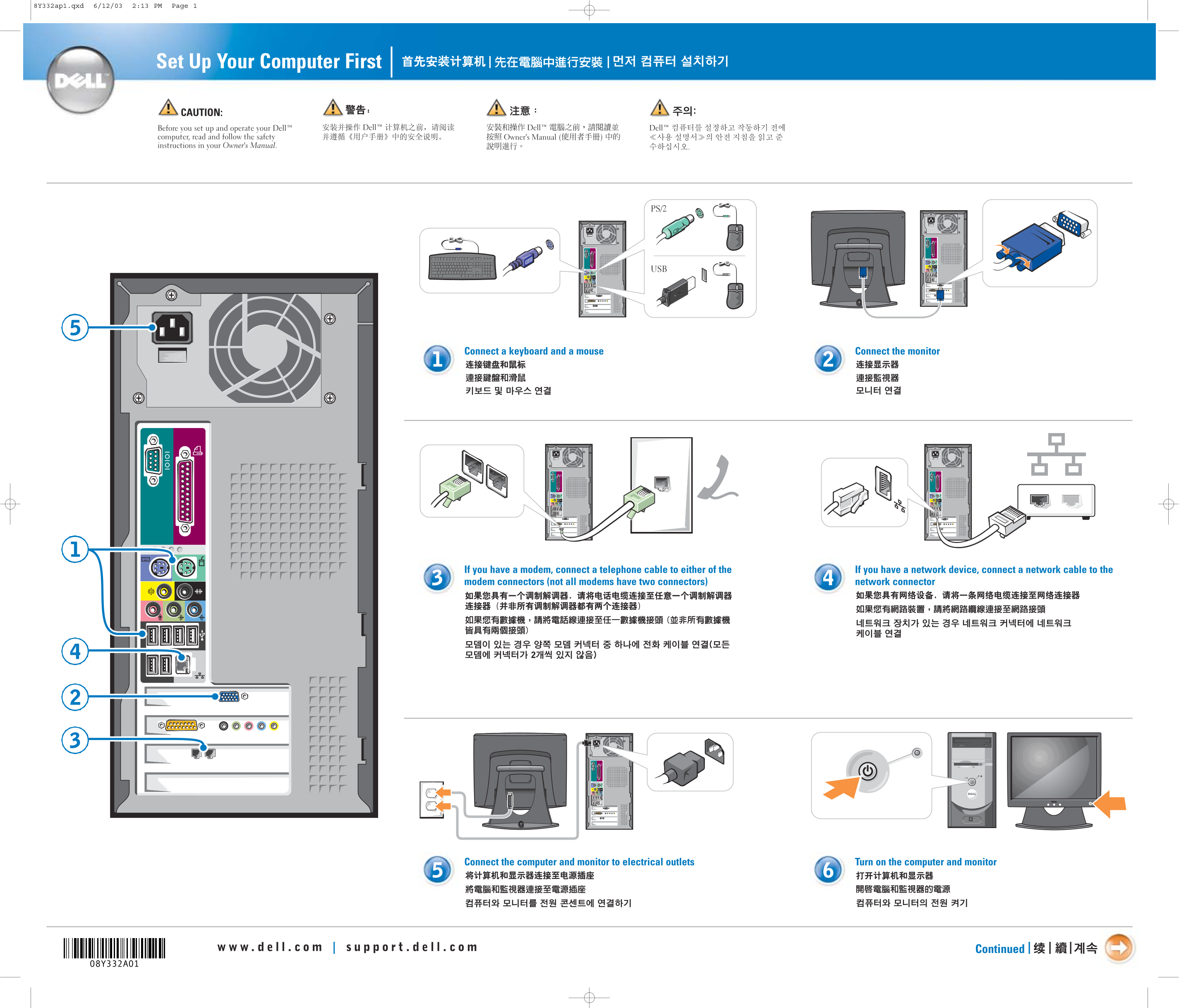
Page 1 Text Content
8Y332ap1.qxd 6/12/03 2:13 PM Page 1
Set Up Your Computer First | |
CAUTION: Before you set up and operate your Dell™ computer, read and follow the safety instructions in your Owner's Manual.
Connect a keyboard and a mouse Connect the monitor
If you have a modem, connect a telephone cable to either of the If you have a network device, connect a network cable to the modem connectors (not all modems have two connectors) network connector
Connect the computer and monitor to electrical outlets Turn on the computer and monitor
Continued | |
Page Summary Contents For Dell Dimension 4600 Installation Charts
Manual Details
| Brand | Dell |
|---|---|
| Pages | 2 |
| File Size | 2.36 MB |
| Published | July 03, 2026 |
Enter the captcha to get the download link:

Frequently Asked Questions
What should I do before setting up my computer?
Read and follow the safety instructions in your Owner's Manual first.
How do I connect my monitor, keyboard, and mouse?
Connect a keyboard and a mouse to the available USB ports, and connect the monitor to the designated video connectors (labeled 1-2-1).
Where should I plug the computer and monitor into an outlet?
You must connect both the computer and the monitor to electrical outlets.
If I have additional sound cards or speakers, how do I connect them?
Connect other devices according to their respective documentation. If using optional integrated sound connectors, connect speakers to the optional sound card connectors but do not remove the cap.