Dell Inspiron 600m Installation Charts
Summary
This Quick Setup Guide for a Dell notebook computer provides step-by-step instructions for initial hardware setup, including connecting the AC adapter, modem, network cable, and USB peripherals. It covers wireless network configuration, battery removal procedures, and accessing the Dell Tell Me How help file for operating system guidance. Designed for new Dell laptop owners who need a concise visual reference to get their system up and running quickly.
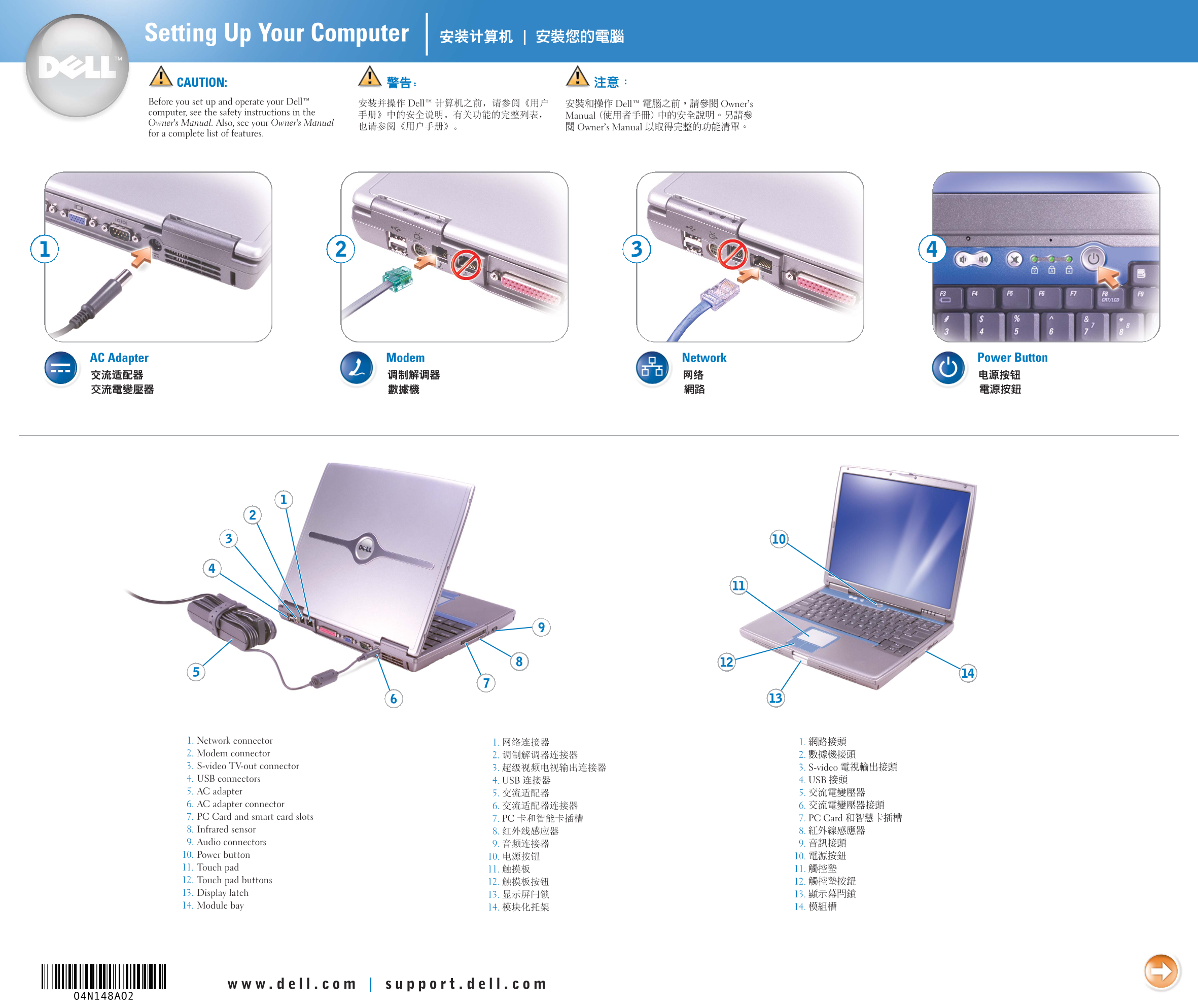
Page 1 Text Content
4N148cc2.qxd 10/13/2003 2:02 PM Page 1
Setting Up Your Computer
CAUTION:
Before you set up and operate your Dell™
computer, see the safety instructions in the
Owner's Manual. Also, see your Owner's Manual
for a complete list of features.
AC Adapter Modem Network Power Button
1. Network connector
2. Modem connector
3. S-video TV-out connector
4. USB connectors
5. AC adapter
6. AC adapter connector
7. PC Card and smart card slots
8. Infrared sensor
9. Audio connectors
10. Power button
11. Touch pad
12. Touch pad buttons
13. Display latch
14. Module bay
Page Summary Contents For Dell Inspiron 600m Installation Charts
Manual Details
| Brand | Dell |
|---|---|
| Pages | 2 |
| File Size | 1.67 MB |
| Published | July 01, 2026 |
Enter the captcha to get the download link:

Frequently Asked Questions
What safety steps should I take before operating the Dell computer?
You must see the safety instructions provided in the Owner's Manual.
How do I connect my computer to a wireless network?
Click the wireless icon, view available networks, select your network, and click Connect.
Where can I find help with operating or using my system?
Use the Dell Tell Me How guide by accessing Start -> Help and Support -> User and system guides -> Tell Me How.