Dell Inspiron 1150 Installation Guide
Summary
Setup poster for a Dell Inspiron laptop from February 2004, providing illustrated connection instructions for AC adapter, USB connectors, video output, network connector, PC Card slot, hard drive bay, audio connectors, CD/DVD drive, and modem. Covers optional wireless network setup through Windows wireless connections icon, battery removal via latch release, and references the Dell Inspiron Help file accessible through Windows Help and Support for additional setup guidance.
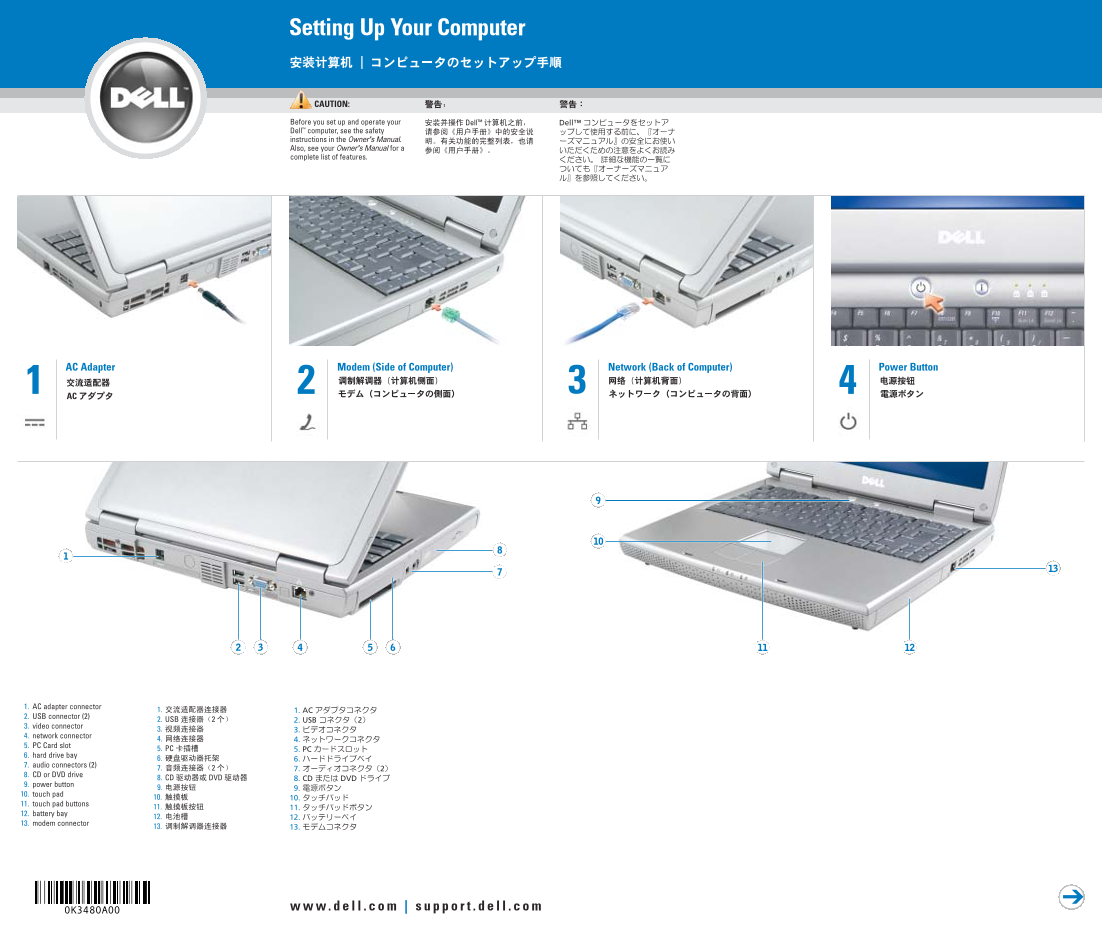
Page 1 Text Content
K3480ap0.qxd 2/3/2004 10:34 AM Page 1
Setting Up Your Computer
CAUTION:
Before you set up and operate your Dell™ computer, see the safety instructions in the Owner's Manual. Also, see your Owner's Manual for a complete list of features.
AC Adapter Modem (Side of Computer) Network (Back of Computer) Power Button
1. AC adapter connector 2. USB connector (2) 3. video connector 4. network connector 5. PC Card slot 6. hard drive bay 7. audio connectors (2) 8. CD or DVD drive 9. power button 10. touch pad 11. touch pad buttons 12. battery bay 13. modem connector
Page Summary Contents For Dell Inspiron 1150 Installation Guide
Manual Details
| Brand | Dell |
|---|---|
| Pages | 2 |
| File Size | 842.87 KB |
| Published | June 18, 2026 |
Enter the captcha to get the download link:

Frequently Asked Questions
What safety information should I review before operating this computer?
You must see the safety instructions in the Owner's Manual and check it for a complete list of features.
How do I connect to a wireless network?
Right-click the network icon, view available networks, select your network, click 'Allow me to connect...', and then connect.
What is the procedure for removing the battery?
Slide the battery latch release and pull the battery out of the bay.