Dell Inspiron 530s Installation Diagrams
Summary
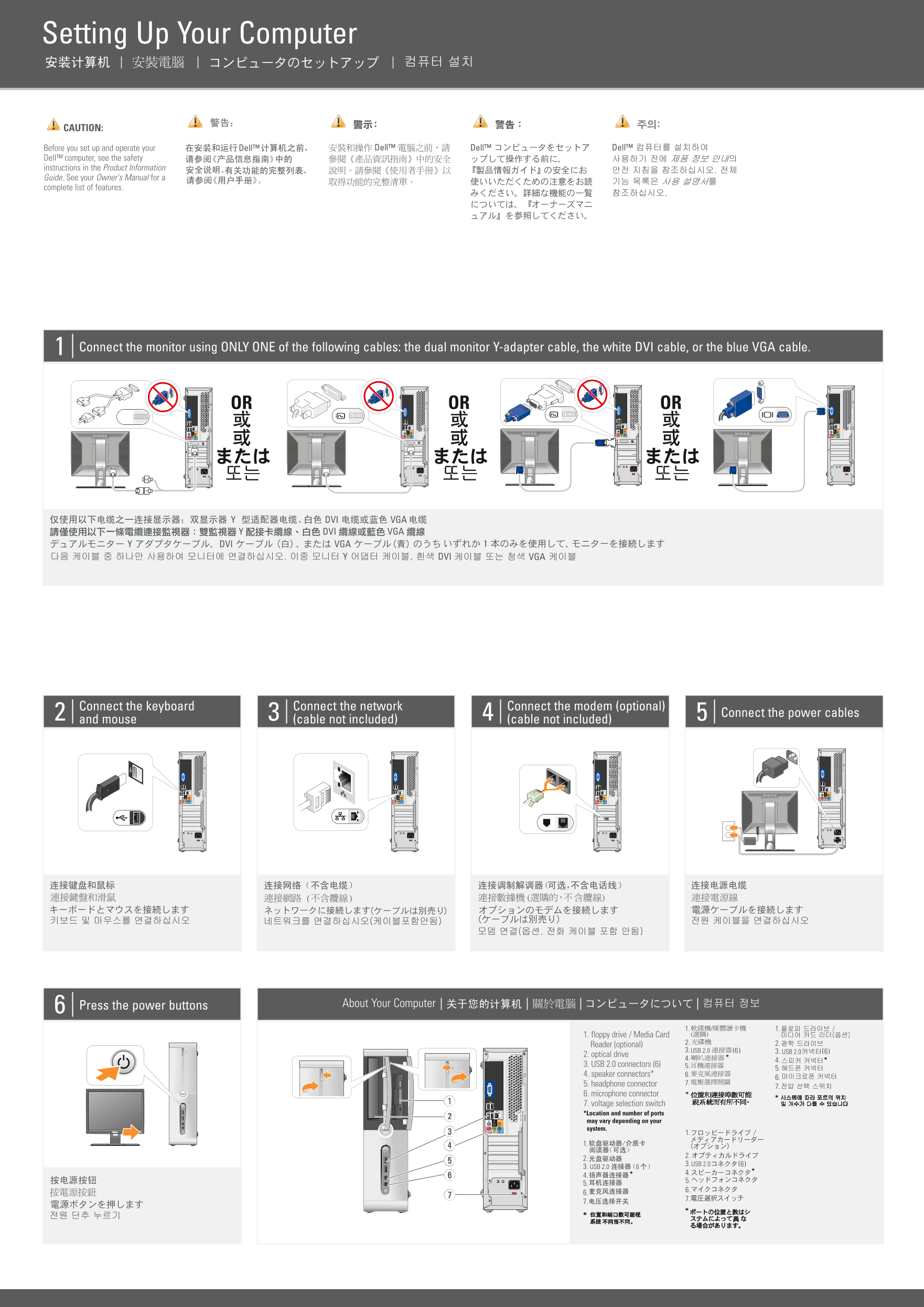
This setup guide for a Dell desktop computer provides illustrated instructions for initial hardware configuration, including monitor connection using DVI, VGA, or dual-monitor Y-adapter cables, keyboard and mouse connection, network cable setup, optional modem connection, and power cable installation. It also covers optional wireless network setup with a diagram showing the router, modem, and wireless adapter configuration. Designed for new desktop computer owners who need a visual reference for basic system assembly and network setup.
Page 1 Text Content
YN905A04ap0.qxp 03/09/2008 16:15 Page 1
Setting Up Your Computer
CAUTION: Before you set up and operate your Dell™ computer, see the safety instructions in the Product Information Guide. See your Owner's Manual for a complete list of features.
Connect the monitor using ONLY ONE of the following cables: the dual monitor Y-adapter cable, the white DVI cable, or the blue VGA cable.
OR OR OR
Connect the keyboard Connect the network Connect the modem (optional)
Connect the power cables
and mouse (cable not included) (cable not included)
Press the power buttons About Your Computer
1. floppy drive / Media Card
Reader (optional)
3. USB 2.0 6( 3. USB 2.0 6(
2. optical drive
3. USB 2.0 connectors (6) 5.
4. speaker connectors* 6.
5. headphone connector 7.
6. microphone connector 7. voltage selection switch *Location and number of ports may vary depending on your system.
3. USB 2.0 6(
3. USB 2.0
Page Summary Contents For Dell Inspiron 530s Installation Diagrams
Manual Details
| Brand | Dell |
|---|---|
| Pages | 2 |
| File Size | 3.46 MB |
| Published | July 01, 2026 |
Enter the captcha to get the download link:

Frequently Asked Questions
What safety precautions should I take before setting up the computer?
Before setup, you must see the safety instructions provided in the Product Information Guide.
How many options are there for connecting a monitor?
You can connect using one of three specific cables: the dual monitor Y-adapter cable, the white DVI cable, or the blue VGA cable.
What components and adapters are required for wireless network connection?
You need an internet service provider providing cable or DSL modem, a wireless router, and either a dedicated network adapter or a USB wireless adapter.
What types of ports can I find on the computer system?
Available inputs include USB 2.0, optical drive connections, speaker connectors, headphone connectors, microphone connectors, floppy drives, and media card readers.