Dell Inspiron 1721 Installation Diagrams
Summary
Multi-language Dell laptop setup guide covering AC adapter connection (with green LED confirmation), modem and network cable attachment, and power-on procedures with battery charging guidance for first-time use. Features detailed system diagram including S-video TV-out, USB connectors, optical drive, audio jacks, ExpressCard slot, and comprehensive status indicators for power, battery, and wireless connectivity.
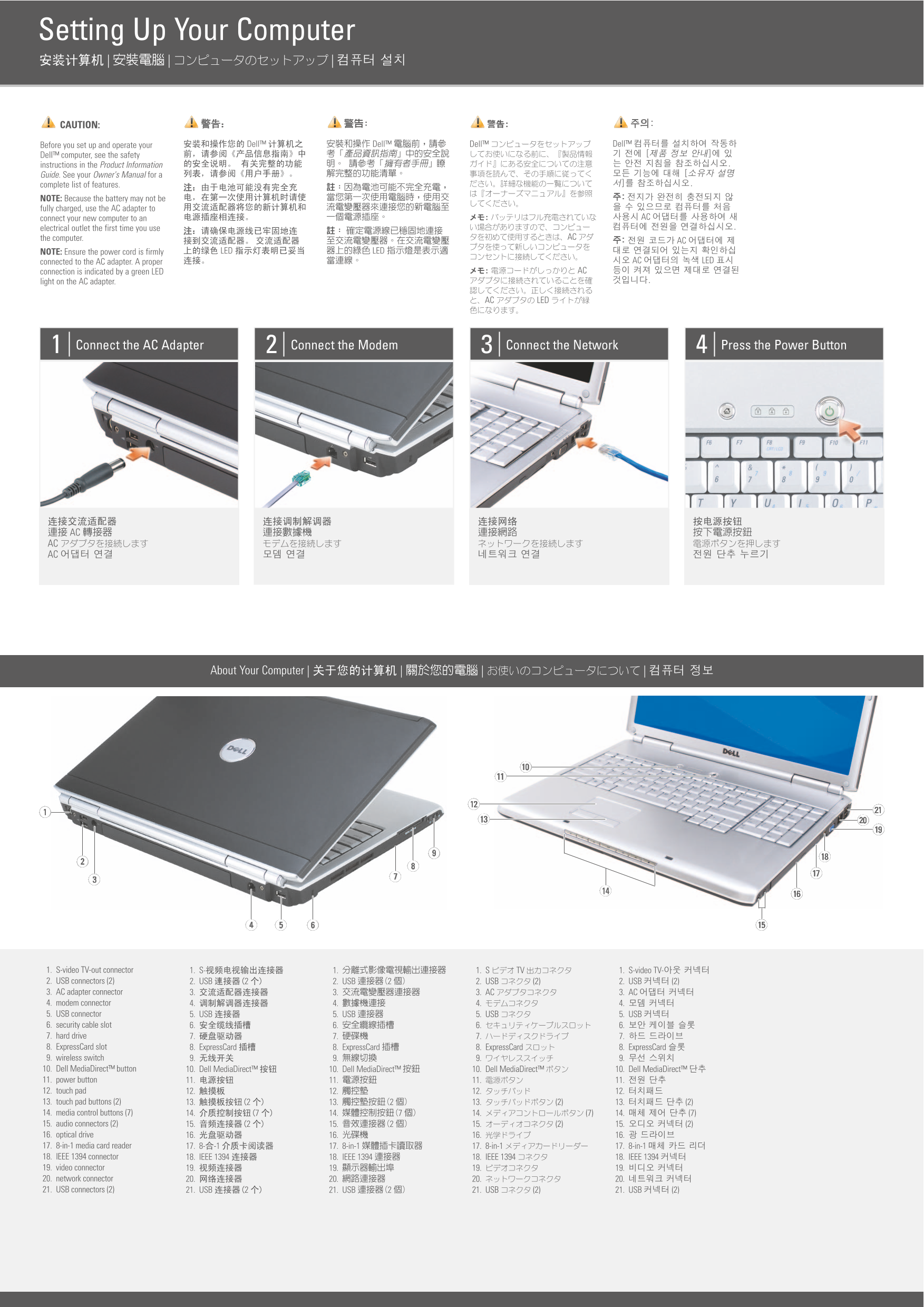
Page 1 Text Content
Setting Up Your Computer | | |
CAUTION:
Before you set up and operate your Dell™ Dell™ Dell™ Dell™
Dell™ computer, see the safety instructions in the Product Information Guide. See your Owner's Manual for a complete list of features. NOTE: Because the battery may not be fully charged, use the AC adapter to
connect your new computer to an AC
electrical outlet the first time you use
the computer. AC
NOTE: Ensure the power cord is firmly LED LED
connected to the AC adapter. A proper AC LED
connection is indicated by a green LED AC
light on the AC adapter.
AC LED
Connect the AC Adapter Connect the Modem Connect the Network Press the Power Button
AC AC AC
About Your Computer | | | |
1. S-video TV-out connector 1. S- 1. 1. S TV 1. S-video TV- 2. USB connectors (2) 2. USB 2 2. USB 2 2. USB (2) 2. USB (2) 3. AC adapter connector 3. 3. 3. AC 3. AC 4. modem connector 4. 4. 4. 4. 5. USB connector 5. USB 5. USB 5. USB 5. USB 6. security cable slot 6. 6. 6. 6. 7. hard drive 7. 7. 7. 7. 8. Express Card slot 8. Express Card 8. Express Card 8. Express Card 8. Express Card 9. wireless switch 9. 9. 9. 9. 10. Dell Media Direct™ button 10. Dell Media Direct™ 10. Dell Media Direct™ 10. Dell Media Direct™ 10. Dell Media Direct™ 11. power button 11. 11. 11. 11. 12. touch pad 12. 12. 12. 12. 13. touch pad buttons (2) 13. 2 13. 2 13. (2) 13. (2) 14. media control buttons (7) 14. 7 14. 7 14. (7) 14. (7) 15. audio connectors (2) 15. 2 15. 2 15. (2) 15. (2) 16. optical drive 16. 16. 16. 16. 17. 8-in-1 media card reader 17. 8- -1 17. 8-in-1 17. 8-in-1 17. 8-in-1 18. IEEE 1394 connector 18. IEEE 1394 18. IEEE 1394 18. IEEE 1394 18. IEEE 1394 19. video connector 19. 19. 19. 19. 20. network connector 20. 20. 20. 20. 21. USB connectors (2) 21. USB 2 21. USB 2 21. USB (2) 21. USB (2)
Page Summary Contents For Dell Inspiron 1721 Installation Diagrams
Manual Details
| Brand | Dell |
|---|---|
| Pages | 2 |
| File Size | 431.29 KB |
| Published | July 03, 2026 |
Enter the captcha to get the download link:

Frequently Asked Questions
What materials are needed for initial setup?
The product requires an AC adapter and must be connected to a dedicated electrical outlet before first use.
What is the correct order to connect networking equipment?
Connect the Modem (1), then the Network Cable (2), which connects to the AC Adapter, and finally press the Power Button (4).
How can I verify that my power connectivity is working correctly?
A successful AC adapter connection is indicated by a green LED light appearing on the AC adapter unit.