Dell Installation Diagrams
Summary
This setup guide for a Dell laptop computer provides initial configuration instructions covering safety precautions, AC adapter connection, and component identification. It details hardware features including USB connectors, AC adapter connector, battery, security cable slot, S-video TV-out, IEEE 1394 connector, audio connectors, ExpressCard slot, media card reader, and power button. The guide is presented in multiple languages for international users and includes regulatory compliance references.
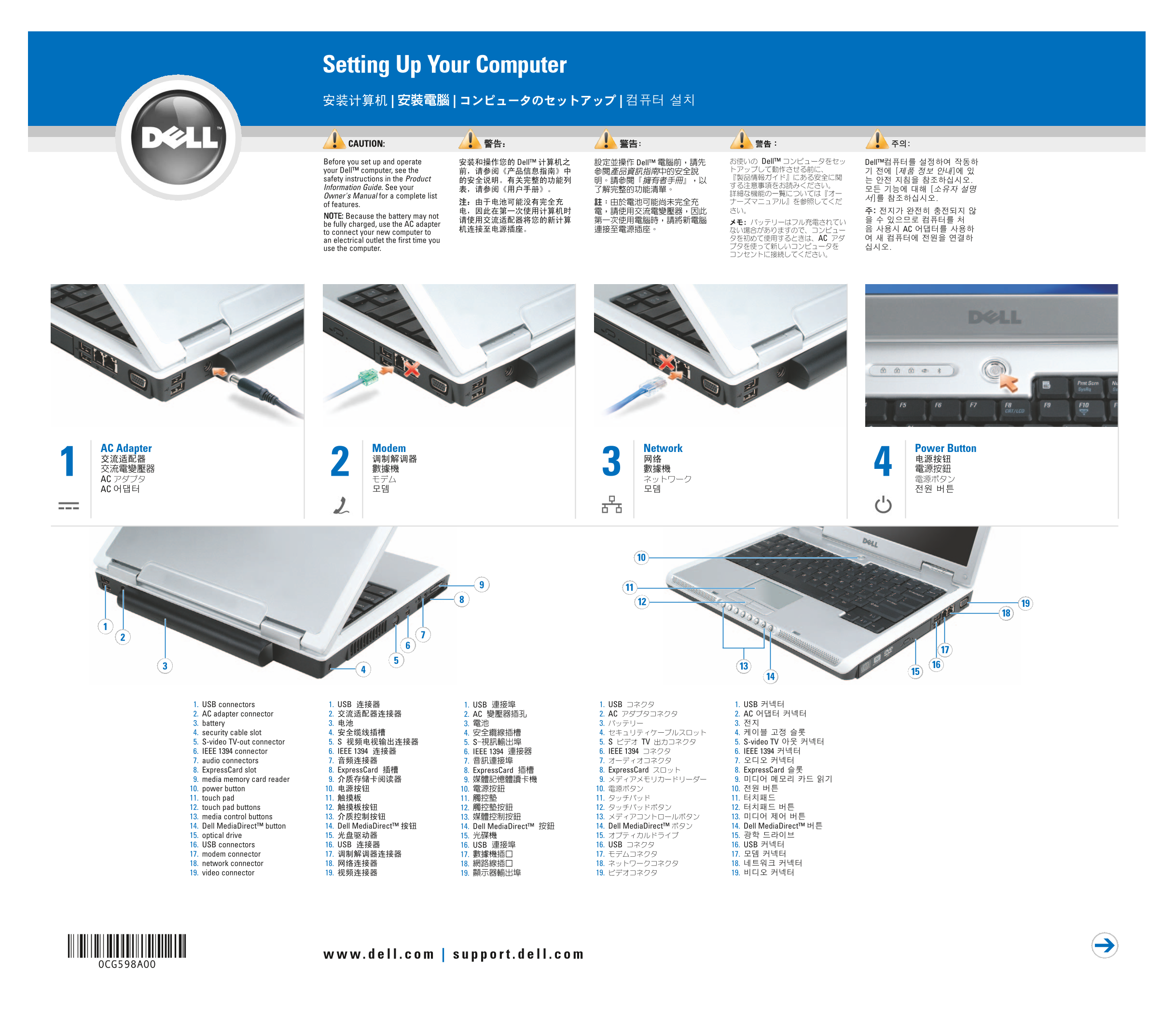
Page 1 Text Content
Setting Up Your Computer | | |
CAUTION: Before you set up and operate Dell™ Dell™ Dell™ Dell™ your Dell™ computer, see the safety instructions in the Product Information Guide. See your Owner's Manual for a complete list of features. NOTE: Because the battery may not be fully charged, use the AC adapter
to connect your new computer to
an electrical outlet the first time you AC
use the computer.
AC Adapter Modem Network Power Button
AC AC
1. USB connectors 1. USB 1. USB 1. USB 1. USB
2. AC adapter connector 2. 2. AC 2. AC 2. AC 3. battery 3. 3. 3. 3.
4. security cable slot 4. 4. 4. 4. 5. S-video TV-out connector 5. S 5. S 5. S TV 5. S-video TV
6. IEEE 1394 connector 6. IEEE 1394 6. IEEE 1394 6. IEEE 1394 6. IEEE 1394
7. audio connectors 7. 7. 7. 7.
8. Express Card slot 8. Express Card 8. Express Card 8. Express Card 8. Express Card 9. media memory card reader 9. 9. 9. 9. 10. power button 10. 10. 10. 10.
11. touch pad 11. 11. 11. 11.
12. touch pad buttons 12. 12. 12. 12. 13. media control buttons 13. 13. 13. 13. 14. Dell Media Direct™ button 14. Dell Media Direct™ 14. Dell Media Direct™ 14. Dell Media Direct™ 14. Dell Media Direct™ 15. optical drive 15. 15. 15. 15.
16. USB connectors 16. USB 16. USB 16. USB 16. USB
17. modem connector 17. 17. 17. 17. 18. network connector 18. 18. 18. 18. 19. video connector 19. 19. 19. 19.
0CG598A00
Page Summary Contents For Dell Installation Diagrams
Manual Details
| Brand | Dell |
|---|---|
| Pages | 2 |
| File Size | 584.13 KB |
| Published | July 01, 2026 |
Enter the captcha to get the download link:

Frequently Asked Questions
What safety precautions should I follow before setting up or operating the Dell computer?
Review the safety instructions found in the Product Information Guide. Also, always use an AC adapter to connect your new computer to an electrical outlet when using it for the first time.
How can I determine if my computer is equipped with a wireless network card?
You can check by starting from the Start menu, clicking 'Connect,' and selecting 'Show all connections' or pressing Start + Alt+C then 'Connect To.'
Where can I find more information regarding features or troubleshooting for my specific Dell Inspiron model?
For additional details, recommendations, or guides about your computer, please see the dedicated Dell Inspiron Owner's Manual.