Dell XPS M1530 Installation Diagrams
Summary
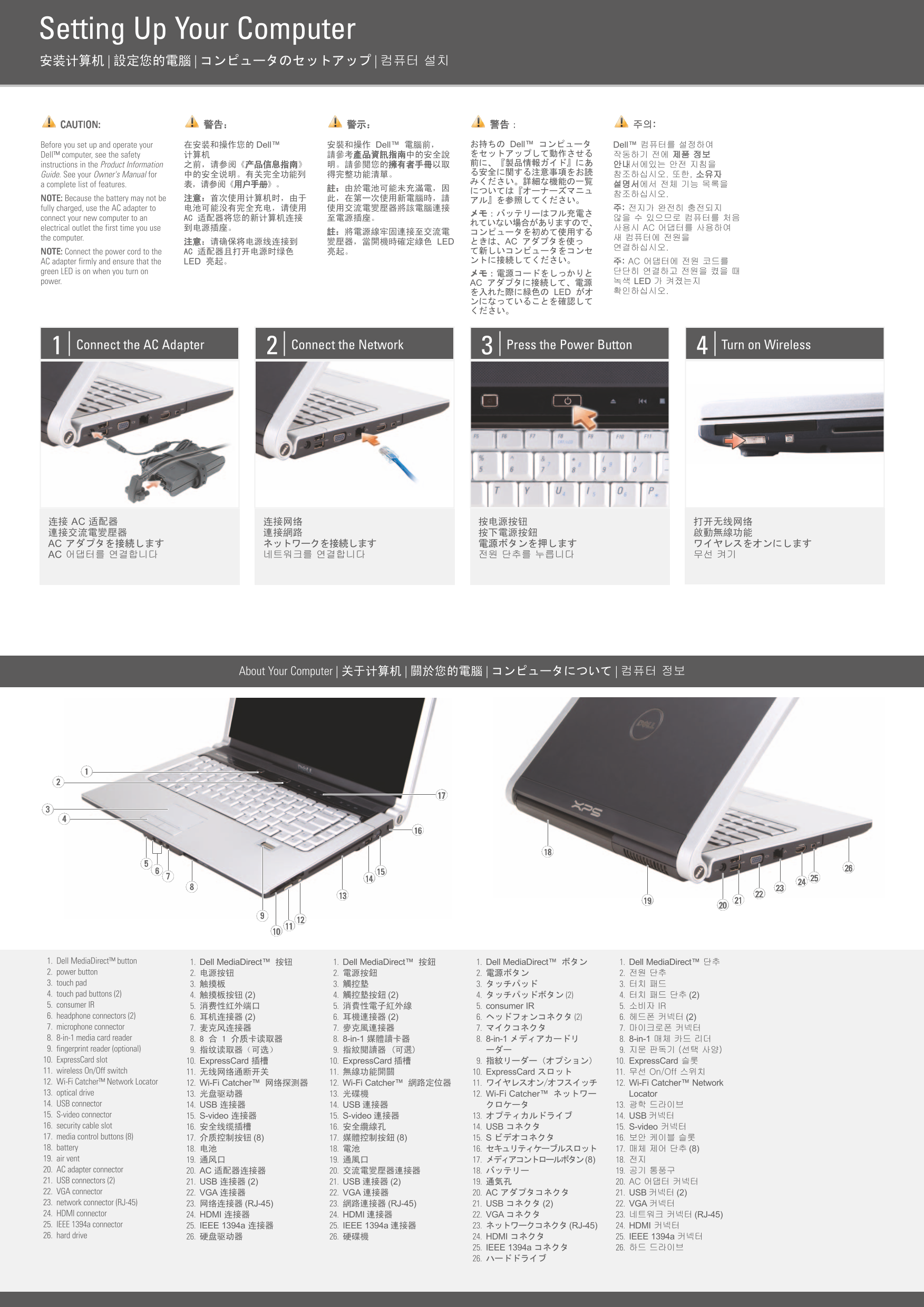
This multilingual setup guide for a Dell notebook computer provides illustrated instructions covering AC adapter connection with green LED verification, network connectivity, powering on, and wireless enablement. It features a detailed hardware diagram identifying 26 components including Dell MediaDirect button, touchpad, media control buttons, ExpressCard slot, wireless switch, Wi-Fi Catcher network locator, HDMI and S-video connectors, eSATA/USB connectors, and various connectivity options. Designed for new laptop owners.
Page 1 Text Content
Setting Up Your Computer 安装计算机 | 設定您的電腦 | コンピュータのセットアップ | 컴퓨터 설치
CAUTION: 警告: 警示: 警告: 주의:
Before you set up and operate your 在安装和操作您的 Dell™ 安裝和操作 Dell™ 電腦前, お持ちの Dell™ コンピュータ Dell™ 컴퓨터를 설정하여 Dell™ computer, see the safety 计算机 請參考產品資訊指南中的安全說 をセットアップして動作させる 작동하기 전에 제품 정보 instructions in the Product Information 之前,请参阅《产品信息指南》 明。請參閱您的擁有者手冊以取 前に、『製品情報ガイド』にあ 안내서에있는 안전 지침을 る安全に関する注意事項をお読
Guide. See your Owner's Manual for 中的安全说明。有关完全功能列 得完整功能清單。 참조하십시오. 또한, 소유자
a complete list of features. 表,请参阅《用户手册》。 설명서에서 전체 기능 목록을
NOTE: Because the battery may not be 注意:首次使用计算机时,由于 此,在第一次使用新電腦時,請 アル』を参照してください。 fully charged, use the AC adapter to 电池可能没有完全充电,请使用 使用交流電變壓器將該電腦連接 주: 전지가 완전히 충전되지
connect your new computer to an AC 适配器将您的新计算机连接 至電源插座。 않을 수 있으므로 컴퓨터를 처음
electrical outlet the first time you use 到电源插座。 사용시 AC 어댑터를 사용하여
the computer. 새 컴퓨터에 전원을
注意:请确保将电源线连接到 變壓器,當開機時確定綠色 LED ときは、AC アダプタを使っ
NOTE: Connect the power cord to the AC 适配器且打开电源时绿色 亮起。 て新しいコンピュータをコンセ AC adapter firmly and ensure that the LED 亮起。 ントに接続してください。 주: AC 어댑터에 전원 코드를
green LED is on when you turn on メモ:電源コードをしっかりと 단단히 연결하고 전원을 켰을 때 power. AC アダプタに接続して、電源 녹색 LED 가 켜졌는지
を入れた際に緑色の LED がオ 확인하십시오.
Connect the AC Adapter Connect the Network Press the Power Button Turn on Wireless
连接 AC 适配器 连接网络 按电源按钮 打开无线网络 連接交流電變壓器 連接網路 按下電源按鈕 啟動無線功能 AC アダプタを接続します ネットワークを接続します 電源ボタンを押します ワイヤレスをオンにします AC 어댑터를 연결합니다 네트워크를 연결합니다 전원 단추를 누릅니다 무선 켜기
About Your Computer | 关于计算机 | 關於您的電腦 | コンピュータについて | 컴퓨터 정보
1. Dell Media Direct™ button 1. Dell Media Direct™ 按钮 1. Dell Media Direct™ 按鈕 1. Dell Media Direct™ ボタン 1. Dell Media Direct™ 단추 2. power button 2. 电源按钮 2. 電源按鈕 2. 電源ボタン 2. 전원 단추 3. touch pad 3. 触摸板 3. 觸控墊 3. タッチパッド 3. 터치 패드 4. touch pad buttons (2) 4. 触摸板按钮 (2) 4. 觸控墊按鈕 (2) 4. タッチパッドボタン (2) 4. 터치 패드 단추 (2) 5. consumer IR 5. 消费性红外端口 5. 消費性電子紅外線 5. consumer IR 5. 소비자 IR 6. headphone connectors (2) 6. 耳机连接器 (2) 6. 耳機連接器 (2) 6. ヘッドフォンコネクタ (2) 6. 헤드폰 커넥터 (2) 7. microphone connector 7. 麦克风连接器 7. 麥克風連接器 7. マイクコネクタ 7. 마이크로폰 커넥터 8. 8-in-1 media card reader 8. 介质卡读取器 8. 8-in-1 媒體讀卡器 8. 8-in-1 メディアカードリ 8. 8-in-1 매체 카드 리더 9. fingerprint reader (optional) 9. 指纹读取器(可选) 9. 指紋閱讀器 (可選) ーダー 9. 지문 판독기 (선택 사양) 10. Express Card slot 10. Express Card 插槽 10. Express Card 插槽 9. 指紋リーダー(オプション) 10. Express Card 슬롯 11. wireless On/Off switch 11. 无线网络通断开关 11. 無線功能開關 10. Express Card スロット 11. 무선 On/Off 스위치 12. Wi-Fi Catcher™ Network Locator 12. Wi-Fi Catcher™ 网络探测器 12. Wi-Fi Catcher™ 網路定位器 11. ワイヤレスオン/オフスイッチ 12. Wi-Fi Catcher™ Network 13. optical drive 13. 光盘驱动器 13. 光碟機 12. Wi-Fi Catcher™ ネットワー Locator 14. USB connector 14. USB 连接器 14. USB 連接器 クロケータ 13. 광학 드라이브 15. S-video connector 15. S-video 连接器 15. S-video 連接器 13. オプティカルドライブ 14. USB 커넥터 16. security cable slot 16. 安全线缆插槽 16. 安全纜線孔 14. USB コネクタ 15. S-video 커넥터 17. media control buttons (8) 17. 介质控制按钮 (8) 17. 媒體控制按鈕 (8) 15. S ビデオコネクタ 16. 보안 케이블 슬롯 18. battery 18. 电池 18. 電池 16. セキュリティケーブルスロット 17. 매체 제어 단추 (8) 19. air vent 19. 通风口 19. 通風口 17. メディアコントロールボタン(8) 18. 전지 20. AC adapter connector 20. AC 适配器连接器 20. 交流電變壓器連接器 18. バッテリー 19. 공기 통풍구 21. USB connectors (2) 21. USB 连接器 (2) 21. USB 連接器 (2) 19. 通気孔 20. AC 어댑터 커넥터 22. VGA connector 22. VGA 连接器 22. VGA 連接器 20. AC アダプタコネクタ 21. USB 커넥터 (2) 23. network connector (RJ-45) 23. 网络连接器 (RJ-45) 23. 網路連接器 (RJ-45) 21. USB コネクタ (2) 22. VGA 커넥터 24. HDMI connector 24. HDMI 连接器 24. HDMI 連接器 22. VGA コネクタ 23. 네트워크 커넥터 (RJ-45) 25. IEEE 1394a connector 25. IEEE 1394a 连接器 25. IEEE 1394a 連接器 23. ネットワークコネクタ (RJ-45) 24. HDMI 커넥터 26. hard drive 26. 硬盘驱动器 26. 硬碟機 24. HDMI コネクタ 25. IEEE 1394a 커넥터
25. IEEE 1394a コネクタ 26. 하드 드라이브
Page Summary Contents For Dell XPS M1530 Installation Diagrams
Manual Details
| Brand | Dell |
|---|---|
| Pages | 2 |
| File Size | 431.41 KB |
| Published | July 02, 2026 |
Enter the captcha to get the download link:

Frequently Asked Questions
What precaution should I take before operating the computer?
Please consult your Owner's Manual for safety instructions and a complete list of features.
How do I know if the AC adapter is connected correctly during startup?
You must ensure that the green LED lights up when you turn on the computer.
What diverse media connectors are available on this device?
The unit has VGA, HDMI, S-video, USB ports, an optical drive, and a card reader.
If I do not have a printed manual, where can I find support documents?
You can visit the Support icon on your desktop or go to support.dell.com.