Dell Inspiron 8600 Installation Guide
Summary
This setup guide and owner's manual provides instructions for setting up and operating Dell computers. It covers initial system configuration, safety instructions, feature descriptions, and basic troubleshooting. The manual includes important safety information and regulatory compliance details. Designed for end users and system owners setting up new Dell computer systems.
Page 1 Text Content
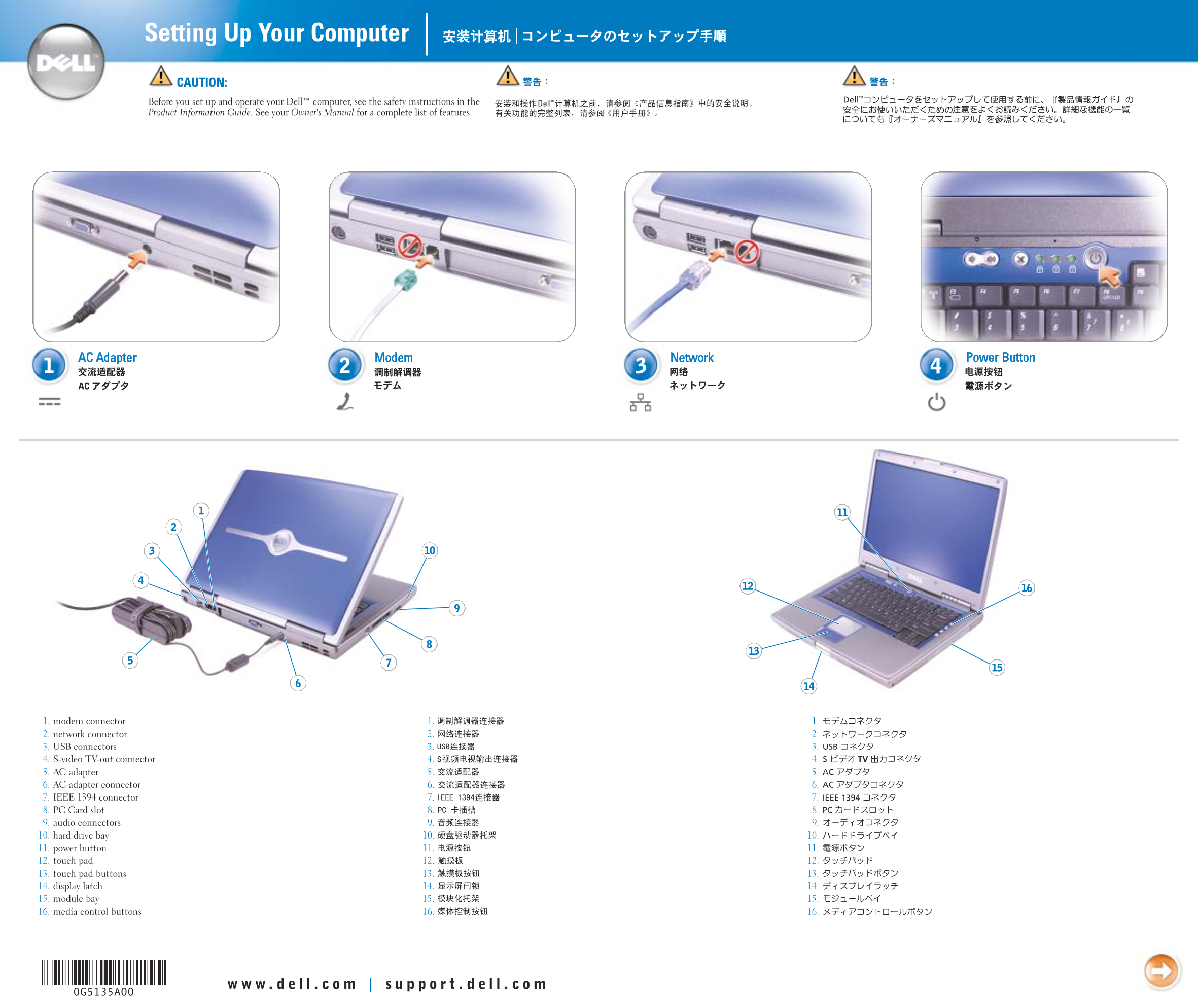
Setting Up Your Computer CAUTION: Before you set up and operate your Dell™ computer, see the safety instructions in the Product Information Guide. See your Owner's Manual for a complete list of features.
AC Adapter Modem Network Power Button
1. modem connector 1. 1. 2. network connector 2. 2. 3. USB connectors 3. 3. 4. S-video TV-out connector 4. 4. 5. AC adapter 5. 5. 6. AC adapter connector 6. 6. 7. IEEE 1394 connector 7. 7. 8. PC Card slot 8. 8. 9. audio connectors 9. 9. 10. hard drive bay 10. 10. 11. power button 11. 11. 12. touch pad 12. 12. 13. touch pad buttons 13. 13. 14. display latch 14. 14. 15. module bay 15. 15. 16. media control buttons 16. 16.
Page Summary Contents For Dell Inspiron 8600 Installation Guide
Manual Details
| Brand | Dell |
|---|---|
| Pages | 2 |
| File Size | 925.78 KB |
| Published | June 26, 2026 |
Enter the captcha to get the download link:

Frequently Asked Questions
What should I do before setting up the Dell computer?
See the safety instructions detailed in the Product Information Guide.
How can I remove a battery from the unit?
Slide and lift the latch release located on the bottom of the computer housing.
Where are printing or peripheral setup guidelines found?
Consult your Owner's Manual, or use the Dell Tell Me How help file for specific instructions.
What steps are required to connect to a wireless network?
Right-click the network icon on the desktop, select the desired network, and click Connect.