Dell Inspiron 500m Installation Guide
Summary
This Dell laptop setup guide from October 2003 provides step-by-step instructions for initial computer configuration, covering AC adapter connection, modem and network setup, USB peripheral connection, and PC Card slot usage. It details wireless network setup using the Windows View Available Wireless Networks feature, battery removal via the latch release, and directs users to the Dell Tell Me How help file and Owner's Manual for additional information on printer setup and device configuration.
Page 1 Text Content
5Y188ap1.qxd 10/13/2003 11:09 AM Page 1
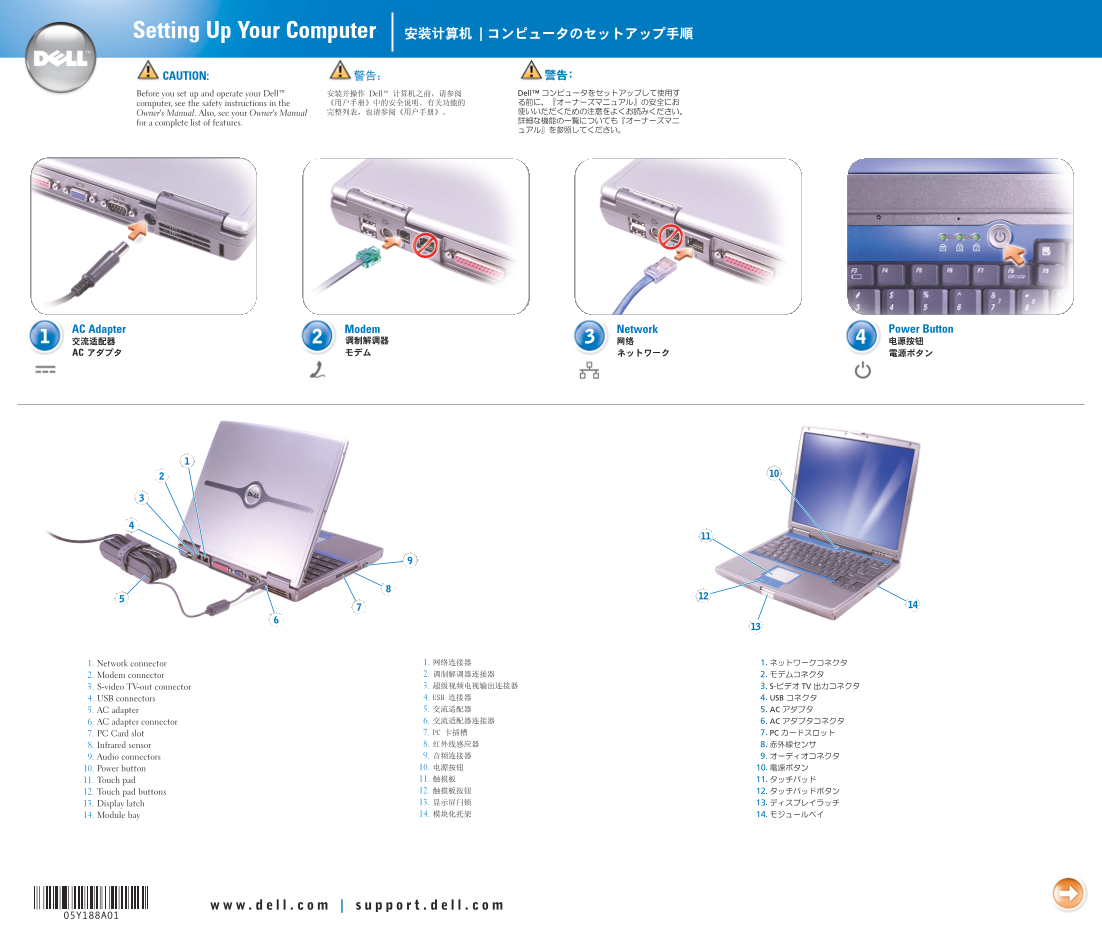
Setting Up Your Computer CAUTION: Before you set up and operate your Dell™ computer, see the safety instructions in the Owner's Manual. Also, see your Owner's Manual for a complete list of features.
AC Adapter Modem Network Power Button
1. Network connector 2. Modem connector 3. S-video TV-out connector 4. USB connectors 5. AC adapter 6. AC adapter connector 7. PC Card slot 8. Infrared sensor 9. Audio connectors 10. Power button 11. Touch pad 12. Touch pad buttons 13. Display latch 14. Module bay
Page Summary Contents For Dell Inspiron 500m Installation Guide
Manual Details
| Brand | Dell |
|---|---|
| Pages | 2 |
| File Size | 1.51 MB |
| Published | June 18, 2026 |
Enter the captcha to get the download link:

Frequently Asked Questions
What safety measures should I take before setting up my Dell computer?
Before setup and operation, you must see the safety instructions listed in your Owner's Manual.
How do I connect to a wireless network using this PC?
Right-click the wireless network icon on the desktop, select View Available Wireless Networks, choose your network, and click Connect.
Where can I find help with operating system guides and peripherals like printers?
Check your Owner's Manual or use the Dell Tell Me How help file by accessing Start > Help and Support.