Dell AP-220- MNT-W2 Wall Mounting Template Owner's Manual - Specifications, User Guide
Summary
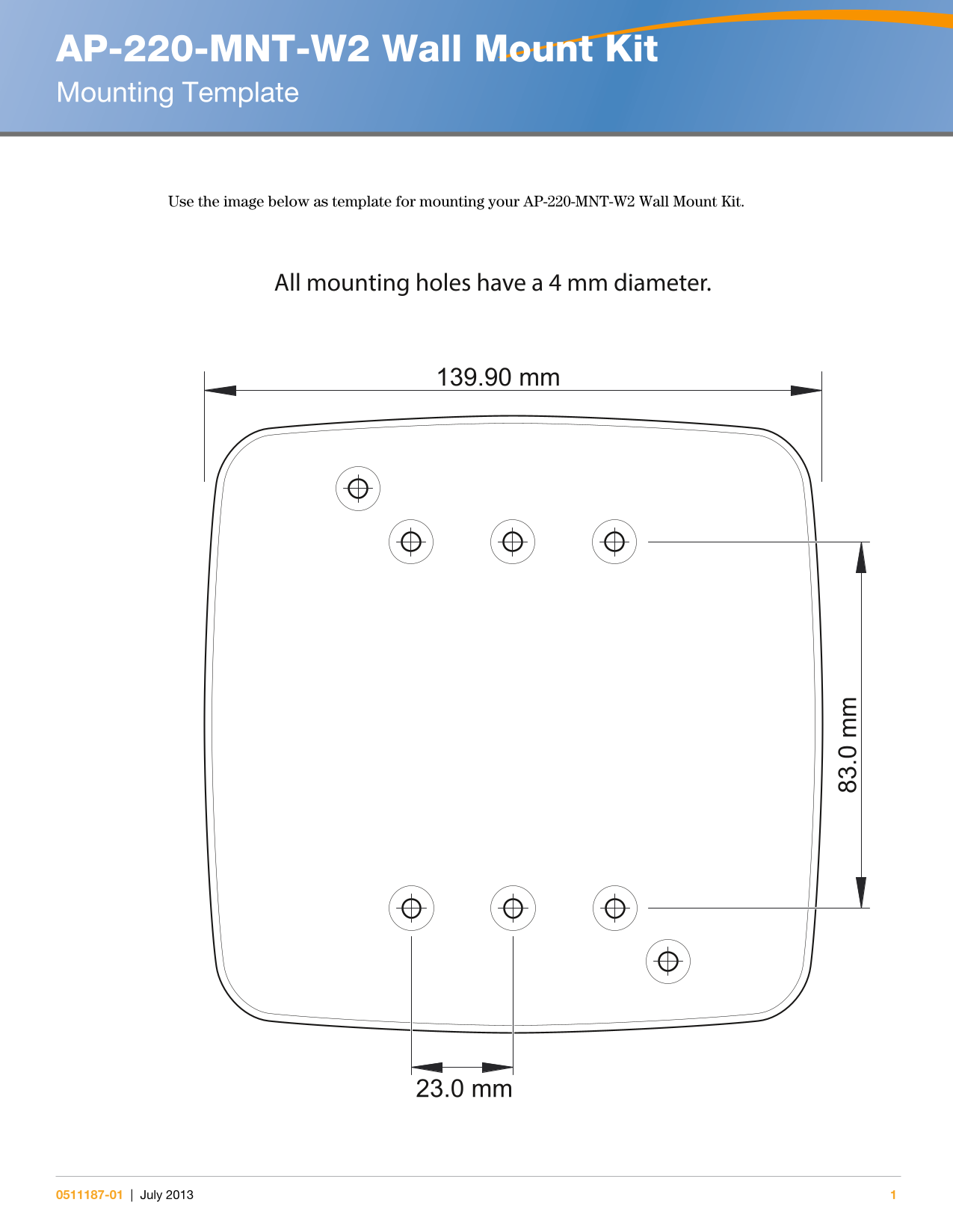
Wall mount kit mounting template for the AP-220-MNT-W2 wireless access point bracket, providing physical dimensions and hole placement specifications for wall installation. The template shows mounting hole positions with 4mm diameter requirements and overall bracket dimensions of 139.90mm by 83.0mm. Intended for network installers mounting Aruba AP-220 series wireless access points on walls.
Page 1 Text Content
AP-220-MNT-W2 Wall Mount Kit Mounting Template
Use the image below as template for mounting your AP-220-MNT-W2 Wall Mount Kit.
All mounting holes have a 4 mm diameter.
139.90 mm
23.0 mm
0511187-01 | July 2013
Page Summary Contents For Dell AP-220- MNT-W2 Wall Mounting Template Owner's Manual - Specifications, User Guide
Page 1
AP-220-MNT-W2 Wall Mount Kit Mounting Template Use the image below as template for mounting your AP-220-MNT-W2 Wall Mount Kit. All mounting holes have a 4 mm diameter. 139.90 mm 23.0 mm 0511187-01 | J...
Manual Details
| Brand | Dell |
|---|---|
| Pages | 1 |
| File Size | 60.59 KB |
| Published | June 27, 2026 |
4 views
Enter the captcha to get the download link:

Frequently Asked Questions
What is the template for mounting the AP-220-MNT-W2 Wall Mount Kit?
Use the provided image as a guide for marking holes on your wall.
What diameter should I use for all mounting holes?
All mounting holes have a 4 mm diameter.