Dell AP-220-MNT-W1 Mounting Template User's Manual
Summary
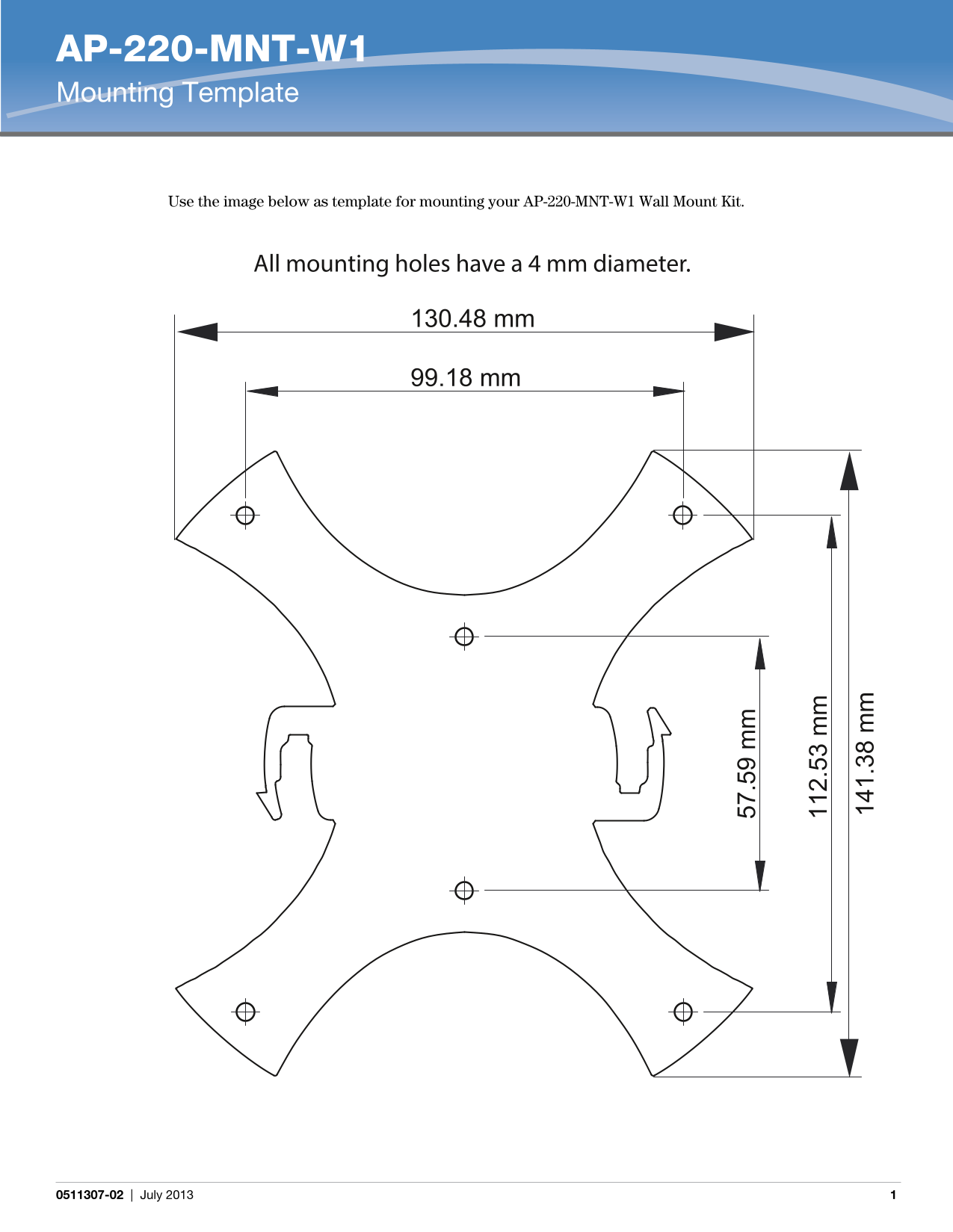
The AP-220-MNT-W1 Mounting Template provides technical specifications for installing the AP-220-MNT-W1 Wall Mount Kit. The document includes precise dimensional measurements in millimeters for mounting hole placement, with all holes having a 4 mm diameter. It specifies spatial relationships between mounting points with measurements including 130.48 mm, 99.18 mm, 57.59 mm, 112.53 mm, and 141.38 mm spacing configurations. Target users include network installation technicians, system integrators, and IT infrastructure professionals responsible for physically mounting wireless access points in enterprise and commercial environments.
Page 1 Text Content
AP-220-MNT-W1 Mounting Template
Use the image below as template for mounting your AP-220-MNT-W1 Wall Mount Kit.
All mounting holes have a 4 mm diameter.
130.48 mm
99.18 mm
0511307-02 | July 2013
Page Summary Contents For Dell AP-220-MNT-W1 Mounting Template User's Manual
Manual Details
| Brand | Dell |
|---|---|
| Pages | 1 |
| File Size | 68.58 KB |
| Published | June 29, 2026 |
Enter the captcha to get the download link:

Frequently Asked Questions
What size are all the mounting holes?
All mounting holes used for the kit have a consistent diameter of 4 mm.
How should I plan my installation process?
You must use the documented image as the template when mounting your AP-220-MNT-W1 Wall Mount Kit.
What dimensional measurements are provided for placement?
Key dimensions shown on the template include 130.48 mm, 99.18 mm, and 57.59 mm.