Dell AP-220-MNT-W1 Wall Mount Kit - Installation Guide
Summary
The AP-220-MNT-W1 Wall Mount Kit Installation Guide provides instructions for mounting Aruba wireless access points. It covers attaching the wall mount adapter using customer-provided screws and wall anchors, connecting cables and antennas to the AP, and securing the AP to the mounting bracket with a 30-degree rotation lock mechanism. The guide includes diagrams for standard and alternate mounting orientations. Target users are network installers, IT technicians, and wireless deployment teams who need to securely mount Aruba AP-220 series access points on walls in office, retail, and enterprise environments.
Page 1 Text Content
AP-220-MNT-W1 Wall Mount Kit Installation Guide
This mount kit supports multiple AP models. All installation images show the 225 AP.
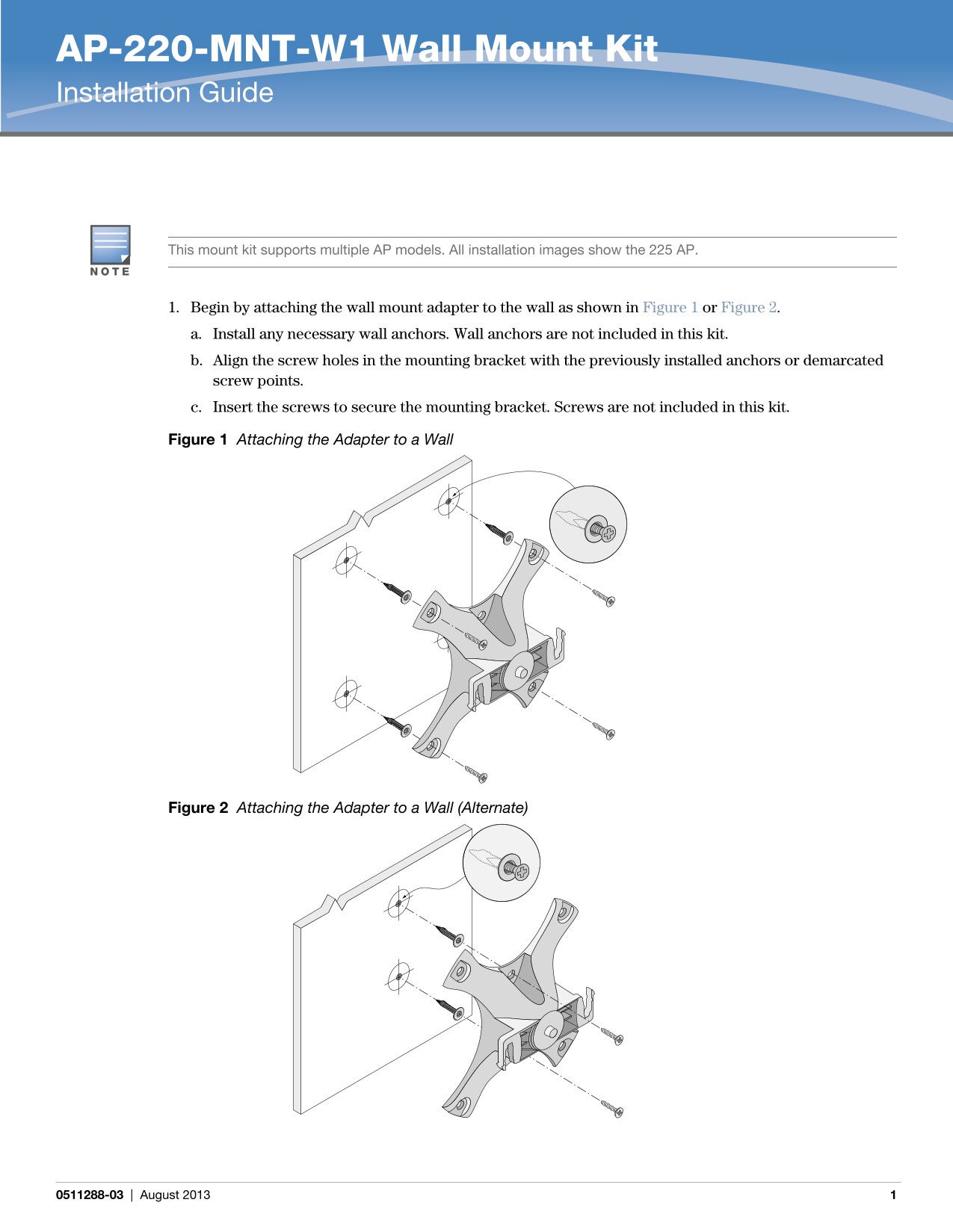
1. Begin by attaching the wall mount adapter to the wall as shown in Figure 1 or Figure 2. a. Install any necessary wall anchors. Wall anchors are not included in this kit. b. Align the screw holes in the mounting bracket with the previously installed anchors or demarcated screw points. c. Insert the screws to secure the mounting bracket. Screws are not included in this kit.
Figure 1 Attaching the Adapter to a Wall
Figure 2 Attaching the Adapter to a Wall (Alternate)
0511288-03 | August 2013
Page Summary Contents For Dell AP-220-MNT-W1 Wall Mount Kit - Installation Guide
Manual Details
| Brand | Dell |
|---|---|
| Pages | 2 |
| File Size | 285.71 KB |
| Published | June 27, 2026 |
Enter the captcha to get the download link:
