User Guide and Manual for NETGEAR GS724T
Summary
Discover next-level network management with the NETGEAR ProSafe Smart Switches. This durable 24-port Gigabit switch system delivers robust performance—supporting 10/100/1000 Mbps and optional fiber connectivity—while providing essential business features like VLANs, QoS, and traffic prioritization that normally require complex managed hardware. The accompanying guide details simple setup using a Web UI or SNMP, helping users monitor performance, configure ports, and secure their network effortlessly. It is ideal for growing businesses seeking the advanced reliability of managed networking without the complexity or expense.
Page 1 Text Content
GS724T Pro Safe™ 24 Port Gigabit Smart Switch
Help is there when you need it! Management at an Unmanaged Price NETGEAR provides, 24x7
Joining NETGEAR’s family of Smart Switches with simple switch management at no extra cost,
technical support* in English, PO LE ER ET TA ER TU
this 24-port Gigabit switch is high on value and capability. With 24 10/100/1000 Mbps ports,
with selected local language
each capable of powering 2000 Mbps of data throughput in full-duplex mode, plus two optional
support during office hours.
fiber ports, it provides fast backbone and connects servers or power users, delivering large amounts of multimedia, image, and video information in no time at all. Ideal for combining 10, 100, and 1000 Mbps devices it delivers 10/100/1000 automatic speed and full/half-duplex sensing plus Auto Uplink™ on every port. Two hot-swappable Small Form factor Pluggable (SFP)** GBIC slots provide optional fiber connectivity for greater distance.
In addition, an intuitive, Web-browser interface offers the simple Smart Switch management, making it a snap to monitor switch performance, configure ports, even set up port trunks, VLANs, and traffic prioritization. Alternatively, use SNMP-based software to manage your Smart Switch. Shipped ready for use straight out of the box, it delivers switching that’s easy to set up and use. NETGEAR Pro Safe Smart Switches are ideal for adding basic management to your unmanaged networks and extending your managed networks.
High Powered Twenty-four 10/100/1000 ports deliver non-blocking, full-speed packet forwarding with 48 Gbps bandwidth migrates your network to future-proof functionality. Two SFP GBIC fiber slots provide optional fiber connectivity for greater distance.
Intelligent Smart Switch capability enables key management features for the value price of an unmanaged switch. Included are performance monitoring, port configuration, VLAN for traffic control, port trunking for increased bandwidth, and Class of Service (Co S) for traffic prioritization.
Right Sized Ideal for growing businesses who want the benefits of management without the cost and complexity of traditional managed switches.
Easygoing and Durable Simple to set up and simple to use for effortless network monitoring and troubleshooting. Made to last, this sturdy switch is housed in a 17-inch metal box and comes with a rack mounting kit.
**Use with NETGEAR Pro Safe AGM731F 1000BASE-SX SFP GBIC module, Pro Safe AGM732F 1000BASE-LX SFP GBIC module or Pro Safe AGM733 1000BASE-ZX SFP GBIC.
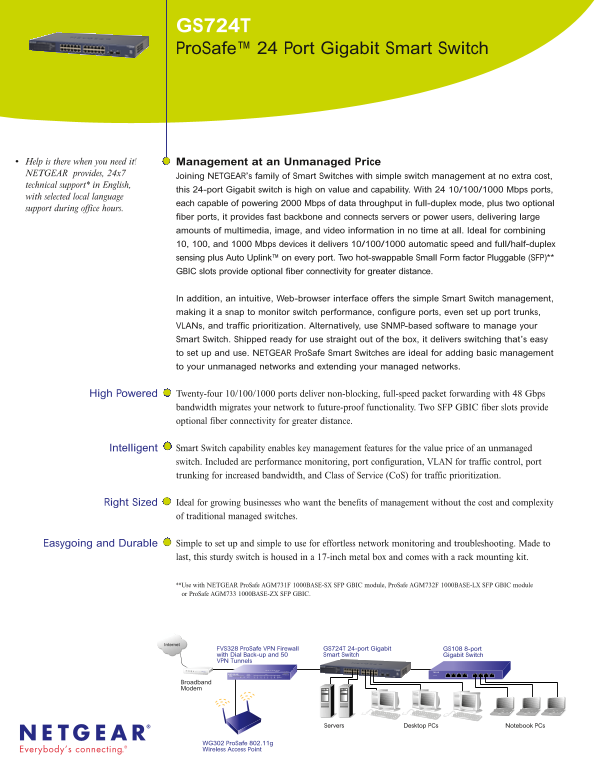
Internet
FVS328 Pro Safe VPN Firewall GS724T 24-port Gigabit GS108 8-port
with Dial Back-up and 50 Smart Switch Gigabit Switch
VPN Tunnels
Broadband Cable Modem
Broadband
Modem
Servers Desktop PCs Notebook PCs
WG302 Pro Safe 802.11g
Wireless Access Point
Page Summary Contents For User Guide and Manual for NETGEAR GS724T
Manual Details
| Brand | NETGEAR |
|---|---|
| Pages | 2 |
| File Size | 119.19 KB |
| Published | June 04, 2026 |
Enter the captcha to get the download link:
