Netgear XAV5001 - Powerline AV 500 Adapter Installation Guide
Summary
Enhance your home connectivity using this Powerline AV 500 Adapter, which transmits high-speed internet signals through your existing electrical wiring, ensuring reliable network coverage anywhere in your home. This manual serves as a comprehensive guide, detailing step-by-step installation procedures, security setup (including key management), and troubleshooting specifics via LED status indicators. Perfect for homeowners or tech enthusiasts seeking to eliminate dead zones and provide seamless networking across multiple rooms without running physical Ethernet cables.
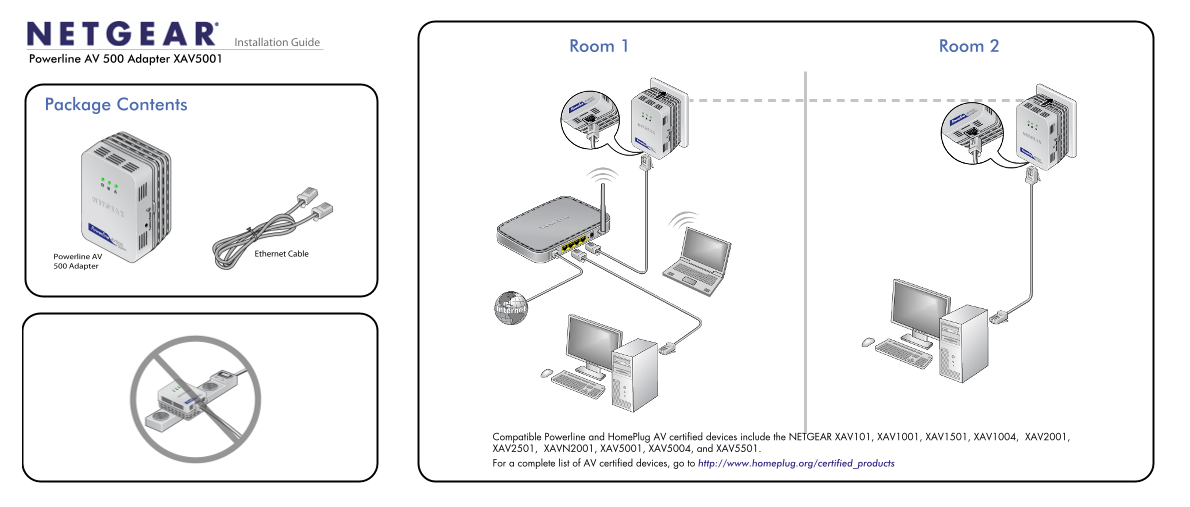
Page 1 Text Content
Installation Guide
Room 1 Room 2
Powerline AV 500 Adapter XAV5001
Package Contents
Ethernet Cable
Powerline AV 500 Adapter
Compatible Powerline and Home Plug AV certified devices include the NETGEAR XAV101, XAV1001, XAV1501, XAV1004, XAV2001, XAV2501, XAVN2001, XAV5001, XAV5004, and XAV5501. For a complete list of AV certified devices, go to http://www.homeplug.org/certified_products
Page Summary Contents For Netgear XAV5001 - Powerline AV 500 Adapter Installation Guide
Manual Details
| Brand | Powerline |
|---|---|
| Pages | 2 |
| File Size | 780.31 KB |
| Published | June 04, 2026 |
Enter the captcha to get the download link:

Frequently Asked Questions
How do I perform a factory reset on the adapter?
Press the Factory Reset button for 1 second, then release to return the Powerline adapter to its factory default settings.
What does an amber Powerline LED indicate?
It indicates that the adapter is in power saving mode. This can happen if the Ethernet LED is off or when the adapter is idle for 10 minutes.
Can I connect the adapter through a UPS or surge protector?
No, line devices should not be plugged into an extension cord, power strip, or surge protector.
What is required before setting up network security?
The Security button must only be pressed after installation is complete and all adapters are communicating (indicated by the blinking Powerline LED).
Which devices are compatible with the XAV5001 adapter?
It is compatible with various Powerline and HomePlug AV certified devices, including models listed on http://www.homeplug.org/certified_products.