HP Scitex FB10000 Industrial Printer Geffen TS Error 67003
Summary
This comprehensive technical guide provides deep troubleshooting instructions for critical industrial control system safety errors, specifically addressing Emergency Stop activation issues (Error ID 67003). It details systematic diagnostic procedures for maintenance engineers and certified electricians to isolate faults within Unloader components, wiring integrity, E.S. buttons, and B&R Safety PLCs. The manual guides users through clearing the error, verifying continuity using specialized tools, and performing proper replacement of faulty safety modules (BSU units) to restore machine functionality safely and efficiently.
Page 1 Text Content
Error ID: 67003: Safety - Emergency stop pressed - Unloader (REC side) FB10000 Error Messages Troubleshooting
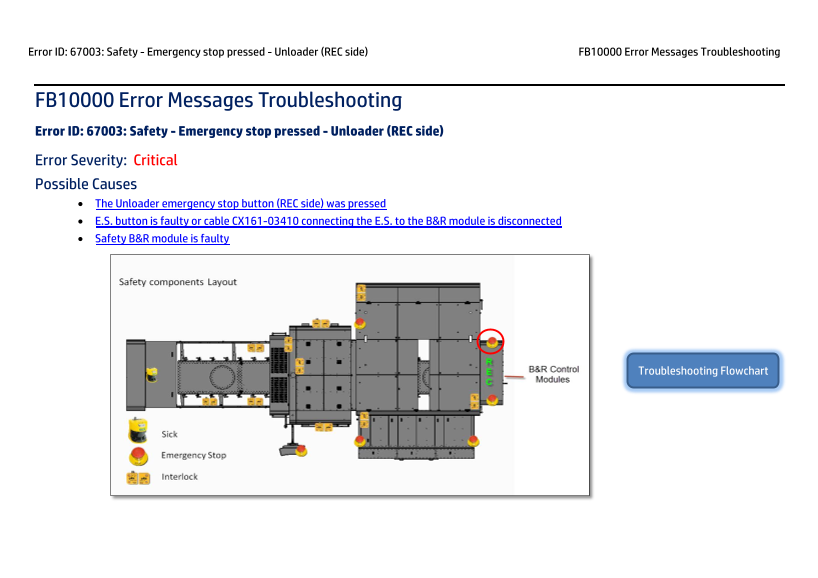
FB10000 Error Messages Troubleshooting Error ID: 67003: Safety - Emergency stop pressed - Unloader (REC side) Error Severity: Critical Possible Causes • The Unloader emergency stop button (REC side) was pressed • E.S. button is faulty or cable CX161-03410 connecting the E.S. to the B&R module is disconnected • Safety B&R module is faulty
Troubleshooting Flowchart
Page Summary Contents For HP Scitex FB10000 Industrial Printer Geffen TS Error 67003
Manual Details
| Brand | HP |
|---|---|
| Pages | 7 |
| File Size | 1.31 MB |
| Published | June 06, 2026 |
Enter the captcha to get the download link:

Frequently Asked Questions
What is the immediate procedure for clearing Error ID: 67003?
Release the unloader E-stop button, press the blue Reset button on the operator console, and tap Get Ready.
How can I check if the physical E-Stop button or its cable connection is faulty?
Set the E.S. button to release position and use a DVM to check continuity between each pair of poles to verify it's normally closed.
What steps must be taken if the Safety B&R Module itself is determined to be faulty?
Turn off power, unplug the BSU unit, replace it with a new BSU module, and then follow the procedure to configure the new module.