HP Deskjet D2600 Series Printer Setup Poster
Summary
Get your new printer up and running quickly with this comprehensive setup guide. This manual provides clear, easy-to-follow instructions designed for first-time users, detailing every step from unboxing and removing packing materials to loading paper and installing ink/toner cartridges. It guides you through connecting power and USB connections, ensuring a seamless transition to printing. Perfect for anyone needing reliable, hassle-free initial device setup.
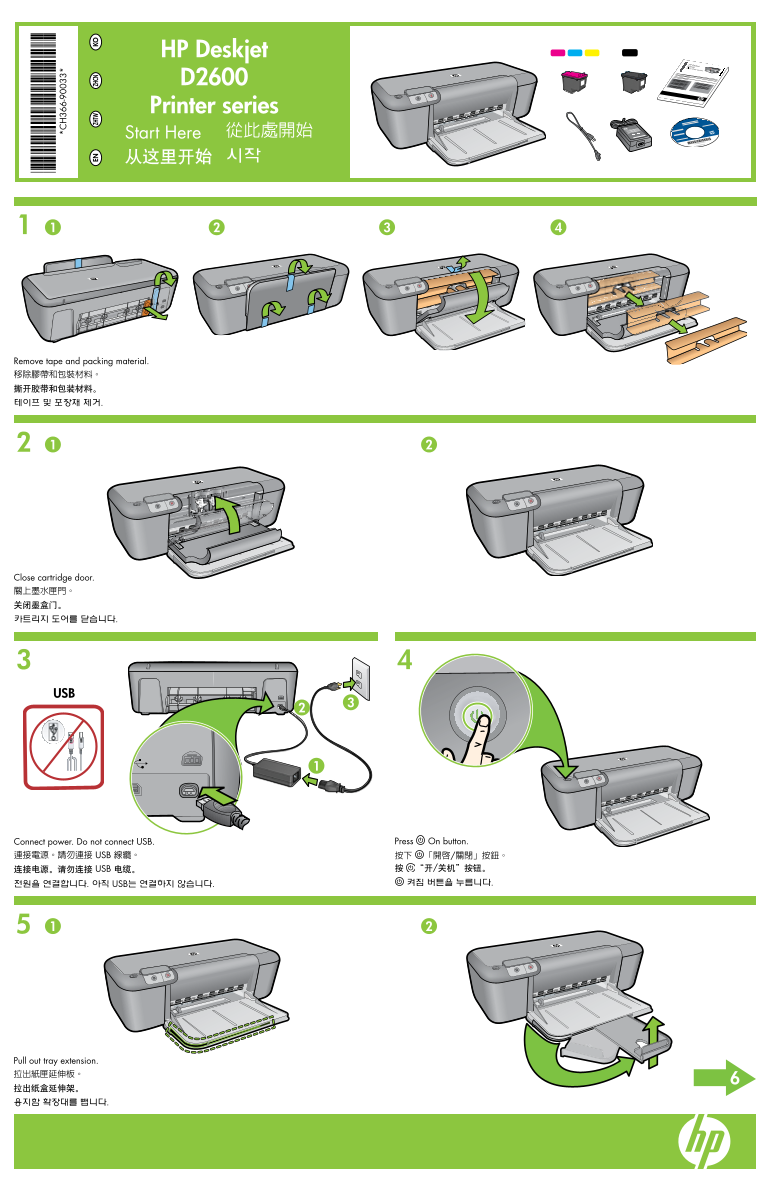
Page 1 Text Content
HP Deskjet
EN ZH TW ZH CN KO
Printer series Start Here 從此處開始 从这里开始 시작
Remove tape and packing material. 移除膠帶和包裝材料。 撕开胶带和包装材料。 테이프 및 포장재 제거.
Close cartridge door. 關上墨水匣門。 关闭墨盒门。 카트리지 도어를 닫습니다.
Connect power. Do not connect USB. Press On button.
連接電源。請勿連接 USB 線纜。 按下 「開啟/關閉」按鈕。
连接电源。请勿连接 USB 电缆。 按 “开/关机”按钮。 전원을 연결합니다. 아직 USB는 연결하지 않습니다. 켜짐 버튼을 누릅니다.
Pull out tray extension. 拉出紙匣延伸板。 拉出纸盒延伸架。 용지함 확장대를 뺍니다.
Page Summary Contents For HP Deskjet D2600 Series Printer Setup Poster
Manual Details
| Brand | HP |
|---|---|
| Pages | 2 |
| File Size | 2.32 MB |
| Published | June 01, 2026 |
Enter the captcha to get the download link:
