HP Deskjet 3840 Printer Series Installation Poster - (Windows)
Summary
This comprehensive guide provides step-by-step instructions for setting up and installing your HP Deskjet 3840 series printer. The manual walks you through essential hardware connection procedures, including powering on the device, correctly loading paper, and inserting ink cartridges. It also covers running the dedicated Windows software setup—compatible with multiple operating systems—and offers crucial troubleshooting advice to ensure a seamless installation process for all new users.
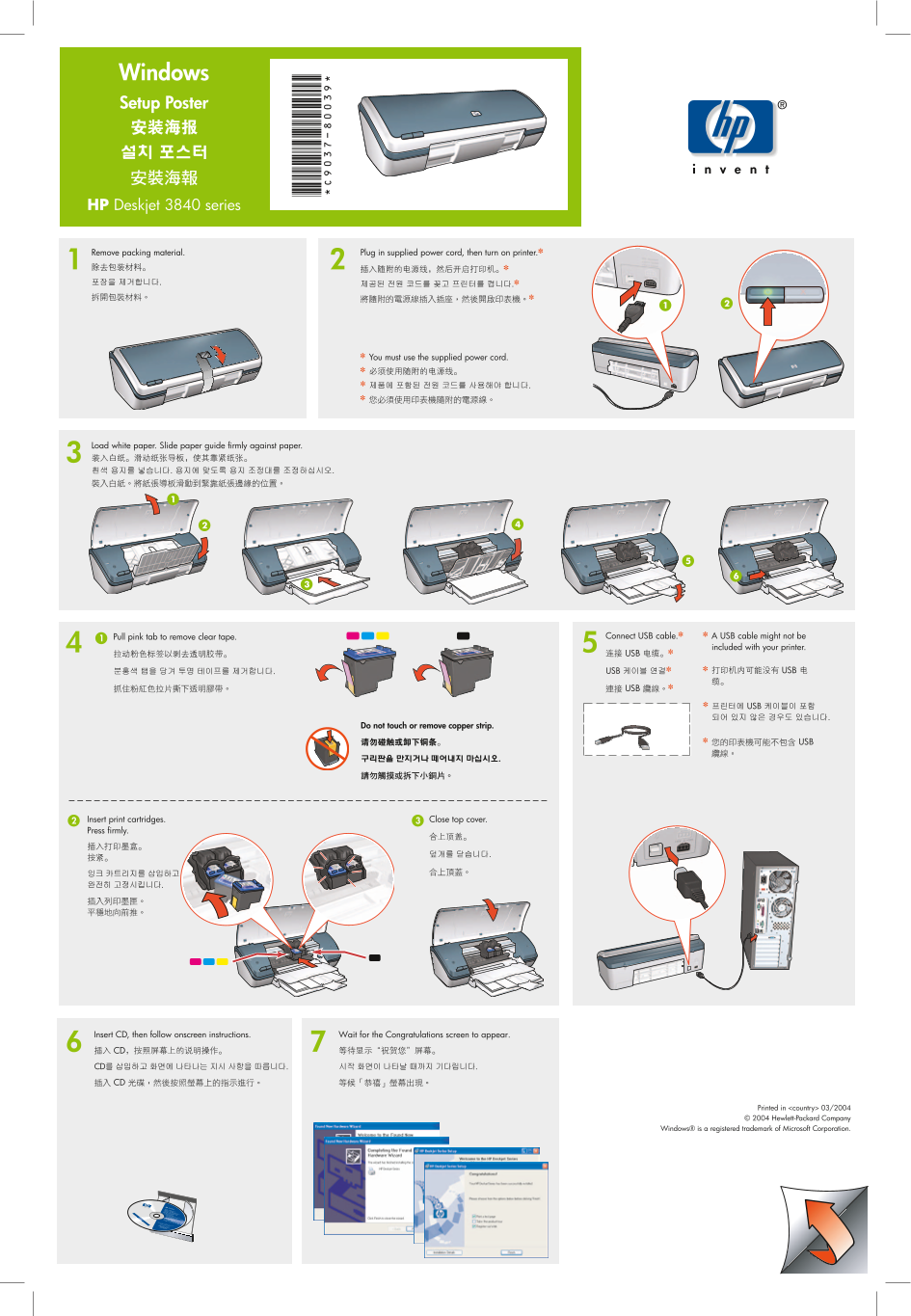
Page 1 Text Content
Setup Poster
HP Deskjet 3840 series
Plug in supplied power cord, then turn on printer.✽Remove packing material.
*C9 -80 *Windows
✽ You must use the supplied power cord.
Load white paper. Slide paper guide firmly against paper.
Connect USB cable.✽ ✽ A USB cable might not be
Pull pink tab to remove clear tape.
included with your printer.
Do not touch or remove copper strip.
Close top cover.Insert print cartridges.
Press firmly.
Insert CD, then follow onscreen instructions. Wait for the Congratulations screen to appear.
Printed in <country> 03/2004 © 2004 Hewlett-Packard Company
Windows® is a registered trademark of Microsoft Corporation.
Page Summary Contents For HP Deskjet 3840 Printer Series Installation Poster - (Windows)
Manual Details
| Brand | HP |
|---|---|
| Pages | 2 |
| File Size | 2.50 MB |
| Published | June 17, 2026 |
Enter the captcha to get the download link:

Frequently Asked Questions
How do I physically power on the printer after unpacking?
Remove packing material, plug in the supplied power cord, and turn on the printer. You must use the supplied power cord.
What steps should I follow if the software installation screens are not visible?
Click Start button, select Run. Then click Browse, select HPPP CD from the drop-down list, then Setup, and finally click Open.
My printer setup failed; what is the troubleshooting procedure?
Disconnect the cable and remove the CD. Restart the computer, temporarily disable firewall or anti-virus software, reinsert the CD, follow instructions, and restart again.
Is a USB cable guaranteed to be included with the HP Deskjet 3840 series?
No, note that the required USB cable might not be included with your printer.