HP Deskjet 2000 Printer Series - J210 Install Poster
Summary
The HP Deskjet 2000 Printer J210 Series owner's guide provides comprehensive instructions for setting up your new inkjet printer. This manual covers the complete physical installation process, from powering on to correctly loading ink cartridges and paper. It also teaches users how to navigate the essential software tools, including Electronic Help for troubleshooting and accessing specifications, and the Readme file for vital support information. Ideal for first-time owners, this guide ensures a smooth and successful setup experience straight out of the box.
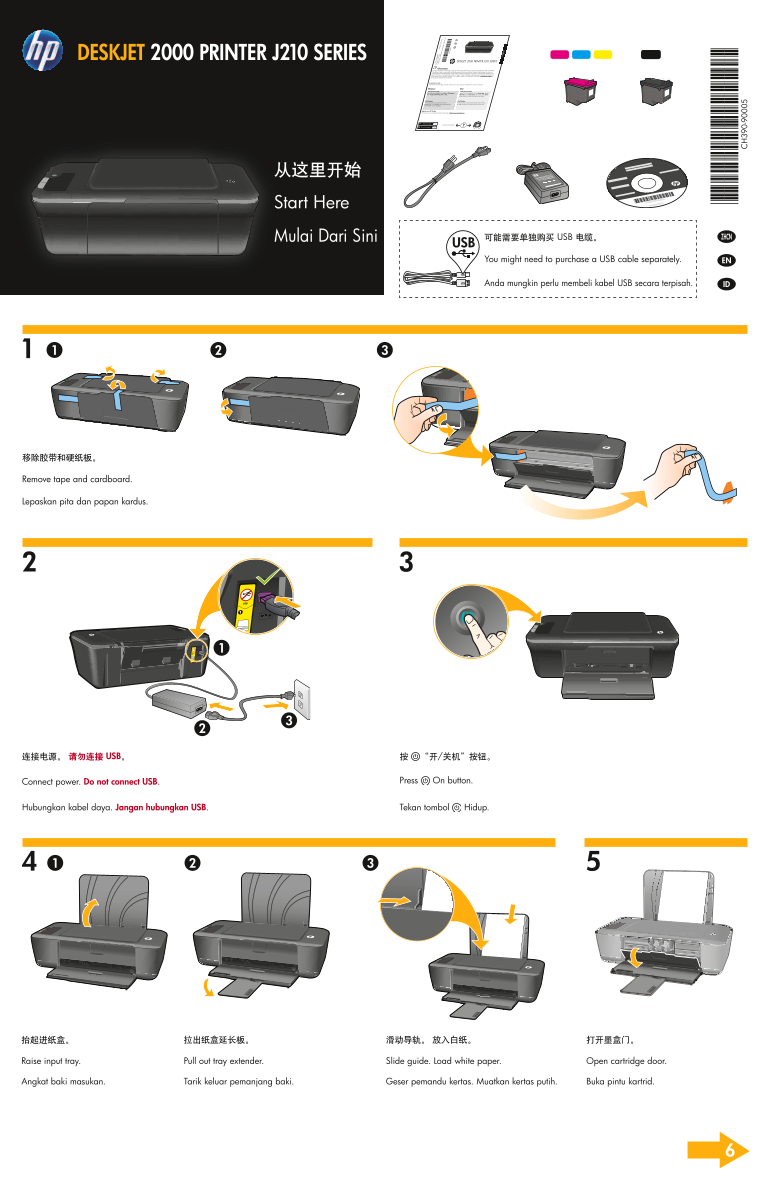
Page 1 Text Content
DESKJET 2000 PRINTER J210 SERIES
For setup information, see the setup poster. All other product information can be found in the electronic Help and Readme. Information
product features and troubleshooting. It also provides product specifications, legal notices, environmental, regulatory, and The electronic Help is automatically installed during printer software installation. Electronic Help includes instructions on
recent updates to your product information. For computers without a CD/DVD drive, please go to www.hp.com/support to support information. The Readme file contains HP support contact information, operating system requirements, and the most
download and install the printer software.
To install the electronic Help, insert the software CD in your computer and follow the on-screen instructions. Install electronic Help
Windows: Mac:
After software installation, click Start > All Programs > Find electronic Help Mac OS X v10.5 and v10.6: From Finder Help, choose Find electronic Help
HP > Deskjet 2000 Printer J210 > Help. button, and then choose the Help for your device. Mac Help. In the Help Viewer, click and hold the Home
Insert software CD. On software CD locate Find Readme Insert the software CD, and then double-click the Read Find Readme
select Read Me in your language. Read Me.chm. Click Read Me.chm to open and then Me folder located at the top-level of the software CD.
Get quicker service and support alerts by registering at http://www.register.hp.com. Register your HP Deskjet
Black Cartridge www.hp.com/support
Tri-color Cartridge
从这里开始 Start Here
Mulai Dari Sini 可能需要单独购买 USB 电缆。 ZHCN
You might need to purchase a USB cable separately. EN
Anda mungkin perlu membeli kabel USB secara terpisah. ID
Pr in te [C ou
nt ry
ew le tt- Pa ck ar Pr in te [C ou
ev el op en t C nt ry
om pa ny , L .P
XX X- XX
Remove tape and cardboard.
Lepaskan pita dan papan kardus. En gl is
*DESKJET 2000 PRINTER J210 SERIES
按 “开/关机”按钮。连接电源。 请勿连接 USB。
Press On button.Connect power. Do not connect USB.
Tekan tombol Hidup.Hubungkan kabel daya. Jangan hubungkan USB.
Pull out tray extender. Slide guide. Load white paper. Open cartridge door.Raise input tray.
Tarik keluar pemanjang baki. Geser pemandu kertas. Muatkan kertas putih. Buka pintu kartrid.Angkat baki masukan.
Page Summary Contents For HP Deskjet 2000 Printer Series - J210 Install Poster
Manual Details
| Brand | HP |
|---|---|
| Pages | 2 |
| File Size | 2.38 MB |
| Published | June 20, 2026 |
Enter the captcha to get the download link:

Frequently Asked Questions
How do I find the electronic Help guide?
After software installation, follow specific steps for Windows (Start menu) or Mac (Finder Help).
What is required if my computer lacks a CD/DVD drive?
You must visit www.hp.com/support to download and install the printer software.
When should I connect the USB cable during setup?
Do not connect the USB until you are prompted on screen.
How do I register my HP Deskjet 2000 Printer J210?
Register at http://www.register.hp.com for quicker service and support alerts.