HP DeskJet Ink Advantage 3830 Series Install Poster
Summary
Effortlessly print, scan, and copy with the HP DeskJet Ink Advantage 3830 all-in-one series printer. Designed for reliable performance in home and small office environments, this unit provides essential multifunction capabilities without sacrificing quality. This manual is your comprehensive guide to setting up and operating the device, covering everything from initial installation and maintenance routines to basic troubleshooting. Whether you are a student or managing household documents, we provide clear, step-by-step instructions to ensure smooth printing every time.
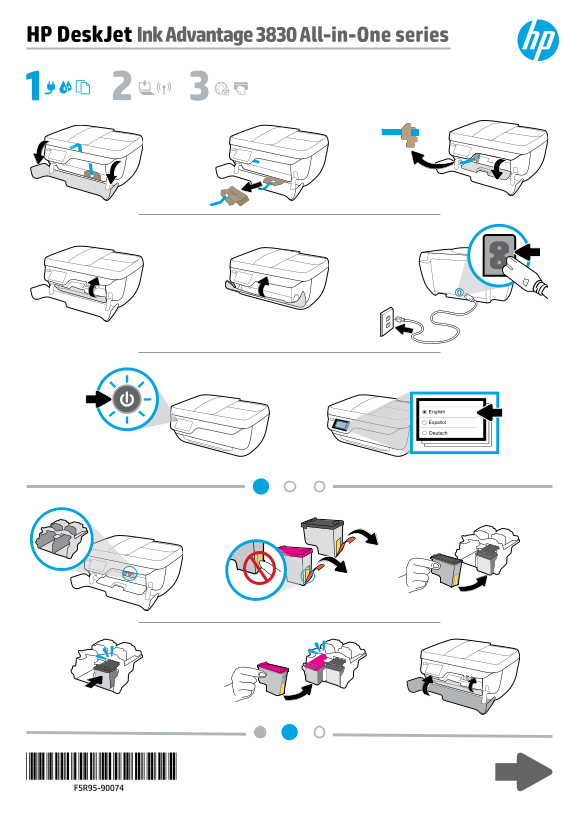
Page 1 Text Content
HP Desk Jet Ink Advantage 3830 All-in-One series
Deutsch
Page Summary Contents For HP DeskJet Ink Advantage 3830 Series Install Poster
Manual Details
| Brand | HP |
|---|---|
| Pages | 2 |
| File Size | 1.25 MB |
| Published | June 17, 2026 |
Enter the captcha to get the download link:

Frequently Asked Questions
What is the full product series name?
The device belongs to the HP DeskJet Ink Advantage 3830 All-in-One series.
Where can I find additional support or documentation for this model?
You can find information related to the printer at ok 123.hp.com/dj3830.
What is the listed copyright year for these manuals?
The copyrighted material date provided in the text is 2018 by HP Development Company, L.P.