HP Deskjet 5440 Printer Series Installation Poster - (Windows)
Summary
The comprehensive user manual guide for the HP Deskjet 5400 series printer provides essential, step-by-step instructions for first-time setup. It details everything from unboxing and connecting the power supply to loading ink cartridges and adjusting paper guides. The guide covers full software installation using the CD or USB connection and includes critical troubleshooting steps for seamless connectivity with your computer. Ideal for new users needing a clear roadmap to get their printer running efficiently.
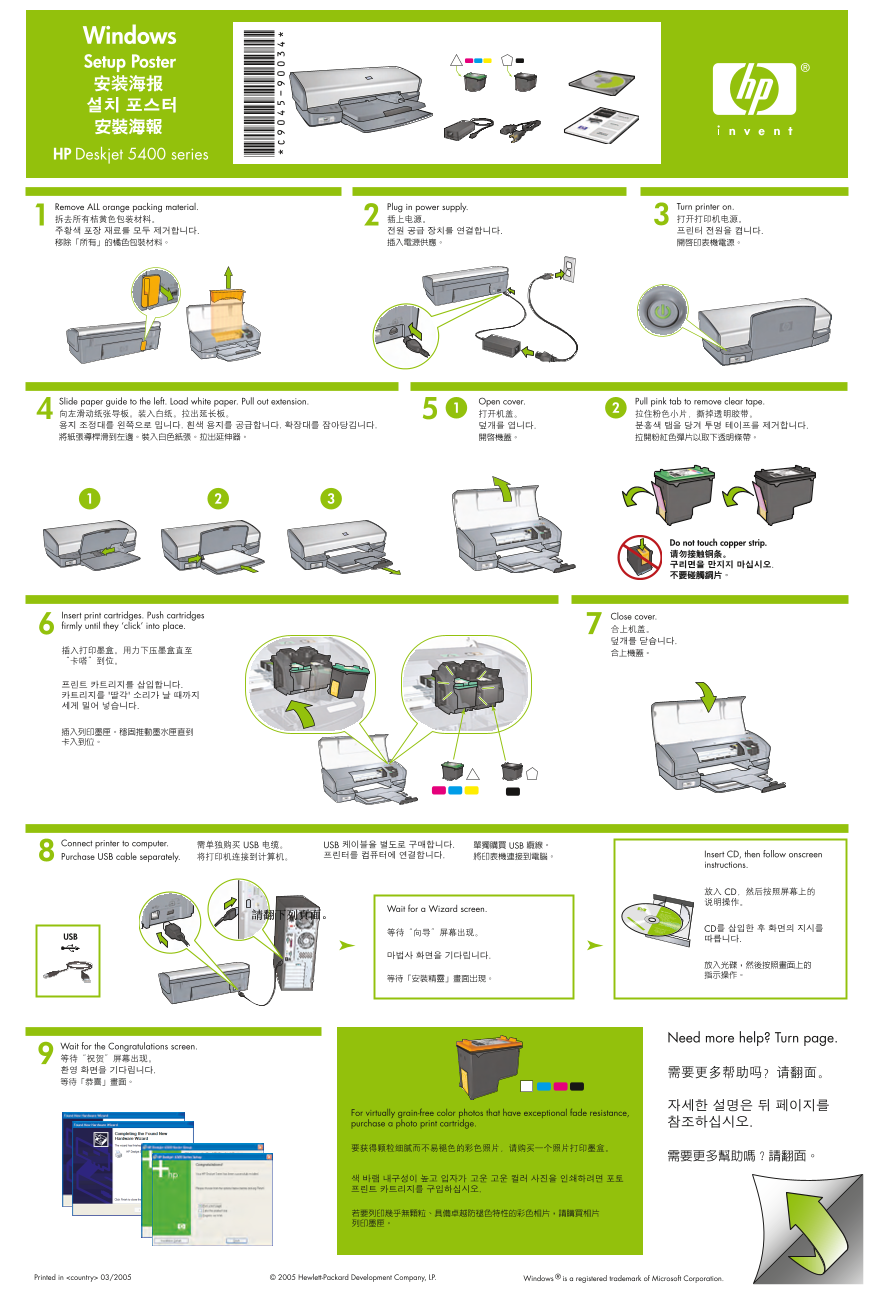
Page 1 Text Content
Windows Setup Poster
HP Deskjet 5400 series
Remove ALL orange packing material. Plug in power supply. Turn printer on.
Slide paper guide to the left. Load white paper. Pull out extension. Open cover. Pull pink tab to remove clear tape.
Do not touch copper strip.
Insert print cartridges. Push cartridges Close cover. firmly until they ‘click’ into place.
Connect printer to computer. USB USB 케이블을 별도로 구매합니다. USB
프린터를 컴퓨터에 연결합니다. Insert CD, then follow onscreen
Purchase USB cable separately.
instructions.
Wait for a Wizard screen.
CD를 삽입한 후 화면의 지시를
USB 따릅니다.
Need more help? Turn page.
Wait for the Congratulations screen.
For virtually grain-free color photos that have exceptional fade resistance, purchase a photo print cartridge. 참조하십시오.
Windows ® is a registered trademark of Microsoft Corporation.© 2005 Hewlett-Packard Development Company, LP.Printed in <country> 03/2005
Page Summary Contents For HP Deskjet 5440 Printer Series Installation Poster - (Windows)
Manual Details
| Brand | HP |
|---|---|
| Pages | 2 |
| File Size | 1.35 MB |
| Published | June 18, 2026 |
Enter the captcha to get the download link:

Frequently Asked Questions
How do I prepare the printer before use?
Remove ALL orange packing material, plug in power, and turn the printer on.
How must I load white paper into the printer?
Slide the guide to the left, supply white paper, pull out the extension, open the cover, and remove clear tape with the pink tab.
What is required for connecting the printer to a computer?
You must purchase a USB cable separately. You can also use the CD provided and follow onscreen instructions.
What should I do if the printer setup fails?
Remove the CD, disconnect the printer cable from the computer, restart the computer, disable software firewalls/anti-virus temporarily, and re-install using the dedicated software CD.