Delta Industrial Automation Inverter CMC-EIP01 CMC-EIP02 Installation Instructions EtherNet IP Communication Card Optional Accessories
Summary
The CMC-EIP01 is a specialized Ethernet communication card engineered to integrate Delta VFD-C2000 series AC motor drives into industrial networks. Supporting protocols like EtherNet/IP and Modbus TCP, it ensures reliable, high-speed connectivity up to 10/100 Mbps without external power. This manual serves as a comprehensive guide for installation, detailing precise mounting procedures and RJ-45 wiring conventions. It also covers electrical specifications, interpreting status LEDs (POWER/LINK), detailed troubleshooting steps, and safe operational guidelines, making it essential for automation engineers and control system technicians.
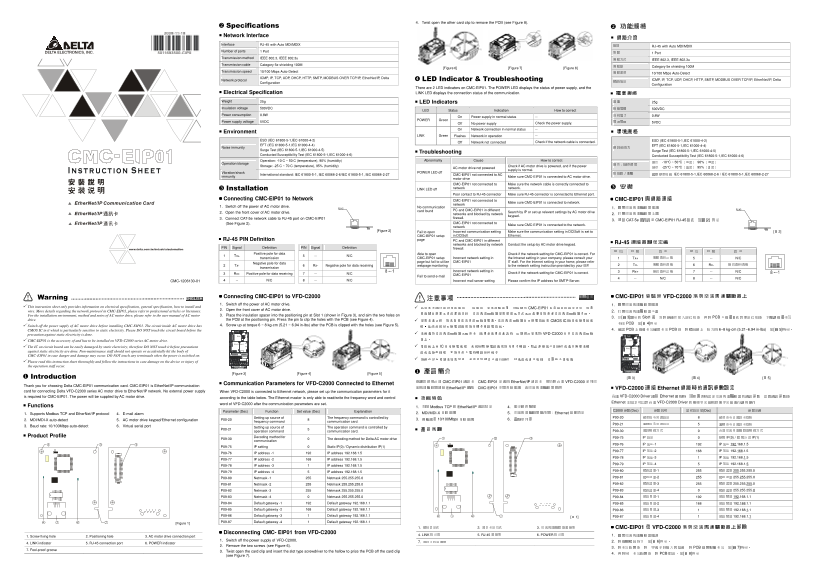
Page 1 Text Content
4. Twist open the other card clip to remove the PCB (see Figure 8).
Specifications 功能規格 Network Interface
網路介面 接頭 RJ-45 with Auto MDI/MDIX 埠數 1 Port 傳輸方式 IEEE 802.3, IEEE 802.3u 傳輸線 Category 5e shielding 100M 傳輸速率 10/100 Mbps Auto-Detect 網路協定
Interface RJ-45 with Auto MDI/MDIX
Number of ports 1 Port
Transmission method IEEE 802.3, IEEE 802.3u
Transmission cable Category 5e shielding 100M
[Figure 6] [Figure 7] [Figure 8]
Transmission speed 10/100 Mbps Auto-Detect
ICMP, IP, TCP, UDP, DHCP, HTTP, SMTP, MODBUS OVER TCP/IP, Ether Net/IP, Delta ICMP, IP, TCP, UDP, DHCP, HTTP, SMTP, MODBUS OVER TCP/IP, Ether Net/IP, Delta
Network protocol LED Indicator & Troubleshooting
Configuration Configuration
There are 2 LED indicators on CMC-EIP01. The POWER LED displays the status of power supply, and the
Electrical Specification LINK LED displays the connection status of the communication. 電氣規格 重量 25g 絕緣電壓 500VDC 消耗電力 0.8W 電源電壓 5VDC Weight 25g LED Indicators Insulation voltage 500VDC
LED Status Indication How to correct
Power consumption 0.8W
On Power supply in normal status --
Power supply voltage 5VDC POWER Green
Off No power supply Check the power supply.
On Network connection in normal status --
Environment 環境規格 雜訊免疫力
Flashes Network in operation -- LINK Green
ESD (IEC 61800-5-1,IEC 61000-4-2) ESD (IEC 61800-5-1,IEC 61000-4-2)
Off Network not connected Check if the network cable is connected.
EFT (IEC 61800-5-1,IEC 61000-4-4) EFT (IEC 61800-5-1,IEC 61000-4-4)
Noise immunity
Surge Test (IEC 61800-5-1,IEC 61000-4-5) Surge Test (IEC 61800-5-1,IEC 61000-4-5)
Troubleshooting
Conducted Susceptibility Test (IEC 61800-5-1,IEC 61000-4-6) Conducted Susceptibility Test (IEC 61800-5-1,IEC 61000-4-6) 操作∕儲存環境
Operation: -10°C ~ 50°C (temperature), 90% (humidity) Abnormality Cause How to correct 操作:-10°C ~ 50°C(溫度),90%(濕度) 儲存:-25°C ~ 70°C(溫度),95%(濕度) 耐振動∕衝擊 國際標準規範 IEC 61800-5-1,IEC 60068-2-6 / IEC 61800-5-1,IEC 60068-2-27
Operation/storage
Storage: -25°C ~ 70°C (temperature), 95% (humidity) Check if AC motor drive is powered, and if the power
AC motor drive not powered
supply is normal.
Vibration/shock POWER LED off
International standard: IEC 61800-5-1, IEC 60068-2-6/IEC 61800-5-1, IEC 60068-2-27 CMC-EIP01 not connected to AC
immunity Make sure CMC-EIP01 is connected to AC motor drive.
motor drive CMC-EIP01 not connected to Make sure the network cable is correctly connected to Installation network network. LINK LED off 安裝 Poor contact to RJ-45 connector Make sure RJ-45 connector is connected to Ethernet port.
Connecting CMC-EIP01 to Network CMC-EIP01 not connected to CMC-EIP01與網路連接
Make sure CMC-EIP01 is connected to network.
network
1. Switch off the power of AC motor drive. No communication 1. 關閉交流馬達驅動器電源
2. Open the front cover of AC motor drive. card found PC and CMC-EIP01 in different Search by IP or set up relevant settings by AC motor drive
networks and blocked by network keypad. 2. 打開交流馬達驅動器上蓋 3. Connect CAT-5e network cable to RJ-45 port on CMC-EIP01 firewall.
3. 連接 CAT-5e 網路線至 CMC-EIP01 RJ-45 接孔,如圖[2] 所示。
(See Figure 2). CMC-EIP01 not connected to Make sure CMC-EIP01 is connected to the network. network
[Figure 2] Fail to open Incorrect communication setting Make sure the communication setting in DCISoft is set to [圖 2]
CMC-EIP01 setup in DCISoft Ethernet.
RJ-45 PIN Definition page PC and CMC-EIP01 in different
networks and blocked by network Conduct the setup by AC motor drive keypad. RJ-45連接器腳位定義 腳 位 訊 號 敘 述 腳 位 訊 號 敘 述
PIN Signal Definition PIN Signal Definition firewall.
Positive pole for data Able to open Check if the network setting for CMC-EIP01 is correct. For
1 Tx+ 5 -- N/C
transmission CMC-EIP01 setup Incorrect network setting in the Intranet setting in your company, please consult your 1 Tx+ 傳輸資料正極 5 -- N/C
Negative pole for data page but fail to utilize CMC-EIP01 IT staff. For the Internet setting in your home, please refer
2 Tx- 6 Rx- Negative pole for data receiving webpage monitoring to the network setting instruction provided by your ISP. 2 Tx- 傳輸資料負極 6 Rx- 接收資料負極
transmission
Incorrect network setting in Check if the network setting for CMC-EIP01 is correct. 3 Rx+ 接收資料正極 7 -- N/C
3 Rx+ Positive pole for data receiving 7 -- N/C CMC-EIP01
Fail to send e-mail
CMC-1206130-01 4 -- N/C 8 -- N/C Incorrect mail server setting Please confirm the IP address for SMTP-Server.
ENGLISH Connecting CMC-EIP01 to VFD-C2000 繁體中文 CMC-EIP01安裝於 VFD-C2000系列交流馬達驅動器上
Warning 注意事項
1. Switch off the power of AC motor drive. 1. 關閉交流馬達驅動器電源
This instruction sheet only provides information on electrical specification, general specification, how to install and 此安裝手冊只提供電氣規格、一般規格、安裝及配線等。詳細關於 CMC-EIP01包含的網路協定內容,請參閱相關的專業文章或書籍資料。交流馬達驅動器安裝環境及方式及注意事項請參考交流馬達驅動器手冊。
wire. More details regarding the network protocol in CMC-EIP01, please refer to professional articles or literaures. 2. Open the front cover of AC motor drive. 2. 打開交流馬達驅動器上蓋 For the installation environment, method and notes of AC motor drive, please refer to the user manual of AC motor 3. Place the insulation spacer into the positioning pin at Slot 1 (shown in Figure 3), and aim the two holes on
3. 於[圖 3]顯示的 Slot1 處,先將絕緣片放入定位柱後,再將 PCB 上兩個圓孔對準定位柱後,下壓讓兩個卡勾卡住
drive. the PCB at the positioning pin. Press the pin to clip the holes with the PCB (see Figure 4). 安裝本產品時,請先關閉交流馬達驅動器電源。交流馬達驅動器的內部電路板有 CMOS IC極易受靜電的破壞,故在未做好防靜電措施前請勿用手觸摸電路板。
4. Screw up at torque 6 ~ 8 kg-cm (5.21 ~ 6.94 in-lbs) after the PCB is clipped with the holes (see Figure 5). PCB,如[圖 4]所示。
Switch off the power supply of AC motor drive before installing CMC-EIP01. The circuit inside AC motor drive has
CMOS IC in it which is particularly sensitive to static electricity. Please DO NOT touch the circuit board before the 4. 確認 PCB 上兩個卡勾確實卡住 PCB 後,將螺絲鎖上,扭力為 6~8 kg-cm (5.21~6.94 in-lbs),如[圖 5]所示。
precaution against static electricity is done. 本機屬於交流馬達驅動器之配件卡,使用者使用本產品時,必須將之安裝於 VFD-C2000系列交流馬達驅動器上。
Slot 3
CMC-EIP01 is the accessory of and has to be installed on VFD-C2000 series AC motor drive. Slot 3
Slot 1Slot 2
The IC on circuit board can be easily damaged by static electricity; therefore DO NOT touch it before precautions 電路板上的 IC易受靜電破壞,未做好防靜電措施前請勿用手觸摸。防止非維護人員操作或意外衝擊本體,造成危險及損壞,且請勿在上電時觸摸任何端子。 Slot 1Slot 2
against static electricity are done. Non-maintenance staff should not operate or accidentally hit the body of CMC-EIP01 in case danger and damage may occur. DO NOT touch any terminaals when the power is switched on.
Please read this instruction sheet thoroughly and follow the instructions in case damage on the device or injury of the operation staff occur.
[Figure 3] [Figure 4] [Figure 5] 產品簡介 感謝您使用台達
Introduction [圖 3] [圖 4] [圖 5]
CMC-EIP01 通訊卡。CMC-EIP01 定義為 Ether Net/IP 通訊卡,用於將台達 VFD-C2000 系列交流馬達驅動器連接
Thank you for choosing Delta CMC-EIP01 communication card. CMC-EIP01 is Ether Net/IP communication Communication Parameters for VFD-C2000 Connected to Ethernet
Ether Net/IP 網路,CMC-EIP01 不需外接電源,由交流馬達驅動器提供。 VFD-C2000連接 Ethernet網路時的通訊參數設定 台達
card for connecting Delta VFD-C2000 series AC motor drive to Ether Net/IP network. No external power supply When VFD-C2000 is connected to Ethernet network, please set up the communication parameters for it
is required for CMC-EIP01. The power will be supplied by AC motor drive. according to the table below. The Ethernet master is only able to read/write the frequency word and control VFD-C2000 Driver 連接 Ethernet 網路時,須根據表格設定交流馬達驅動器的通訊參數。設置通訊參數後,
word of VFD-C2000 after the communication parameters are set. Ethernet 主站才可以對台達 VFD-C2000 Driver 的頻率字元組和控制字元組進行讀寫操作。
Functions 1. 支援 Modbus TCP Ether Net/IP 通訊協定 4. 電子郵件警報
Parameter (Dec) Function Set value (Dec) Explanation C2000 參數(Dec) 參數說明 當前設定值(Dec) 參數定義
1. Supports Modbus TCP and Ether Net/IP protocol 4. E-mail alarm 2. MDI/MDI-X 自動偵測 5. 交流馬達驅動器操作器∕Ethernet 組態設定
Setting up source of The frequency command is controlled by 3. 傳輸速率 10/100Mbps 自動偵測 6. 虛擬序列埠 P00-20 頻率指令來源設定 8 頻率命令由通訊卡控制
2. MDI/MDI-X auto-detect 5. AC motor drive keypad/Ethernet configuration P00-20
frequency command communication card.
3. Baud rate: 10/100Mbps auto-detect 6. Virtual serial port Setting up source of The operation command is controlled by
operation command communication card.
Product Profile Decoding method for P09-75 IP 設定 0 靜態 IP(0) / 動態分派 IP(1)
P09-30 0 The decoding method for Delta AC motor drive
communication
P09-76 IP 地址-1 192 IP 地址 192.168.1.5
P09-75 IP setting 0 Static IP(0) / Dynamic distribution IP(1)
P09-77 IP 地址-2 168 IP 地址 192.168.1.5
P09-76 IP address -1 192 IP address 192.168.1.5
P09-78 IP 地址-3 1 IP 地址 192.168.1.5
P09-77 IP address -2 168 IP address 192.168.1.5
P09-78 IP address -3 1 IP address 192.168.1.5 P09-79 IP 地址-4 5 IP 地址 192.168.1.5
P09-79 IP address -4 5 IP address 192.168.1.5 P09-80 網路遮罩-1 255 網路遮罩 255.255.255.0
P09-80 Netmask -1 255 Netmask 255.255.255.0 P09-81 網路遮罩-2 255 網路遮罩 255.255.255.0
P09-81 Netmask -2 255 Netmask 255.255.255.0 P09-82 網路遮罩-3 255 網路遮罩 255.255.255.0
P09-82 Netmask -3 255 Netmask 255.255.255.0 P09-83 網路遮罩-4 0 網路遮罩 255.255.255.0
P09-83 Netmask -4 0 Netmask 255.255.255.0 P09-84 預設閘道-1 192 預設閘道 192.168.1.1
P09-84 Default gateway -1 192 Default gateway 192.168.1.1 P09-85 預設閘道-2 168 預設閘道 192.168.1.1
P09-85 Default gateway -2 168 Default gateway 192.168.1.1 P09-86 預設閘道-3 1 預設閘道 192.168.1.1
P09-86 Default gateway -3 1 Default gateway 192.168.1.1 [圖 1] P09-87 預設閘道-4 1 預設閘道 192.168.1.1
[Figure 1] P09-87 Default gateway -4 1 Default gateway 192.168.1.1
1. 螺絲固定孔 2. 通訊卡定位孔 3. 交流馬達驅動器連接埠 CMC-EIP01從 VFD-C2000系列交流馬達驅動器上卸除
Disconnecting CMC- EIP01 from VFD-C2000 4. LINK 指示燈 5. RJ-45 連接埠 6. POWER 指示燈
1. Screw fixing hole 2. Positioning hole 3. AC motor drive connection port 1. 關閉交流馬達驅動器電源
1. Switch off the power supply of VFD-C2000. 7. 通訊卡防呆溝槽 2. 將兩顆螺絲拆下,如[圖 6]所示。
4. LINK indicator 5. RJ-45 connection port 6. POWER indicator
2. Remove the two screws (see Figure 6). 3. 將卡勾扳開後,將一字起子斜插入凹陷處,將 PCB 撬開脫離卡勾,如[圖 7]所示。
7. Fool-proof groove 3. Twist open the card clip and insert the slot type screwdriver to the hollow to prize the PCB off the card clip
4. 再將另一卡勾扳開後,將 PCB 取出,如[圖 8]所示。
(see Figure 7).
Page Summary Contents For Delta Industrial Automation Inverter CMC-EIP01 CMC-EIP02 Installation Instructions EtherNet IP Communication Card Optional Accessories
Manual Details
| Brand | Delta |
|---|---|
| Pages | 2 |
| File Size | 648.02 KB |
| Published | June 06, 2026 |
Enter the captcha to get the download link:

Frequently Asked Questions
How do I connect CMC-EIP01 to the network?
First, switch off the power of the AC motor drive, then connect a CAT-5e network cable to the RJ-45 port on CMC-EIP01.
What does the LED indicator status mean?
A green POWER LED means normal power supply; if it is Off, no power supply is detected. The LINK LED indicates connection status.
What communication protocols are supported?
It supports both Modbus TCP and EtherNet/IP protocols, operating at 10/100 Mbps auto-detect speed.
Are there any safety warnings during installation?
The PCB is highly sensitive to ESD; therefore, do not touch the circuit board without implementing proper anti-static measures.