Delta Industrial Automation Inverter CME-USB01 VFD-E Series USB Interface Optional Accessory
Summary
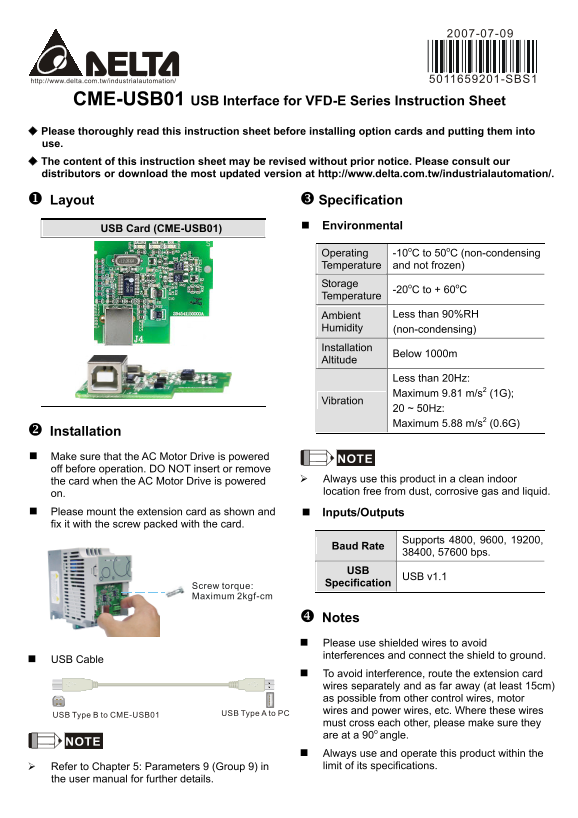
This module provides reliable USB v1.1 interface connectivity for VFD-E series AC Motor Drives, allowing integration with PC or USB devices. This comprehensive guide ensures industrial safety by detailing proper installation procedures, environmental specifications, supported serial baud rates (up to 57600 bps), and crucial wiring best practices. It is designed for technicians and automation engineers utilizing Delta drive systems who require robust digital communication connectivity in demanding industrial environments.
Page 1 Text Content
5011659201-SBS1
CME-USB01 USB Interface for VFD-E Series Instruction Sheet Please thoroughly read this instruction sheet before installing option cards and putting them into use. The content of this instruction sheet may be revised without prior notice. Please consult our distributors or download the most updated version at http://www.delta.com.tw/industrialautomation/.
Layout Specification
Environmental
USB Card (CME-USB01)
Operating -10o C to 50o C (non-condensing
Temperature and not frozen)
Storage
-20o C to + 60o C
Temperature
Ambient Less than 90%RH
Humidity (non-condensing)
Installation Altitude Below 1000m
Less than 20Hz: Maximum 9.81 m/s2 (1G);
Vibration
20 ~ 50Hz: Maximum 5.88 m/s2 (0.6G)
Installation Make sure that the AC Motor Drive is powered NOTE off before operation. DO NOT insert or remove
the card when the AC Motor Drive is powered Always use this product in a clean indoor on. location free from dust, corrosive gas and liquid.
Please mount the extension card as shown and Inputs/Outputs fix it with the screw packed with the card.
Baud Rate Supports 4800, 9600, 19200,
38400, 57600 bps.
USB v1.1
Specification
Screw torque: Maximum 2kgf-cm
Notes Please use shielded wires to avoid interferences and connect the shield to ground.
USB Cable
To avoid interference, route the extension card wires separately and as far away (at least 15cm) as possible from other control wires, motor wires and power wires, etc. Where these wires
USB Type B to CME-USB01 USB Type A to PC
must cross each other, please make sure they are at a 90o angle.
Always use and operate this product within the Refer to Chapter 5: Parameters 9 (Group 9) in limit of its specifications.
the user manual for further details.
Page Summary Contents For Delta Industrial Automation Inverter CME-USB01 VFD-E Series USB Interface Optional Accessory
Manual Details
| Brand | Delta |
|---|---|
| Pages | 2 |
| File Size | 380.63 KB |
| Published | June 06, 2026 |
Enter the captcha to get the download link:

Frequently Asked Questions
What is the operating temperature range for the CME-USB01 card?
It operates from -10°C to 50°C (non-condensing and non-frozen).
What baud rates are supported by the USB interface?
It supports multiple communication speeds/baud rates, including 4800, 9600, 19200, 38400, and 57600 bps.