Delta Industrial Automation Industrial Network Solution IFD9506 Ethernet, EtherNet IP Communication Converter Module Installation Manual
Summary
The IFD9506 is a powerful industrial communication gateway designed to seamlessly bridge disparate control protocols, including Ethernet, RS-485, and RS-232. Supporting standardized MODBUS TCP/RTU, this device enables complex system integration while featuring optional IP filtering and advanced alarm triggering. This manual provides comprehensive technical documentation, offering detailed electrical specifications, wiring guides, interface definitions (RJ-11, RJ-45), and step-by-step instructions for configuring all communication parameters via software and external switches for professional automation engineers and technicians.
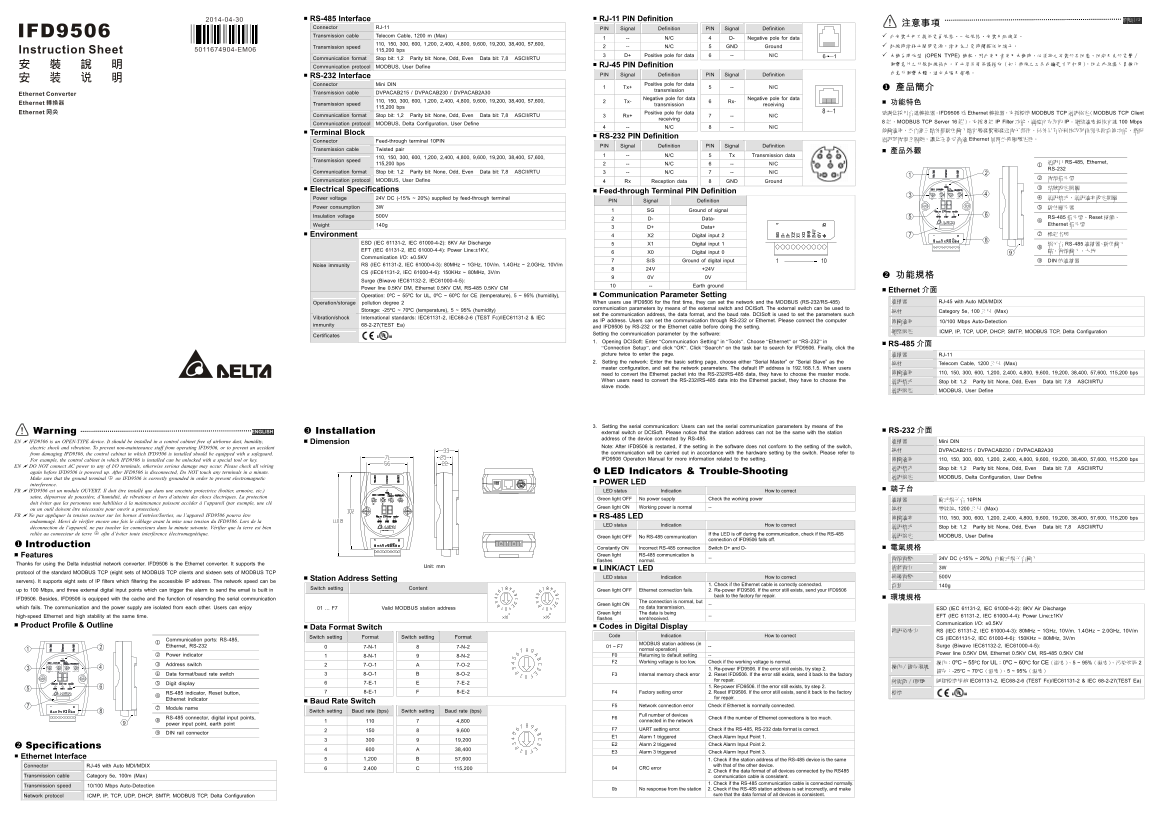
Page 1 Text Content
2014-04-30 RS-485 Interface RJ-11 PIN Definition 繁體中文
Connector RJ-11 PIN Signal Definition PIN Signal Definition 注意事項
Transmission cable Telecom Cable, 1200 m (Max) 此安裝手冊只提供電氣規格、一般規格、安裝及配線等。
1 -- N/C 4 D- Negative pole for data
Transmission speed 110, 150, 300, 600, 1,200, 2,400, 4,800, 9,600, 19,200, 38,400, 57,600, 2 -- N/C 5 GND Ground 配線時請務必關閉電源,請勿在上電時觸摸任何端子。
5011674904-EM06 115,200 bps
3 D+ Positive pole for data 6 -- N/C 本機為開放型 (OPEN TYPE) 機殼,因此使用者使用本機時,必須將之安裝於具防塵、防潮及免於電擊∕
Communication format Stop bit: 1,2 Parity bit: None, Odd, Even Data bit: 7,8 ASCII/RTU
RJ-45 PIN Definition 衝擊意外之外殼配線箱內。另必須具備保護措施(如:特殊之工具或鑰匙才可打開),防止非維護人員操作
Communication protocol MODBUS, User Define
PIN Signal Definition PIN Signal Definition 或意外衝擊本體,造成危險及損壞。
RS-232 Interface Connector Mini DIN
1 Tx+ Positive pole for data 產品簡介
transmission 5 -- N/C
Transmission cable DVPACAB215 / DVPACAB230 / DVPACAB2A30
2 Tx- Negative pole for data 功能特色
Transmission speed 110, 150, 300, 600, 1,200, 2,400, 4,800, 9,600, 19,200, 38,400, 57,600, transmission 6 Rx- Negative pole for data receiving
115,200 bps
感謝您採用台達轉換器。IFD9506 Ethernet 轉換器,支援標準 MODBUS TCP 通訊協定(MODBUS TCP Client
Communication format Stop bit: 1,2 Parity bit: None, Odd, Even Data bit: 7,8 ASCII/RTU 3 Rx+ Positive pole for data
receiving 7 -- N/C
Communication protocol MODBUS, Delta Configuration, User Define 組,MODBUS TCP Server 16 組)。支援 IP Filter 功能,過濾可存取的 IP。網路速度最快可達 100 Mbps
Terminal Block
RS-232 PIN Definition
Connector Feed-through terminal 10PIN 通訊與電源全隔離,讓您在享受高速 Ethernet 同時並兼顧穩定性。
PIN Signal Definition PIN Signal Definition
Transmission cable Twisted pair
1 -- N/C 5 Tx Transmission data
Transmission speed 110, 150, 300, 600, 1,200, 2,400, 4,800, 9,600, 19,200, 38,400, 57,600, RS-485, Ethernet,
115,200 bps 2 -- N/C 6 -- N/C 通訊口
RS-232
Communication format Stop bit: 1,2 Parity bit: None, Odd, Even Data bit: 7,8 ASCII/RTU 3 -- N/C 7 -- N/C
Communication protocol MODBUS, User Define 電源指示燈
4 Rx Reception data 8 GND Ground
Electrical Specifications 站號設定開關
Feed-through Terminal PIN Definition
Power voltage 24V DC (-15% ~ 20%) supplied by feed-through terminal 通訊格式、通訊速率設定開關
PIN Signal Definition
Power consumption 3W 數位顯示器
1 SG Ground of signal
Insulation voltage 500V 指示燈、Reset 按鍵、
2 D- Data-
RS-485 Weight 140g Ethernet 指示燈
3 D+ Data+
Environment 4 X2 Digital input 2 模組名稱
ESD (IEC 61131-2, IEC 61000-4-2): 8KV Air Discharge 5 X1 Digital input 1 RS-485 連接器、數位輸入
EFT (IEC 61131-2, IEC 61000-4-4): Power Line:±1KV, 點、電源輸入、大地 9
6 X0 Digital input 0
Communication I/O: ±0.5KV
7 S/S Ground of digital input DIN 軌連接器
Noise immunity RS (IEC 61131-2, IEC 61000-4-3): 80MHz ~ 1GHz, 10V/m. 1.4GHz ~ 2.0GHz, 10V/m
CS (IEC61131-2, IEC 61000-4-6): 150KHz ~ 80MHz, 3V/m
Surge (Biwave IEC61132-2, IEC61000-4-5):
10 -- Earth ground
Power line 0.5KV DM, Ethernet 0.5KV CM, RS-485 0.5KV CM
Ethernet 介面
Operation: 0ºC ~ 55ºC for UL, 0ºC ~ 60ºC for CE (temperature), 5 ~ 95% (humidity), Communication Parameter Setting
Operation/storage pollution degree 2 When users use IFD9506 for the first time, they can set the network and the MODBUS (RS-232/RS-485) 連接器 RJ-45 with Auto MDI/MDIX
Storage: -25ºC ~ 70ºC (temperature), 5 ~ 95% (humidity) communication parameters by means of the external switch and DCISoft. The external switch can be used to
線材 Category 5e, 100 公尺 (Max)
set the communication address, the data format, and the baud rate. DCISoft is used to set the parameters such
Vibration/shock International standards: IEC61131-2, IEC68-2-6 (TEST Fc)/IEC61131-2 & IEC
as IP address. Users can set the communication through RS-232 or Ethernet. Please connect the computer 傳輸速率 10/100 Mbps Auto-Detection
immunity 68-2-27(TEST Ea) and IFD9506 by RS-232 or the Ethernet cable before doing the setting.
網路協定 ICMP, IP, TCP, UDP, DHCP, SMTP, MODBUS TCP, Delta Configuration
Certificates Setting the communication parameter by the software: 1. Opening DCISoft: Enter “Communication Setting” in “Tools”. Choose “Ethernet” or “RS-232” in
RS-485 介面
“Connection Setup”, and click “OK”. Click “Search” on the task bar to search for IFD9506. Finally, click the picture twice to enter the page. 連接器 RJ-11 2. Setting the network: Enter the basic setting page, choose either “Serial Master” or “Serial Slave” as the 線材 Telecom Cable, 1200 公尺 (Max) master configuration, and set the network parameters. The default IP address is 192.168.1.5. When users
need to convert the Ethernet packet into the RS-232/RS-485 data, they have to choose the master mode. 傳輸速率 110, 150, 300, 600, 1,200, 2,400, 4,800, 9,600, 19,200, 38,400, 57,600, 115,200 bps
When users need to convert the RS-232/RS-485 data into the Ethernet packet, they have to choose the 通訊格式 Stop bit: 1,2 Parity bit: None, Odd, Even Data bit: 7,8 ASCII/RTU slave mode.
通訊協定 MODBUS, User Define
3. Setting the serial communication: Users can set the serial communication parameters by means of the
ENGLISH Installation external switch or DCISoft. Please notice that the station address can not be the same with the station RS-232 介面
Warning
address of the device connected by RS-485.
EN IFD9506 is an OPEN-TYPE device. It should be installed in a control cabinet free of airborne dust, humidity, Dimension 連接器 Mini DIN
electric shock and vibration. To prevent non-maintenance staff from operating IFD9506, or to prevent an accident Note: After IFD9506 is restarted, if the setting in the software does not conform to the setting of the switch,
線材 DVPACAB215 / DVPACAB230 / DVPACAB2A30
from damaging IFD9506, the control cabinet in which IFD9506 is installed should be equipped with a safeguard. the communication will be carried out in accordance with the hardware setting by the switch. Please refer to For example, the control cabinet in which IFD9506 is installed can be unlocked with a special tool or key. IFD9506 Operation Manual for more information related to the setting. 傳輸速率 110, 150, 300, 600, 1,200, 2,400, 4,800, 9,600, 19,200, 38,400, 57,600, 115,200 bps
EN DO NOT connect AC power to any of I/O terminals, otherwise serious damage may occur. Please check all wiring 通訊格式 Stop bit: 1,2 Parity bit: None, Odd, Even Data bit: 7,8 ASCII/RTU again before IFD9506 is powered up. After IFD9506 is disconnected, Do NOT touch any terminals in a minute. LED Indicators & Trouble-Shooting
Make sure that the ground terminal on IFD9506 is correctly grounded in order to prevent electromagnetic 通訊協定 MODBUS, Delta Configuration, User Define
interference. POWER LED
FR IFD9506 est un module OUVERT. Il doit être installé que dans une enceinte protectrice (boitier, armoire, etc.) LED status Indication How to correct 端子台
saine, dépourvue de poussière, d’humidité, de vibrations et hors d’atteinte des chocs électriques. La protection Green light OFF No power supply Check the working power
連接器 歐式端子台 10PIN
doit éviter que les personnes non habilitées à la maintenance puissent accéder à l’appareil (par exemple, une clé
Green light ON Working power is normal -- 線材 雙絞線, 1200 公尺 (Max)
ou un outil doivent être nécessaire pour ouvrir a protection). FR Ne pas appliquer la tension secteur sur les bornes d’entrées/Sorties, ou l’appareil IFD9506 pourra être RS-485 LED
傳輸速率 110, 150, 300, 600, 1,200, 2,400, 4,800, 9,600, 19,200, 38,400, 57,600, 115,200 bps
endommagé. Merci de vérifier encore une fois le câblage avant la mise sous tension du IFD9506. Lors de la
LED status Indication How to correct 通訊格式 Stop bit: 1,2 Parity bit: None, Odd, Even Data bit: 7,8 ASCII/RTU
déconnection de l’appareil, ne pas toucher les connecteurs dans la minute suivante. Vérifier que la terre est bien reliée au connecteur de terre afin d’éviter toute interférence électromagnétique.
Green light OFF No RS-485 communication If the LED is off during the communication, check if the RS-485 通訊協定 MODBUS, User Define
connection of IFD9506 falls off.
Introduction
Constantly ON Incorrect RS-485 connection Switch D+ and D- 電氣規格 Features Green light RS-485 communication is
電源電壓 24V DC (-15% ~ 20%) 由歐式端子台輸入
flashes normal. --
Thanks for using the Delta industrial network converter. IFD9506 is the Ethernet converter. It supports the
Unit: mm 消耗電力 3W
LINK/ACT LED
protocol of the standard MODBUS TCP (eight sets of MODBUS TCP clients and sixteen sets of MODBUS TCP
LED status Indication How to correct 絕緣電壓 500V
Station Address Setting
servers). It supports eight sets of IP filters which filtering the accessible IP address. The network speed can be
1. Check if the Ethernet cable is correctly connected. 重量 140g
up to 100 Mbps, and three external digital input points which can trigger the alarm to send the email is built in Switch setting Content Green light OFF Ethernet connection fails. 2. Re-power IFD9506. If the error still exists, send your IFD9506
back to the factory for repair.
IFD9506. Besides, IFD9506 is equipped with the cache and the function of resending the serial communication 環境規格
Green light ON The connection is normal, but
which fails. The communication and the power supply are isolated from each other. Users can enjoy 01 … F7 Valid MODBUS station address no data transmission. -- ESD (IEC 61131-2, IEC 61000-4-2): 8KV Air Discharge
Green light The data is being
high-speed Ethernet and high stability at the same time. EFT (IEC 61131-2, IEC 61000-4-4): Power Line:±1KV
flashes sent/received. --
Communication I/O: ±0.5KV
Product Profile & Outline Codes in Digital Display
Data Format Switch
雜訊免疫力 RS (IEC 61131-2, IEC 61000-4-3): 80MHz ~ 1GHz, 10V/m. 1.4GHz ~ 2.0GHz, 10V/m
Switch setting Format Switch setting Format Code Indication How to correct
CS (IEC61131-2, IEC 61000-4-6): 150KHz ~ 80MHz, 3V/m
Communication ports: RS-485,
Ethernet, RS-232 0 7-N-1 8 7-N-2 01 ~ F7 MODBUS station address (in Surge (Biwave IEC61132-2, IEC61000-4-5):
normal operation) --
F0 Returning to default setting -- Power line 0.5KV DM, Ethernet 0.5KV CM, RS-485 0.5KV CM
Power indicator 1 8-N-1 9 8-N-2
F2 Working voltage is too low. Check if the working voltage is normal. 操作:0ºC ~ 55ºC for UL;0ºC ~ 60ºC for CE(溫度)、5 ~ 95%(濕度)、污染等級
Address switch 2 7-O-1 A 7-O-2 操作∕儲存環境
1. Re-power IFD9506. If the error still exists, try step 2.
Data format/baud rate switch 3 8-O-1 B 8-O-2 F3 Internal memory check error 2. Reset IFD9506. If the error still exists, send it back to the factory
for repair. 耐震動∕/衝擊 國際標準規範 IEC61131-2, IEC68-2-6 (TEST Fc)/IEC61131-2 & IEC 68-2-27(TEST Ea)
Digit display 6 7-E-1 E 7-E-2
1. Re-power IFD9506. If the error still exists, try step 2.
7 8-E-1 F 8-E-2 F4 Factory setting error 2. Reset IFD9506. If the error still exists, send it back to the factory 標準
RS-485 indicator, Reset button, for repair. Ethernet indicator
Baud Rate Switch
F5 Network connection error Check if Ethernet is normally connected.
Module name
Switch setting Baud rate (bps) Switch setting Baud rate (bps)
F6 Full number of devices
RS-485 connector, digital input points, 1 110 7 4,800 connected in the network Check if the number of Ethernet connections is too much.
power input point, earth point
2 150 8 9,600 F7 UART setting error. Check if the RS-485, RS-232 data format is correct.
DIN rail connector
E1 Alarm 1 triggered Check Alarm Input Point 1.
E2 Alarm 2 triggered Check Alarm Input Point 2.
Specifications
E3 Alarm 3 triggered Check Alarm Input Point 3.
Ethernet Interface 5 1,200 B 57,600
1. Check if the station address of the RS-485 device is the same Connector RJ-45 with Auto MDI/MDIX with that of the other device.
6 2,400 C 115,200 04 CRC error
2. Check if the data format of all devices connected by the RS485
Transmission cable Category 5e, 100m (Max) communication cable is consistent.
1. Check if the RS-485 communication cable is connected normally.
Transmission speed 10/100 Mbps Auto-Detection
0b No response from the station 2. Check if the RS-485 station address is set incorrectly, and make
Network protocol ICMP, IP, TCP, UDP, DHCP, SMTP, MODBUS TCP, Delta Configuration sure that the data format of all devices is consistent.
Page Summary Contents For Delta Industrial Automation Industrial Network Solution IFD9506 Ethernet, EtherNet IP Communication Converter Module Installation Manual
Manual Details
| Brand | Delta |
|---|---|
| Pages | 2 |
| File Size | 635.78 KB |
| Published | June 03, 2026 |
Enter the captcha to get the download link:

Frequently Asked Questions
What is the maximum transmission distance for RS-485?
The maximum cable length for RS-485 using Telecom Cable is 1,200 meters.
How can I set up network and MODBUS communication parameters on first use?
Use external switches and DCISoft software. For Ethernet or RS-232 setup, connect a computer via RS-232 or Ethernet cable before setting parameters.
What is the default IP address when configuring the network settings?
The default IP address for the device is 192.168.1.5.
Can this unit handle multiple communication types and data conversion?
Yes, it supports Ethernet (MODBUS TCP Client/Server), RS-485, and RS-232, allowing conversion between these protocols.