Delta Industrial Automation Industrial Network Solution DVPDNET-SL DeviceNet Scan Module Installation Manual
Summary
Essential installation guide and technical reference for the industrial DVPDNET-SL DeviceNet I/O scanner. This comprehensive manual details electrical specifications, wiring requirements, network configuration, and troubleshooting procedures for reliable automated system integration. Perfect for automation engineers and maintenance technicians, it provides step-by-step instructions on optimizing communication across PLC networks and interpreting status indicators quickly to ensure optimal performance in demanding industrial environments.
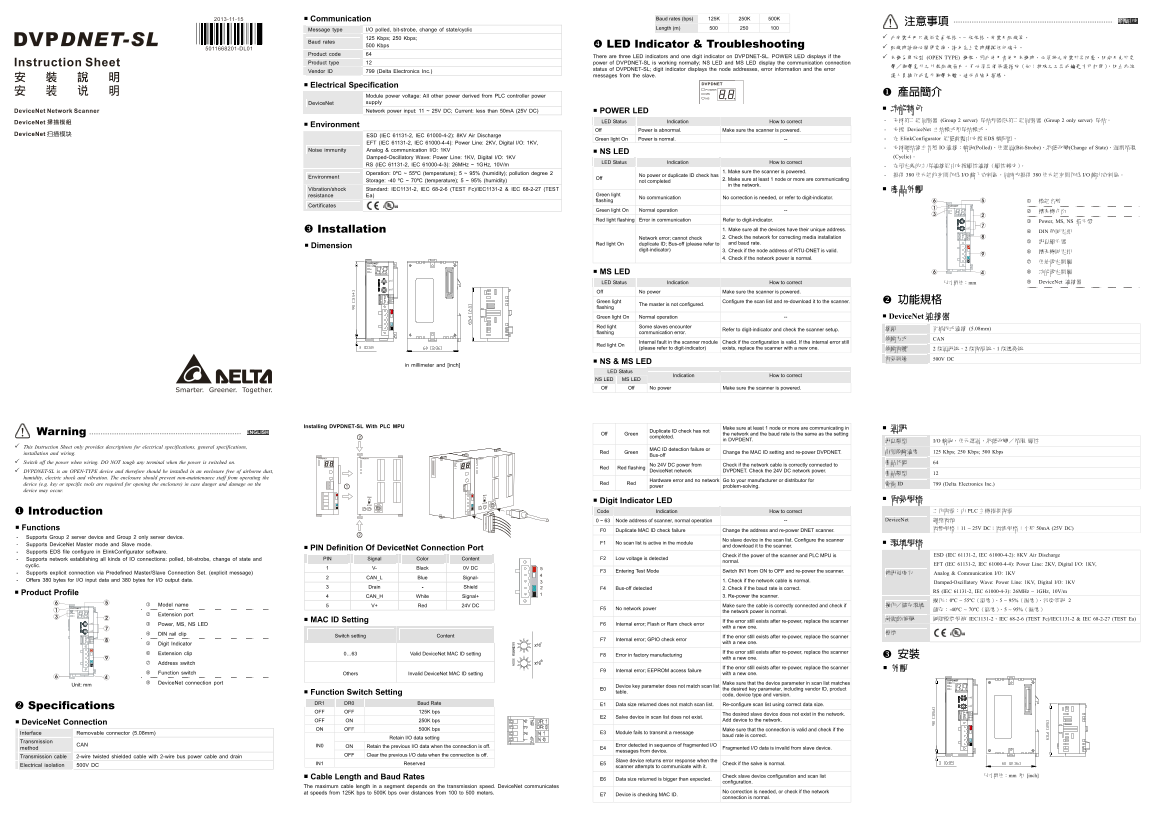
Page 1 Text Content
Communication Baud rates (bps) 125K 250K 500K 繁體中文 Message type I/O polled, bit-strobe, change of state/cyclic Length (m) 500 250 100 注意事項
125 Kbps; 250 Kbps; 此安裝手冊只提供電氣規格、一般規格、安裝及配線等。
Baud rates
500 Kbps LED Indicator & Troubleshooting 配線時請務必關閉電源,請勿在上電時觸摸任何端子。
Product code 64
There are three LED indicators and one digit indicator on DVPDNET-SL. POWER LED displays if the 本機為開放型 (OPEN TYPE) 機殼,因此使用者使用本機時,必須將之安裝於具防塵、防潮及免於電
Product type 12 power of DVPDNET-SL is working normally; NS LED and MS LED display the communication connection
status of DVPDNET-SL; digit indicator displays the node addresses, error information and the error
Vendor ID 799 (Delta Electronics Inc.)
messages from the slave. 護人員操作或意外衝擊本體,造成危險及損壞。
DVPDNET
Electrical Specification
POWER
MS 產品簡介
Module power voltage: All other power derived from PLC controller power NS supply Device Net
Network power input: 11 ~ 25V DC; Current: less than 50m A (25V DC) 功能特色
POWER LED
LED Status Indication How to correct - 支持第二組伺服器 (Group 2 server) 從站和僅限第二組伺服器 (Group 2 only server) 從站。
Environment
Off Power is abnormal. Make sure the scanner is powered. - 支援 Device Net 主站模式和從站模式。
ESD (IEC 61131-2, IEC 61000-4-2): 8KV Air Discharge
Green light On Power is normal. -- - 在 Elink Configurator 組態軟體中支援 EDS 檔配置。
EFT (IEC 61131-2, IEC 61000-4-4): Power Line: 2KV, Digital I/O: 1KV,
- 支持網站建立各種 IO 連接:輪詢(Polled)、位選通(Bit-Strobe)、狀態改變(Change of State)、週期循環
Noise immunity Analog & communication I/O: 1KV
NS LED
Damped-Oscillatory Wave: Power Line: 1KV, Digital I/O: 1KV (Cyclic)。
LED Status Indication How to correct
RS (IEC 61131-2, IEC 61000-4-3): 26MHz ~ 1GHz, 10V/m - 在預定義的主/從連接組中支援顯性連接(顯性報文)。
Operation: 0ºC ~ 55ºC (temperature); 5 ~ 95% (humidity); pollution degree 2 1. Make sure the scanner is powered.
Environment Off No power or duplicate ID check has
Storage: -40 ºC ~ 70ºC (temperature); 5 ~ 95% (humidity) 2. Make sure at least 1 node or more are communicating
not completed
in the network.
Vibration/shock Standard: IEC1131-2, IEC 68-2-6 (TEST Fc)/IEC1131-2 & IEC 68-2-27 (TEST 產品外觀
resistance Ea) Green light flashing No communication No correction is needed, or refer to digit-indicator. 1 模組名稱
Certificates
Green light On Normal operation -- 2 擴充機介面 Red light flashing Error in communication Refer to digit-indicator. 3 Power, MS, NS 指示燈
Installation 1. Make sure all the devices have their unique address. 4 DIN 軌固定扣 Network error; cannot check 2. Check the network for correcting media installation
and baud rate. 5 訊息顯示器
Red light On duplicate ID; Bus-off (please refer to
Dimension
digit-indicator) 3. Check if the node address of RTU-DNET is valid. 6 擴充機固定扣
4. Check if the network power is normal.
DVPDNET 7 位址設定開關
NS MS LED 8 功能設定開關
LED Status Indication How to correct 尺寸單位:mm 9 Device Net 連接器
Off No power Make sure the scanner is powered.
IN 1 Green light 功能規格 IN 0
flashing The master is not configured. Configure the scan list and re-download it to the scanner. Green light On Normal operation -- Device Net 連接器 Red light Some slaves encounter
接頭 可插拔式連接 (5.08mm)
flashing communication error. Refer to digit-indicator and check the scanner setup.
傳輸方式 CAN
Check if the configuration is valid. If the internal error still
Red light On Internal fault in the scanner module
(please refer to digit-indicator) exists, replace the scanner with a new one. 傳輸電纜 2 條通訊線、2 條電源線、1 條遮蔽線
電氣絕緣 500V DC
NS & MS LED
in millimeter and [inch]
LED Status
Indication How to correct
NS LED MS LED Off Off No power Make sure the scanner is powered.
Installing DVPDNET-SL With PLC MPU Make sure at least 1 node or more are communicating in
ENGLISH Off Green Duplicate ID check has not the network and the baud rate is the same as the setting
Warning completed.
in DVPDENT. 訊息類型 I/O 輪詢,位元選通,狀態改變/循環 顯性
This Instruction Sheet only provides descriptions for electrical specifications, general specifications,
installation and wiring. Red Green MAC ID detection failure or 串列傳輸速度 125 Kbps; 250 Kbps; 500 Kbps
Bus-off Change the MAC ID setting and re-power DVPDNET.
DVPDNET DVP28SV
Switch off the power when wiring. DO NOT tough any terminal when the power is switched on. 產品代碼 64
Check if the network cable is correctly connected to
Red Red flashing No 24V DC power from
DVPDNET-SL is an OPEN-TYPE device and therefore should be installed in an enclosure free of airborne dust, Device Net network DVPDNET. Check the 24V DC network power.
humidity, electric shock and vibration. The enclosure should prevent non-maintenance staff from operating the
Go to your manufacturer or distributor for
device (e.g. key or specific tools are required for opening the enclosure) in case danger and damage on the Red Red Hardware error and no network 廠商 ID 799 (Delta Electronics Inc.)
power problem-solving.
device may occur.
Digit Indicator LED 電氣規格
Introduction Code Indication How to correct 工作電源:由 PLC 主機提供電源
0 ~ 63 Node address of scanner, normal operation -- Device Net 網路電源
Functions 電壓規格:11 ~ 25V DC;電流規格:小於 50m A (25V DC)
F0 Duplicate MAC ID check failure Change the address and re-power DNET scanner.
- Supports Group 2 server device and Group 2 only server device.
- Supports Device Net Master mode and Slave mode. F1 No scan list is active in the module No slave device in the scan list. Configure the scanner 環境規格
and download it to the scanner.
PIN Definition Of Devicet Net Connection Port
- Supports EDS file configure in Elink Configurator software.
ESD (IEC 61131-2, IEC 61000-4-2): 8KV Air Discharge
- Supports network establishing all kinds of IO connections: polled, bit-strobe, change of state and PIN Signal Color Content F2 Low voltage is detected Check if the power of the scanner and PLC MPU is
normal.
cyclic. EFT (IEC 61131-2, IEC 61000-4-4): Power Line: 2KV, Digital I/O: 1KV,
1 V- Black 0V DC
- Supports explicit connection via Predefined Master/Slave Connection Set. (explicit message) F3 Entering Test Mode Switch IN1 from ON to OFF and re-power the scanner. 雜訊免疫力
Analog & Communication I/O: 1KV
2 CAN_L Blue Signal-
- Offers 380 bytes for I/O input data and 380 bytes for I/O output data. 1. Check if the network cable is normal.
Damped-Oscillatory Wave: Power Line: 1KV, Digital I/O: 1KV
3 Drain - Shield F4 Bus-off detected 2. Check if the baud rate is correct.
RS (IEC 61131-2, IEC 61000-4-3): 26MHz ~ 1GHz, 10V/m
Product Profile
4 CAN_H White Signal+ 3. Re-power the scanner.
1 Model name 5 V+ Red 24V DC 操作/儲存環境
F5 No network power Make sure the cable is correctly connected and check if 儲存:-40ºC ~ 70ºC(溫度)、5 ~ 95%(濕度)
the network power is normal.
2 Extension port
MAC ID Setting 耐震動/衝擊 國際標準規範 IEC1131-2、IEC 68-2-6 (TEST Fc)/IEC1131-2 & IEC 68-2-27 (TEST Ea)
3 Power, MS, NS LED F6 Internal error; Flash or Ram check error If the error still exists after re-power, replace the scanner
with a new one.
4 DIN rail clip 標準
Switch setting Content
F7 Internal error; GPIO check error If the error still exists after re-power, replace the scanner
5 Digit Indicator with a new one.
6 Extension clip 0…63 Valid Device Net MAC ID setting F8 Error in factory manufacturing If the error still exists after re-power, replace the scanner
with a new one. 安裝
7 Address switch
F9 Internal error; EEPROM access failure If the error still exists after re-power, replace the scanner 外觀
8 Function switch Others Invalid Device Net MAC ID setting with a new one.
DVPDNET
Unit: mm 9 Device Net connection port Make sure that the device parameter in scan list matches
E0 Device key parameter does not match scan list the desired key parameter, including vendor ID, product NS
Function Switch Setting table.
code, device type and version. x10
DR1 DR0 Baud Rate E1 Data size returned does not match scan list. Re-configure scan list using correct data size.
Specifications x10
OFF OFF 125K bps DR
E2 Salve device in scan list does not exist. The desired slave device does not exist in the network. IN
OFF ON 250K bps Add device to the network.
Device Net Connection
ON OFF 500K bps
Interface Removable connector (5.08mm) E3 Module fails to transmit a message Make sure that the connection is valid and check if the
baud rate is correct.
Retain I/O data setting
Transmission
method CAN ON Retain the previous I/O data when the connection is off. IN0 E4 Error detected in sequence of fragmented I/O
messages from device. Fragmented I/O data is invalid from slave device.
Transmission cable 2-wire twisted shielded cable with 2-wire bus power cable and drain OFF Clear the previous I/O data when the connection is off.
Electrical isolation 500V DC IN1 Reserved E5 Slave device returns error response when the
scanner attempts to communicate with it. Check if the salve is normal.
尺寸單位:mm 和 [inch]
Cable Length and Baud Rates E6 Data size returned is bigger than expected. Check slave device configuration and scan list
configuration.
The maximum cable length in a segment depends on the transmission speed. Device Net communicates at speeds from 125K bps to 500K bps over distances from 100 to 500 meters. E7 Device is checking MAC ID. No correction is needed, or check if the network
connection is normal.
Page Summary Contents For Delta Industrial Automation Industrial Network Solution DVPDNET-SL DeviceNet Scan Module Installation Manual
Manual Details
| Brand | Delta |
|---|---|
| Pages | 2 |
| File Size | 870.30 KB |
| Published | June 06, 2026 |
Enter the captcha to get the download link:

Frequently Asked Questions
DVPDNET-SL 设备需要安装在什么环境?
作为开放型设备,必须安装于防尘、防潮并免受电击/冲击的机柜内。
如果POWER LED是闪烁的,表示系统处于什么状态?
Power abnormal,说明电源工作异常,需要确保扫描仪已通电。
如何确认网络中设备地址是否唯一?
所有连接的设备必须拥有唯一的地址(Unique ID)。
什么是最高通讯速率和距离限制?
在125 Kbps时,最大通信距离为 500m;在500 Kbps时,最大通信距离为 125m。