Dell XPS Dimension XPS Quick User Guide
Summary
Setup guide for Dell Dimension desktop computers covering initial hardware setup including keyboard, mouse, monitor, modem, and network connections. It includes diagrams of front and rear panel connectors, USB ports, audio jacks, and references to Dell support resources. Target users are end users and consumers performing initial setup of Dell Dimension desktop systems.
Page 1 Text Content
D0944a01.qxd 6/24/2003 8:26 AM Page 1
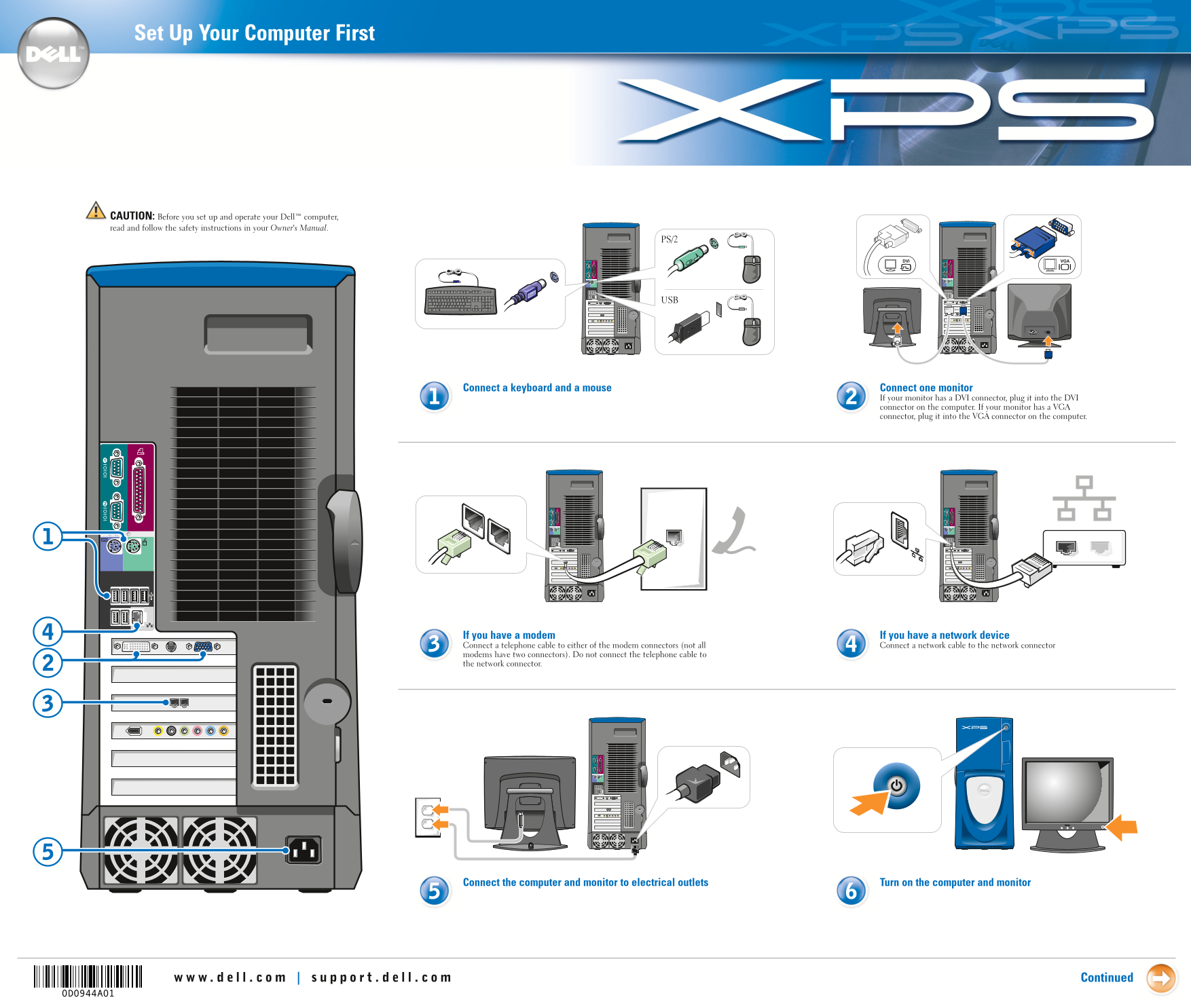
Set Up Your Computer First
CAUTION: Before you set up and operate your Dell™ computer, read and follow the safety instructions in your Owner's Manual.
Connect a keyboard and a mouse Connect one monitor
If your monitor has a DVI connector, plug it into the DVI connector on the computer. If your monitor has a VGA connector, plug it into the VGA connector on the computer.
If you have a modem If you have a network device Connect a telephone cable to either of the modem connectors (not all Connect a network cable to the network connector modems have two connectors). Do not connect the telephone cable to the network connector.
Connect the computer and monitor to electrical outlets Turn on the computer and monitor
Continued
Page Summary Contents For Dell XPS Dimension XPS Quick User Guide
Manual Details
| Brand | Dell |
|---|---|
| Pages | 2 |
| File Size | 1.22 MB |
| Published | June 27, 2026 |
Enter the captcha to get the download link:

Frequently Asked Questions
What connections do I use for a monitor?
Use the DVI or VGA connector depending on what your monitor has.
How should I connect networking cables to the computer?
Connect a network cable to one of the available network connectors and attach a telephone cable to a modem connector, but never cross connection types.
Where can I find help or troubleshooting information?
You can consult your Owner's Manual, the Dell Solution Center icon, or visit support.dell.com.