Dell XPS 15 9530 Quick User Guide
Summary
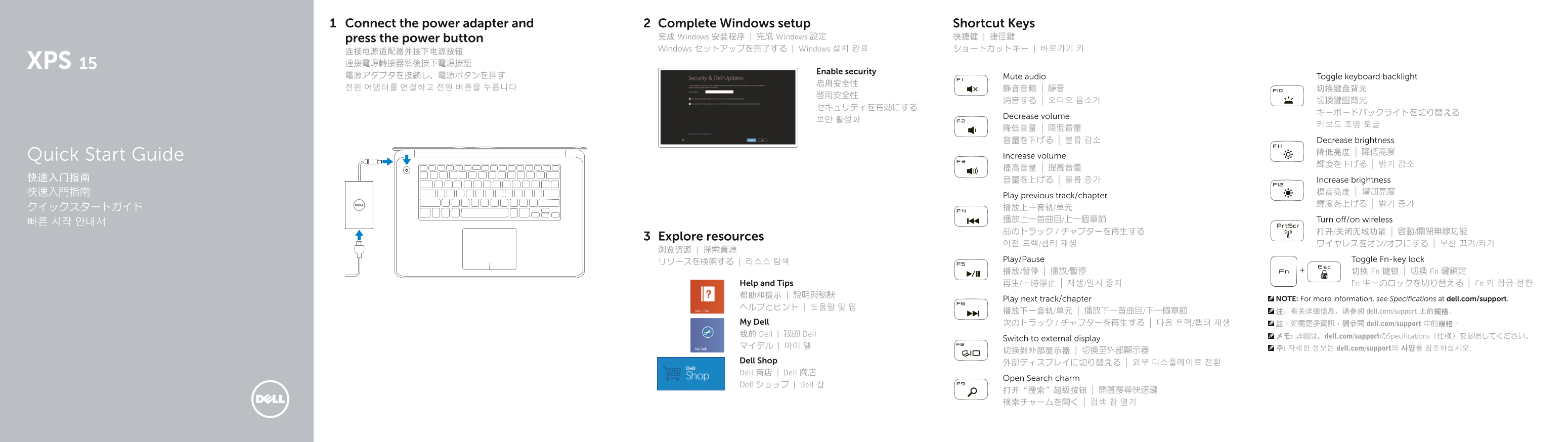
This Quick Start Guide for a Dell notebook provides multilingual setup instructions covering power adapter connection, Windows setup, and security configuration. It includes a comprehensive shortcut key reference for audio controls, keyboard backlight toggling, display brightness adjustment, media playback controls, wireless toggling, Fn-key lock, and external display switching. Also features a hardware diagram and information on My Dell, Dell Shop, and product support resources. Designed for new laptop owners.
Page 1 Text Content
Connect the power adapter and Complete Windows setup Shortcut Keys
press the power button 完成 Windows 安装程序 | 完成 Windows 設定 快捷键 | 捷徑鍵 Windows セットアップを完了する | Windows 설치 완료 ショートカットキー | 바로가기 키
Enable security
電源アダプタを接続し、電源ボタンを押す Mute audio Toggle keyboard backlight
Decrease volume
降低音量 | 降低音量 音量を下げる | 볼륨 감소 Decrease brightness
Quick Start Guide Increase volume
快速入门指南 音量を上げる | 볼륨 증가 Increase brightness
Play previous track/chapter
クイックスタートガイド 播放上一音轨/单元 播放上一首曲目/上一個章節 Turn off/on wireless
Explore resources
Play/Pause Toggle Fn-key lock
播放/暂停 | 播放/暫停 切换 Fn 键锁 | 切換 Fn 鍵鎖定
Help and Tips 再生/一時停止 | 재생/일시 중지 Fn キーのロックを切り替える | Fn 키 잠금 전환 帮助和提示 | 說明與秘訣
Play next track/chapter NOTE: For more information, see Specifications at dell.com/support.
播放下一音轨/单元 | 播放下一首曲目/下一個章節 注:有关详细信息,请参阅 dell.com/support 上的规格。
My Dell 次のトラック / チャプターを再生する | 다음 트랙/챕터 재생 註:如需更多資訊,請參閱 dell.com/support 中的規格。 我的 Dell | 我的 Dell メモ: 詳細は、dell.com/supportのSpecifications(仕様)を参照してください。
Switch to external display
マイデル | 마이 델 주: 자세한 정보는 dell.com/support의 사양을 참조하십시오.
Dell Shop 外部ディスプレイに切り替える | 외부 디스플레이로 전환 Dell 商店 | Dell 商店
Open Search charm
Dell ショップ | Dell 샵
Page Summary Contents For Dell XPS 15 9530 Quick User Guide
Manual Details
| Brand | Dell |
|---|---|
| Pages | 2 |
| File Size | 1.03 MB |
| Published | July 01, 2026 |
Enter the captcha to get the download link:

Frequently Asked Questions
How do I power on the laptop?
Connect the power adapter and press the main power button.
Which ports can I use to connect an external display?
The device includes both Mini DisplayPort and HDMI ports for connecting to external monitors.
How can I adjust the screen brightness or volume?
Use the dedicated function keys to increase/decrease brightness, or designated keys to manage audio volume.