Dell XPS 18 1820 Quick User Guide
Summary
Dell XPS 18 portable all-in-one Quick Start Guide (2014) with multilingual setup covering keyboard/mouse, power adapter, Windows setup, security updates, network connection, SD card insertion, basic/powered stand options, and front/back features including microphones, camera, and USB 3.0 ports.
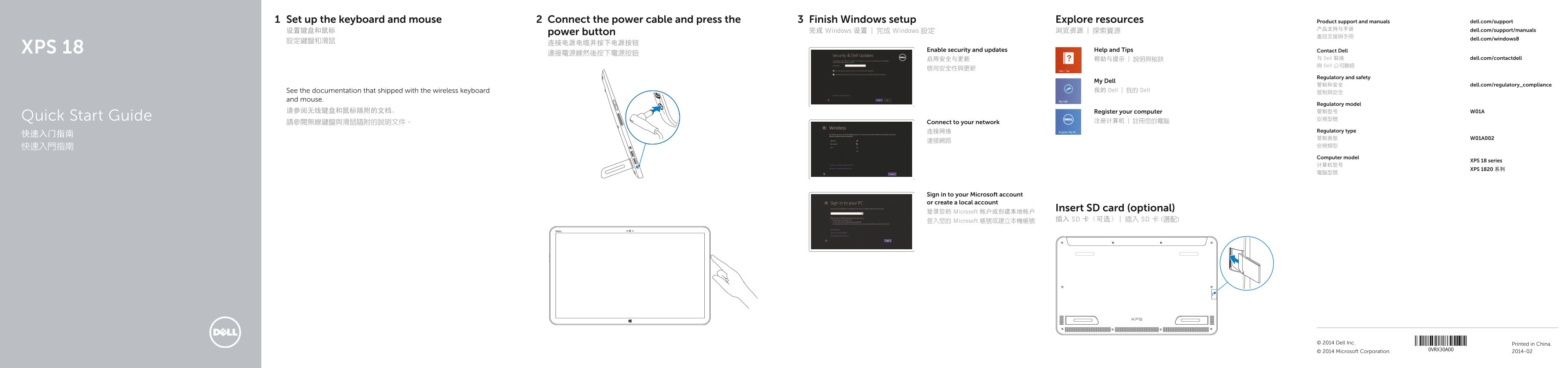
Page 1 Text Content
Set up the keyboard and mouse Connect the power cable and press the Finish Windows setup Explore resources Product support and manuals dell.com/support
产品支持与手册 dell.com/support/manuals
设置键盘和鼠标 power button 完成 Windows 设置 | 完成 Windows 設定 浏览资源 | 探索資源
dell.com/windows8
XPS 18 Enable security and updates Help and Tips Contact Dell
启用安全与更新 帮助与提示 | 說明與秘訣 与 Dell 联络 dell.com/contactdell 與 Dell 公司聯絡
Regulatory and safety
My Dell
管制和安全 dell.com/regulatory_compliance
See the documentation that shipped with the wireless keyboard 我的 Dell | 我的 Dell
and mouse.
Regulatory model
请参阅无线键盘和鼠标随附的文档。 Register your computer 管制型号 W01A
Quick Start Guide 安規型號
請參閱無線鍵盤與滑鼠隨附的說明文件。 Connect to your network 注册计算机 | 註冊您的電腦
连接网络 Regulatory type
快速入門指南 安規類型 Computer model
XPS 18 series
XPS 1820 系列
Sign in to your Microsoft account or create a local account
Insert SD card (optional)
登录您的 Microsoft 帐户或创建本地帐户
登入您的 Microsoft 帳號或建立本機帳號 插入 SD 卡(可选) | 插入 SD 卡 (選配)
Printed in China.© 2014 Dell Inc. © 2014 Microsoft Corporation. 2014-02
Page Summary Contents For Dell XPS 18 1820 Quick User Guide
Manual Details
| Brand | Dell |
|---|---|
| Pages | 2 |
| File Size | 281.37 KB |
| Published | July 03, 2026 |
Enter the captcha to get the download link:

Frequently Asked Questions
Is there an optional powered stand available?
Yes, a Powered stand is described as functional component (optional).
What indicators are visible on the docking-status?
The docking-status light on the powered stand turns on when your computer is correctly seated.