Dell XPS 12 9Q23 Quick Start Guide
Summary
Quick Start Guide for a Dell 2-in-1 convertible laptop with tablet transformation capability. Multi-language document covering tablet conversion steps, computer features including digital array microphones, camera with status light, ambient-light sensor, Windows button, screen rotation lock, volume controls, backlit keyboard, USB 3.0 with PowerShare, mini-DisplayPort, and five battery status lights. Includes Mexican NOM regulatory information.
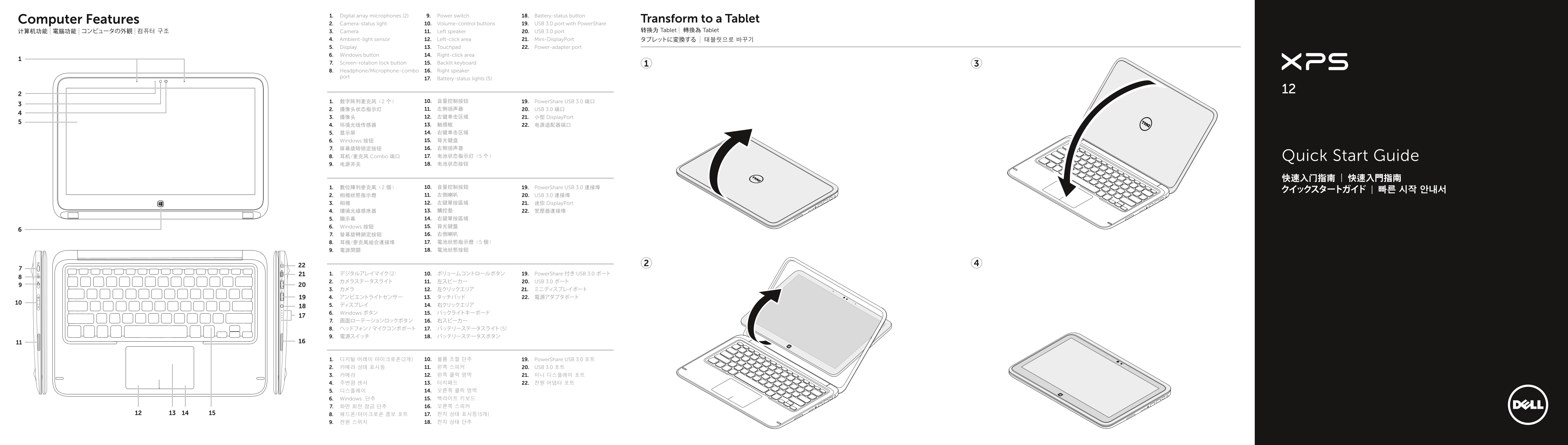
Page 1 Text Content
1. Digital array microphones (2) 9. Power switch 18. Battery-status button
Computer Features Transform to a Tablet
2. Camera-status light 10. Volume-control buttons 19. USB 3.0 port with Power Share
计算机功能 | 電腦功能 | コンピュータの外観 | 컴퓨터 구조 3. Camera 11. Left speaker 20. USB 3.0 port 转换为 Tablet | 轉換為 Tablet
4. Ambient-light sensor 12. Left-click area 21. Mini-Display Port タブレットに変換する | 태블릿으로 바꾸기 5. Display 13. Touchpad 22. Power-adapter port 6. Windows button 14. Right-click area 7. Screen-rotation lock button 15. Backlit keyboard 8. Headphone/Microphone-combo 16. Right speaker port
17. Battery-status lights (5)
1. 数字阵列麦克风(2 个) 10. 音量控制按钮 19. Power Share USB 3.0 端口 2. 摄像头状态指示灯 11. 左侧扬声器 20. USB 3.0 端口 3. 摄像头 12. 左键单击区域 21. 小型 Display Port 4. 环境光线传感器 13. 触摸板 22. 电源适配器端口 5. 显示屏 14. 右键单击区域 6. Windows 按钮 15. 背光键盘 7. 屏幕旋转锁定按钮 16. 右侧扬声器 8. 耳机/麦克风 Combo 端口 17. 电池状态指示灯(5 个) Quick Start Guide 9. 电源开关 18. 电池状态按钮
1. 數位陣列麥克風(2 個) 10. 音量控制按鈕 19. Power Share USB 3.0 連接埠
2. 相機狀態指示燈 11. 左側喇叭 20. USB 3.0 連接埠 3. 相機 12. 左鍵單按區域 21. 迷你 Display Port 4. 環境光線感應器 13. 觸控墊 22. 變壓器連接埠 5. 顯示幕 14. 右鍵單按區域 6. Windows 按鈕 15. 背光鍵盤 7. 螢幕旋轉鎖定按鈕 16. 右側喇叭 8. 耳機/麥克風組合連接埠 17. 電池狀態指示燈(5 個) 9. 電源開關 18. 電池狀態按鈕
1. デジタルアレイマイク(2) 10. ボリュームコントロールボタン 19. Power Share 付き USB 3.0 ポート 2. カメラステータスライト 11. 左スピーカー 20. USB 3.0 ポート
5. ディスプレイ 14. 右クリックエリア 6. Windows ボタン 15. バックライトキーボード 7. 画面ローテーションロックボタン 16. 右スピーカー 8. ヘッドフォン / マイクコンボポート 17. バッテリーステータスライト(5) 9. 電源スイッチ 18. バッテリーステータスボタン
1. 디지털 어레이 마이크로폰(2개) 10. 볼륨 조절 단추 19. Power Share USB 3.0 포트 2. 카메라 상태 표시등 11. 왼쪽 스피커 20. USB 3.0 포트 3. 카메라 12. 왼쪽 클릭 영역 21. 미니 디스플레이 포트 4. 주변광 센서 13. 터치패드 22. 전원 어댑터 포트 5. 디스플레이 14. 오른쪽 클릭 영역 6. Windows 단추 15. 백라이트 키보드 7. 화면 회전 잠금 단추 16. 오른쪽 스피커 8. 헤드폰/마이크로폰 콤보 포트 17. 전지 상태 표시등(5개) 9. 전원 스위치 18. 전지 상태 단추
Page Summary Contents For Dell XPS 12 9Q23 Quick Start Guide
Manual Details
| Brand | Dell |
|---|---|
| Pages | 2 |
| File Size | 1.47 MB |
| Published | July 03, 2026 |
Enter the captcha to get the download link:

Frequently Asked Questions
How do I connect the power source?
Connect the power adapter to the device and plug it into a compatible wall outlet.
What is contained in the Headphone/Microphone-combo port?
This port combines both headphone and microphone functions.
Where can I find technical support?
For sales, technical support, or customer service issues, visit dell.com/ContactDell.
How do I manage brightness settings?
You can increase or decrease the brightness by swiping right from the display's edge or pointing at the relevant corner.