Dell XPS 13 9333 Quick Start Guide
Summary
This Quick Start Guide for the Dell XPS 13 ultrabook (Model XPS-13-9333, Regulatory Model P29G, Type P29G003) provides multilingual setup instructions covering power adapter connection, Windows 7 and Windows 8 operating system configuration, security and update settings, and network connectivity. It documents premium hardware features including ambient light sensor, camera, dual digital microphones, mini DisplayPort, and USB 3.0 with PowerShare. Keyboard shortcut keys, keyboard backlight toggle, and Dell Help Documentation access are included. Designed for premium ultrabook users.
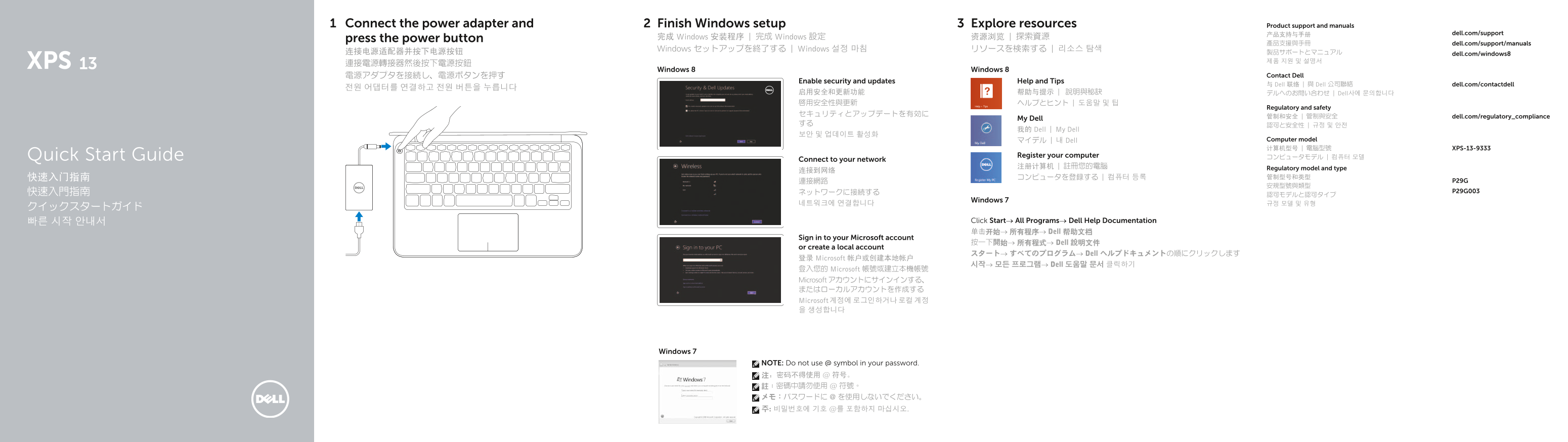
Page 1 Text Content
Connect the power adapter and Finish Windows setup Explore resources Product support and manuals
产品支持与手册 dell.com/support
press the power button 完成 Windows 安装程序 | 完成 Windows 設定 资源浏览 | 探索資源
產品支援與手冊 dell.com/support/manuals
Windows セットアップを終了する | Windows 설정 마침 リソースを検索する | 리소스 탐색
连接电源适配器并按下电源按钮 製品サポートとマニュアル dell.com/windows8
Windows 8 Windows 8
電源アダプタを接続し、電源ボタンを押す Contact Dell
Enable security and updates Help and Tips
与 Dell 联络 | 與 Dell 公司聯絡 dell.com/contactdell
启用安全和更新功能 帮助与提示 | 說明與秘訣 デルへのお問い合わせ | Dell사에 문의합니다 啟用安全性與更新 ヘルプとヒント | 도움말 및 팁
Regulatory and safety
管制和安全 | 管制與安全 dell.com/regulatory_compliance
My Dell
我的 Dell | My Dell
マイデル | 내 Dell Computer model 计算机型号 | 電腦型號 XPS-13-9333
Quick Start Guide Register your computer コンピュータモデル | 컴퓨터 모델
Connect to your network
注册计算机 | 註冊您的電腦 Regulatory model and type
Windows 7
빠른 시작 안내서 Click Start→ All Programs→ Dell Help Documentation 单击开始→ 所有程序→ Dell 帮助文档
Sign in to your Microsoft account
按一下開始→ 所有程式→ Dell 說明文件
or create a local account
スタート→ すべてのプログラム→ Dell ヘルプドキュメントの順にクリックします
登录 Microsoft 帐户或创建本地帐户
시작→ 모든 프로그램→ Dell 도움말 문서 클릭하기
登入您的 Microsoft 帳號或建立本機帳號 Microsoft アカウントにサインインする、 またはローカルアカウントを作成する Microsoft 계정에 로그인하거나 로컬 계정 을 생성합니다
Windows 7
NOTE: Do not use @ symbol in your password. 注:密码不得使用 @ 符号。 註:密碼中請勿使用 @ 符號。 メモ:パスワードに @ を使用しないでください。 주: 비밀번호에 기호 @를 포함하지 마십시오.
Page Summary Contents For Dell XPS 13 9333 Quick Start Guide
Manual Details
| Brand | Dell |
|---|---|
| Pages | 2 |
| File Size | 386.37 KB |
| Published | July 02, 2026 |
Enter the captcha to get the download link:

Frequently Asked Questions
How do I connect to a monitor that isn't standard?
Use the Mini DisplayPort (5) or one of the USB 3.0 ports with PowerShare (6).
What controls ambient lighting and volume?
The left-click area (11) is used for mute audio, while the right-click area (9) allows increasing or decreasing brightness and volume.
How can I check my battery status/power?
View the Battery-status lights (8), use the Battery-status button (7), or observe the Power-status light (10).
What is the function of the USB 3.0 port with PowerShare?
It provides enhanced power to support external devices needing more energy.