Dell Inspiron 13 7359 Quick Start Guide
Summary
This Quick Start Guide for the Dell Inspiron 13 7000 Series 2-in-1 notebook (Model P57G, Regulatory Type P57G002) provides setup instructions for both Windows and Ubuntu operating systems. It covers power adapter connection, operating system setup, network connectivity, and security configuration. Includes guidance on registering the computer, enabling Dell updates, creating Windows recovery media, and using SupportAssist for system health monitoring. Designed for home users and students seeking a versatile convertible laptop.
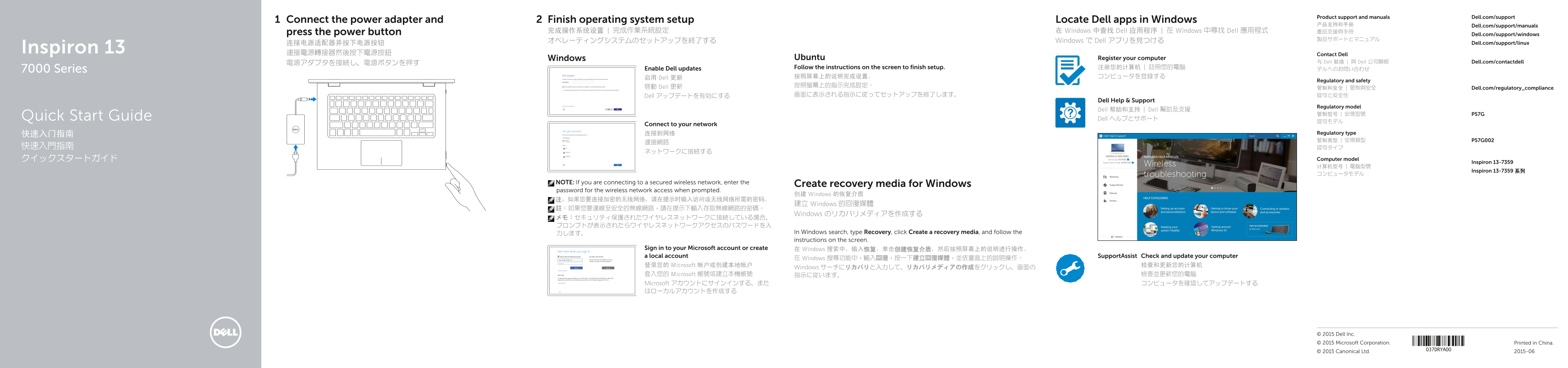
Page 1 Text Content
Product support and manuals Dell.com/support
Connect the power adapter and Finish operating system setup Locate Dell apps in Windows
产品支持和手册 Dell.com/support/manuals
press the power button 完成操作系统设置 | 完成作業系統設定 在 Windows 中查找 Dell 应用程序 | 在 Windows 中尋找 Dell 應用程式 產品支援與手冊
Dell.com/support/windows
オペレーティングシステムのセットアップを終了する Windows で Dell アプリを見つける
连接电源适配器并按下电源按钮 Dell.com/support/linux
Inspiron 13 連接電源轉接器然後按下電源按鈕
Contact Dell
Windows Ubuntu Register your computer
電源アダプタを接続し、電源ボタンを押す 与 Dell 联络 | 與 Dell 公司聯絡 Dell.com/contactdell
Enable Dell updates Follow the instructions on the screen to finish setup. 注册您的计算机 | 註冊您的電腦 デルへのお問い合わせ
7000 Series
启用 Dell 更新 按照屏幕上的说明完成设置。 コンピュータを登録する
Regulatory and safety
啟動 Dell 更新 按照螢幕上的指示完成設定。
管制和安全 | 管制與安全 Dell.com/regulatory_compliance
Dell アップデートを有効にする 画面に表示される指示に従ってセットアップを終了します。 認可と安全性
Dell Help & Support
Regulatory model
Dell 帮助和支持 | Dell 幫助及支援
Dell ヘルプとサポートQuick Start Guide
Connect to your network
快速入门指南 连接到网络 Regulatory type 管制类型 | 安規類型 P57G002
クイックスタートガイド Computer model
Inspiron 13-7359
Inspiron 13-7359 系列
NOTE: If you are connecting to a secured wireless network, enter the Create recovery media for Windows password for the wireless network access when prompted.
创建 Windows 的恢复介质
建立 Windows 的回復媒體
Windows のリカバリメディアを作成する
力します。 In Windows search, type Recovery, click Create a recovery media, and follow the instructions on the screen.
Sign in to your Microsoft account or create 在 Windows 搜索中,输入恢复,单击创建恢复介质,然后按照屏幕上的说明进行操作。 a local account Support Assist Check and update your computer
在 Windows 搜尋功能中,輸入回復,按一下建立回復媒體,並依畫面上的說明操作。
登录您的 Microsoft 帐户或创建本地帐户 检查和更新您的计算机
Windows サーチにリカバリと入力して、リカバリメディアの作成をクリックし、画面の
登入您的 Microsoft 帳號或建立本機帳號 指示に従います。 檢查並更新您的電腦 Microsoft アカウントにサインインする、また コンピュータを確認してアップデートする はローカルアカウントを作成する
© 2015 Dell Inc. © 2015 Microsoft Corporation. Printed in China.
© 2015 Canonical Ltd. 2015-06
Page Summary Contents For Dell Inspiron 13 7359 Quick Start Guide
Manual Details
| Brand | Dell |
|---|---|
| Pages | 2 |
| File Size | 1.05 MB |
| Published | July 01, 2026 |
Enter the captcha to get the download link:

Frequently Asked Questions
How do I set up the device initially?
Connect the power adapter to the unit, press the power button, and follow all subsequent on-screen setup instructions.
What must be done when connecting to a secured wireless network?
If the network is encrypted, ensure you enter the required password when prompted during connection.
How can I check for system or software updates?
Use the 'SupportAssist' feature within Windows Search function to check and update your computer.
Does this model support external monitors?
Yes, it includes an HDMI port and supports switching display output to an external screen.
What is the purpose of the ambient light sensor?
The ambient light sensor allows automatic adjustment or notification regarding surrounding lighting conditions.