Dell Inspiron M5040 Quick Start Guide
Summary
Dell Inspiron M5040/15-N5040/15-N5050 Quick Start Guide (March 2011) with multilingual setup covering power cable, network cable, and wireless activation, service tag location, Mexico NOM regulatory compliance specifications, and system features for regulatory model P18F.
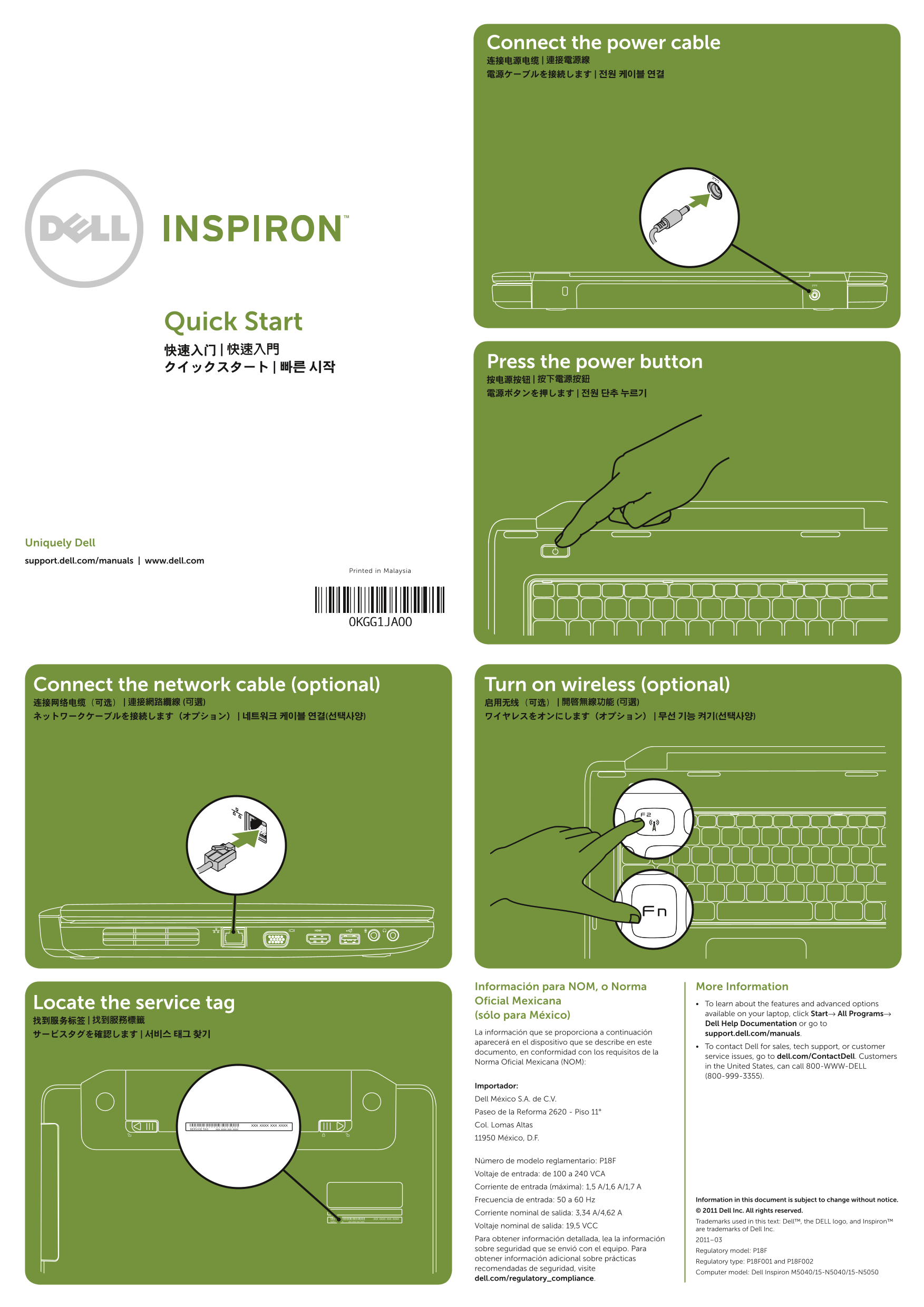
Page 1 Text Content
Connect the power cable 连接电源电缆 | 連接電源線 電源ケーブルを接続します | 전원 케이블 연결
Quick Start 快速入门 | 快速入門
Press the power button
Uniquely Dell support.dell.com/manuals | www.dell.com
Printed in Malaysia
Connect the network cable (optional) Turn on wireless (optional) 连接网络电缆(可选) | 連接網路纜線 (可選) 启用无线(可选) | 開啟無線功能 (可選) ネットワークケーブルを接続します(オプション) | 네트워크 케이블 연결(선택사양) ワイヤレスをオンにします(オプション) | 무선 기능 켜기(선택사양)
Información para NOM, o Norma More Information Locate the service tag Oficial Mexicana To learn about the features and advanced options
(sólo para México) available on your laptop, click Start→ All Programs→
Dell Help Documentation or go to
La información que se proporciona a continuación support.dell.com/manuals.
aparecerá en el dispositivo que se describe en este
To contact Dell for sales, tech support, or customer
documento, en conformidad con los requisitos de la
service issues, go to dell.com/Contact Dell. Customers
Norma Oficial Mexicana (NOM):
in the United States, can call 800-WWW-DELL (800-999-3355).
Importador: Dell México S.A. de C.V. Paseo de la Reforma 2620 - Piso 11° Col. Lomas Altas 11950 México, D.F.
Número de modelo reglamentario: P18F Voltaje de entrada: de 100 a 240 VCA Corriente de entrada (máxima): 1,5 A/1,6 A/1,7 A
Frecuencia de entrada: 50 a 60 Hz Information in this document is subject to change without notice. © 2011 Dell Inc. All rights reserved.
Corriente nominal de salida: 3,34 A/4,62 A
Trademarks used in this text: Dell™, the DELL logo, and Inspiron™
Voltaje nominal de salida: 19,5 VCC
are trademarks of Dell Inc.
Para obtener información detallada, lea la información 2011–03 sobre seguridad que se envió con el equipo. Para Regulatory model: P18F obtener información adicional sobre prácticas
Regulatory type: P18F001 and P18F002
recomendadas de seguridad, visite
Computer model: Dell Inspiron M5040/15-N5040/15-N5050
dell.com/regulatory_compliance.
Page Summary Contents For Dell Inspiron M5040 Quick Start Guide
Manual Details
| Brand | Dell |
|---|---|
| Pages | 2 |
| File Size | 493.02 KB |
| Published | July 03, 2026 |
Enter the captcha to get the download link:

Frequently Asked Questions
Which components are available on the laptop?
The listed components include connectors for VGA, HDMI, USB 2.0, audio input/microphone, and a security cable slot.
What is the voltage range for this device?
The input voltage ranges from 100 to 240 VCA, with a frequency of 50 to 60 Hz.
How do I get technical support or sales information?
For Dell service issues, visit dell.com/ContactDell. US customers can call 800-WWW-DELL (800-999-3355).
Does the unit have wireless connectivity options?
Yes, users can optionally turn on wireless functionality and there is a dedicated wireless status light to indicate its state.