Dell Inspiron 14 5445 Quick Start Guide
Summary
Quick start guide for the Dell Inspiron 14 5000 Series laptop covering power adapter connection, Windows setup, and keyboard shortcut keys including Fn-key lock toggle, keyboard backlight, display brightness, wireless toggle, audio controls, and media playback functions. Details hardware features including dual microphones, camera with status indicator, USB 3.0 ports, HDMI, network port, media card reader, headset port, and security cable slot. Multilingual instructions in English, Chinese simpl
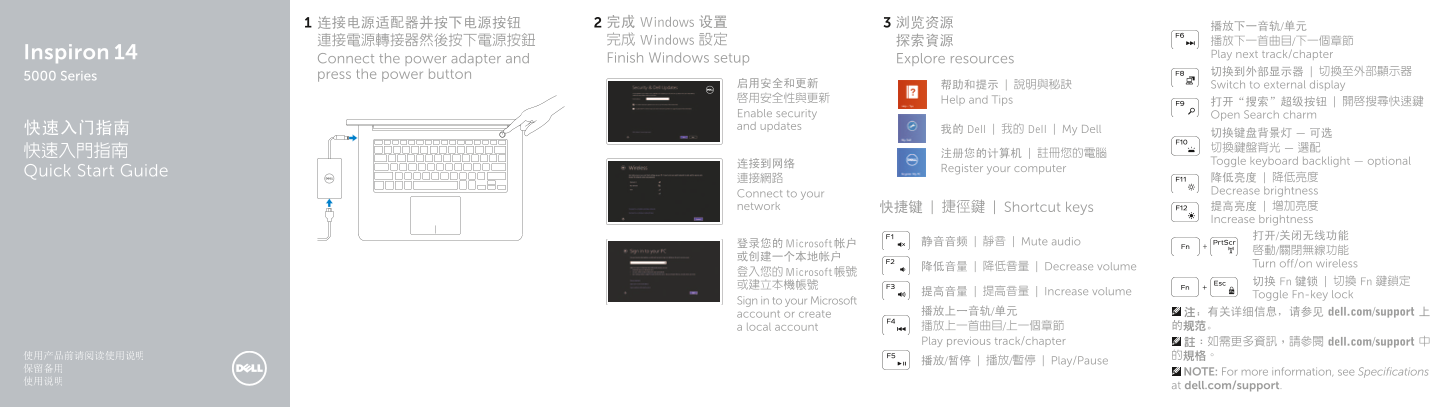
Page 1 Text Content
连接电源适配器并按下电源按钮 完成 Windows 设置 浏览资源
連接電源轉接器然後按下電源按鈕 完成 Windows 設定 探索資源 播放下一首曲目/下一個章節
Inspiron Play next track/chapter
Connect the power adapter and Finish Windows setup Explore resources
press the power button 切换到外部显示器 | 切換至外部顯示器
5000 Series
启用安全和更新 帮助和提示 | 說明與秘訣 Switch to external display 啟用安全性與更新 Help and Tips
Enable security Open Search charm 快速入门指南 and updates
我的 Dell | 我的 Dell | My Dell
连接到网络 Toggle keyboard backlight — optional
Quick Start Guide Register your computer
連接網路 降低亮度 | 降低亮度 Connect to your Decrease brightness
network 快捷键 | 捷徑鍵 | Shortcut keys 提高亮度 | 增加亮度
Increase brightness 打开/关闭无线功能
登录您的 Microsoft 帐户 静音音频 | 靜音 | Mute audio
Turn off/on wireless
降低音量 | 降低音量 | Decrease volume
登入您的 Microsoft 帳號
切换 Fn 键锁 | 切換 Fn 鍵鎖定
提高音量 | 提高音量 | Increase volume
Toggle Fn-key lock
Sign in to your Microsoft
account or create 播放上一音轨/单元 注:有关详细信息,请参见 dell.com/support 上
a local account 播放上一首曲目/上一個章節 的规范。
Play previous track/chapter 註:如需更多資訊,請參閱 dell.com/support 中
播放/暂停 | 播放/暫停 | Play/Pause
NOTE: For more information, see Specifications at dell.com/support.
Page Summary Contents For Dell Inspiron 14 5445 Quick Start Guide
Manual Details
| Brand | Dell |
|---|---|
| Pages | 2 |
| File Size | 232.52 KB |
| Published | June 17, 2026 |
Enter the captcha to get the download link:
