Dell Inspiron 620 Quick Start Guide
Summary
Quick Start guide for the Dell Inspiron 620 desktop computer (Regulatory Model D11M, 2011). Multi-language document covering display connection via VGA, DVI, or HDMI cable/adapter combinations, keyboard and mouse setup, network cable connection, and power-on procedures. Details front and back panel views including media card reader, optical drive bays, USB connectors, audio ports, and expansion slots.
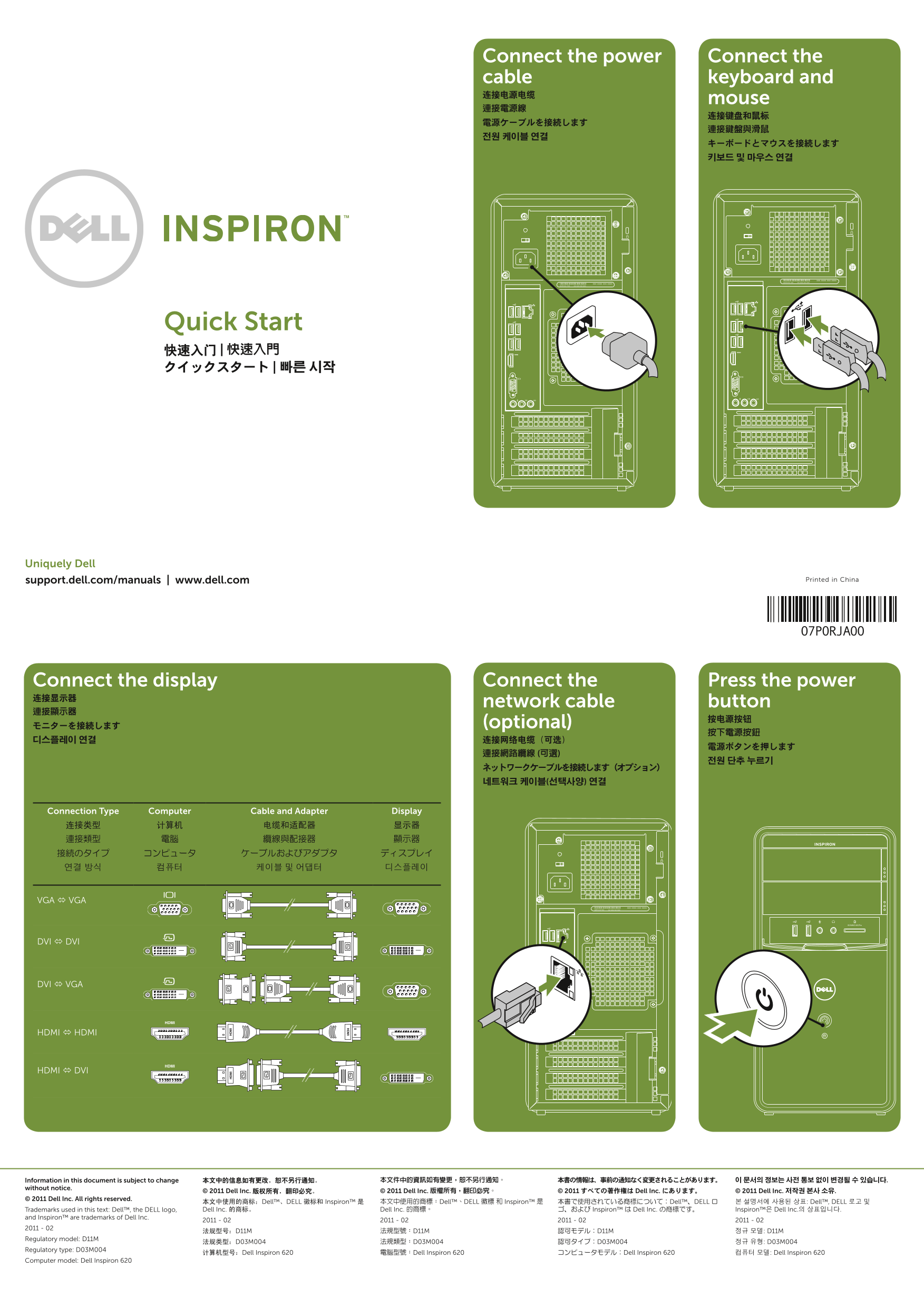
Page 1 Text Content
Connect the power Connect the cable keyboard and 连接电源电缆
mouse
Quick Start 快速入门 | 快速入門 クイックスタート | 빠른 시작
Uniquely Dell
support.dell.com/manuals | www.dell.com Printed in China
Connect the display Connect the Press the power 连接显示器
network cable button
モニターを接続します (optional)
Connection Type Computer Cable and Adapter Display 连接类型 计算机 电缆和适配器 显示器 連接類型 電腦 纜線與配接器 顯示器 接続のタイプ コンピュータ ケーブルおよびアダプタ ディスプレイ 연결 방식 컴퓨터 케이블 및 어댑터 디스플레이
VGA VGA
DVI DVI
DVI VGA
HDMI HDMI
HDMI DVI
Information in this document is subject to change 本文中的信息如有更改,恕不另行通知。 本文件中的資訊如有變更,恕不另行通知。 本書の情報は、事前の通知なく変更されることがあります。 이 문서의 정보는 사전 통보 없이 변경될 수 있습니다.
without notice.
© 2011 Dell Inc. 版权所有,翻印必究。 © 2011 Dell Inc. 版權所有,翻印必究。 © 2011 すべての著作権は Dell Inc. にあります。 © 2011 Dell Inc. 저작권 본사 소유.
© 2011 Dell Inc. All rights reserved.
本文中使用的商标:Dell™、DELL 徽标和 Inspiron™ 是 本文中使用的商標:Dell™、DELL 徽標 和 Inspiron™ 是 本書で使用されている商標について:Dell™、DELL ロ 본 설명서에 사용된 상표: Dell™, DELL 로고 및 Trademarks used in this text: Dell™, the DELL logo, Dell Inc. 的商标。 Dell Inc. 的商標。 ゴ、および Inspiron™ は Dell Inc. の商標です。 Inspiron™은 Dell Inc.의 상표입니다.
and Inspiron™ are trademarks of Dell Inc.
Regulatory model: D11M
Regulatory type: D03M004
计算机型号:Dell Inspiron 620 電腦型號:Dell Inspiron 620 コンピュータモデル:Dell Inspiron 620 컴퓨터 모델: Dell Inspiron 620
Computer model: Dell Inspiron 620
Page Summary Contents For Dell Inspiron 620 Quick Start Guide
Manual Details
| Brand | Dell |
|---|---|
| Pages | 2 |
| File Size | 1.13 MB |
| Published | July 02, 2026 |
Enter the captcha to get the download link:

Frequently Asked Questions
How do I connect the display?
Connect the display using available cable types such as VGA, DVI, HDMI, or a combination like DVI to VGA.
What peripherals can be connected?
You can connect a keyboard and mouse, and optionally connect a network cable, display, power, and use multiple USB 2.0 ports (2 on the front and 6 on the rear).
Where are the extra expansion options located?
The device features four Expansion card slots, along with dedicated microphone and line-in connectors.