Dell Inspiron 13 7353 Quick Start Guide
Summary
This Quick Start Guide for the Dell Inspiron 13 7000 Series 2-in-1 notebook (Regulatory Model P57G, Type P57G002, Model Inspiron 13-7353) provides multilingual setup instructions covering power adapter connection, Windows setup, network connectivity, and computer registration. It documents dual-mode usage in notebook and tablet configurations, keyboard shortcut keys for multimedia playback and display controls, hardware features with numbered diagrams, and guidance on enabling Dell updates and using SupportAssist. Designed for home and student users seeking a versatile convertible notebook.
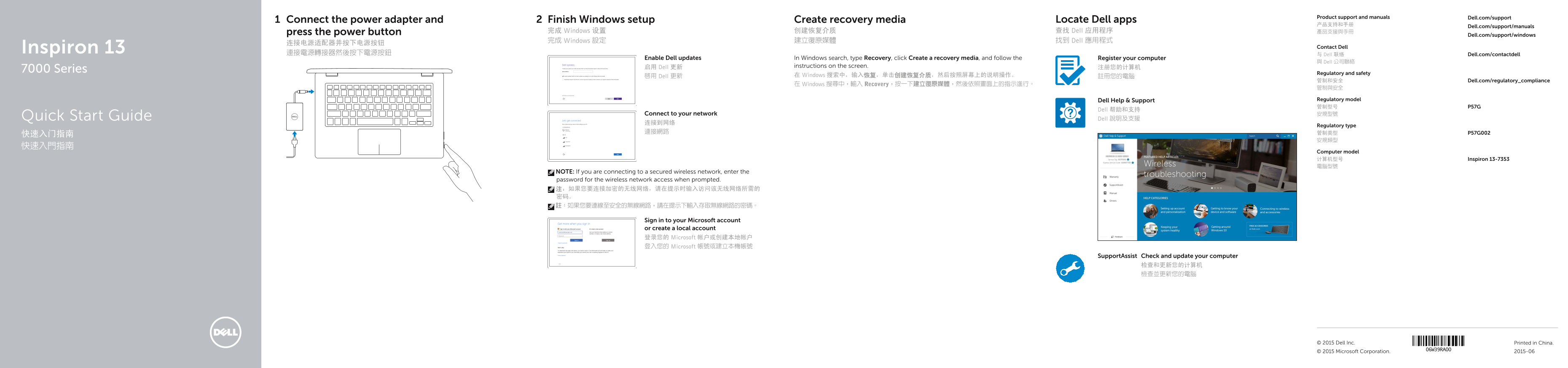
Page 1 Text Content
Product support and manuals Dell.com/support
Connect the power adapter and Finish Windows setup Create recovery media Locate Dell apps
Dell.com/support/manuals
press the power button 完成 Windows 设置 创建恢复介质 查找 Dell 应用程序 產品支援與手冊
Dell.com/support/windows
完成 Windows 設定 建立復原媒體 找到 Dell 應用程式
Inspiron 13 Contact Dell
連接電源轉接器然後按下電源按鈕 与 Dell 联络 Dell.com/contactdell
Enable Dell updates In Windows search, type Recovery, click Create a recovery media, and follow the Register your computer
與 Dell 公司聯絡
启用 Dell 更新 instructions on the screen. 注册您的计算机
7000 Series
Regulatory and safety
啟用 Dell 更新 在 Windows 搜索中,输入恢复,单击创建恢复介质,然后按照屏幕上的说明操作。 註冊您的電腦
管制和安全 Dell.com/regulatory_compliance
在 Windows 搜尋中,輸入 Recovery,按一下建立復原媒體,然後依照畫面上的指示進行。
Dell Help & Support Regulatory model 管制型号 P57G
Dell 帮助和支持
Connect to your network 安規型號
Dell 說明及支援Quick Start Guide
Regulatory type
Computer model 计算机型号 Inspiron 13-7353 電腦型號
NOTE: If you are connecting to a secured wireless network, enter the password for the wireless network access when prompted. 注:如果您要连接加密的无线网络,请在提示时输入访问该无线网络所需的 密码。 註:如果您要連線至安全的無線網路,請在提示下輸入存取無線網路的密碼。
Sign in to your Microsoft account or create a local account 登录您的 Microsoft 帐户或创建本地帐户 登入您的 Microsoft 帳號或建立本機帳號
Support Assist Check and update your computer
© 2015 Dell Inc. Printed in China.
© 2015 Microsoft Corporation. 2015-06
Page Summary Contents For Dell Inspiron 13 7353 Quick Start Guide
Manual Details
| Brand | Dell |
|---|---|
| Pages | 2 |
| File Size | 1.27 MB |
| Published | July 02, 2026 |
Enter the captcha to get the download link:

Frequently Asked Questions
如何为Inspiron 13-7353备份操作系统?
在Windows搜索中输入Recovery,然后选择Create a recovery media来创建恢复介质。
设备在哪里可以更新其驱动和版本信息?
可以通过Dell.com/support或使用SupportAssist工具进行检查和更新。
我需要知道哪些端口可以用作数据传输及连接外设?
该设备配有多个USB 3.0端口,包括一个带有PowerShare的USB 3.0端口,以及可插入媒体卡的介质读取器,还有HDMI接口。
如果我的Inspiron 13-7353处于无法开机状态,应该怎么办?
请先连接电源适配器,然后按下电源按钮。如无法解决,应联系Dell支持获取进一步帮助。