Dell XPS 8900 Quick User Guide - Windows 8
Summary
Quick Start Guide for the Dell XPS 8900 high-performance desktop computer (Regulatory Model D14M). Multi-language document covering keyboard and mouse connection, display attachment to discrete graphics card, optional network cable setup, power connection, and Windows setup completion. Includes guidance for wireless network security, security and updates enablement, and Microsoft account or local account sign-in procedures.
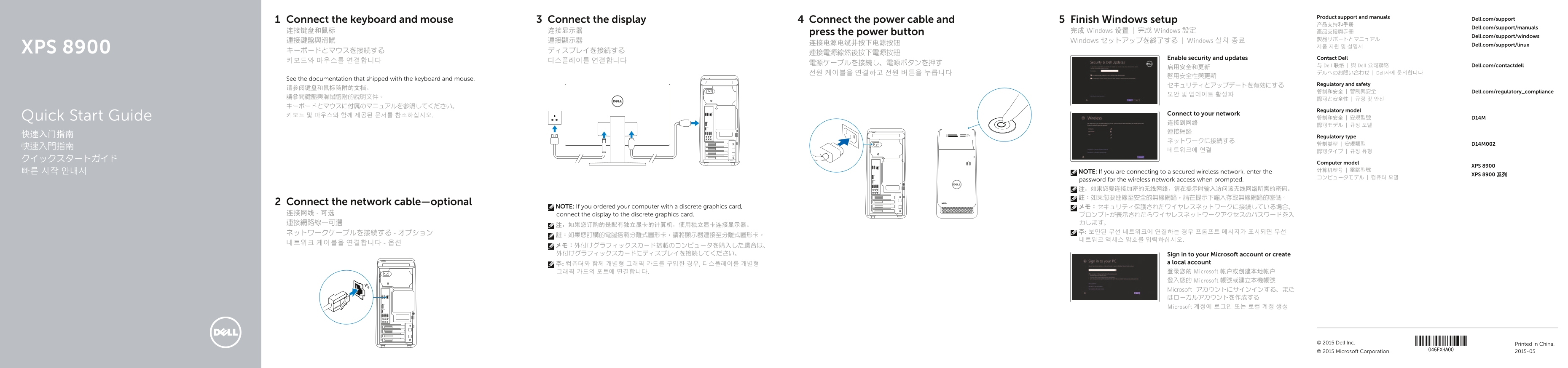
Page 1 Text Content
Product support and manuals
Connect the keyboard and mouse Connect the display Connect the power cable and Finish Windows setup Dell.com/support
Dell.com/support/manuals
连接键盘和鼠标 连接显示器 press the power button 完成 Windows 设置 | 完成 Windows 設定 產品支援與手冊
Dell.com/support/windows
連接鍵盤與滑鼠 連接顯示器 Windows セットアップを終了する | Windows 설치 종료
连接电源电缆并按下电源按钮 Dell.com/support/linux
XPS 8900 キーボードとマウスを接続する ディスプレイを接続する
Enable security and updates Contact Dell
与 Dell 联络 | 與 Dell 公司聯絡 Dell.com/contactdell
전원 케이블을 연결하고 전원 버튼을 누릅니다 デルへのお問い合わせ | Dell사에 문의합니다
See the documentation that shipped with the keyboard and mouse.
セキュリティとアップデートを有効にする Regulatory and safety
管制和安全 | 管制與安全 Dell.com/regulatory_compliance
Regulatory model
키보드 및 마우스와 함께 제공된 문서를 참조하십시오. Connect to your network
Quick Start Guide 管制和安全 | 安規型號 D14M
快速入门指南 Regulatory type
Computer model
XPS 8900
NOTE: If you are connecting to a secured wireless network, enter the
XPS 8900 系列
password for the wireless network access when prompted. 注:如果您要连接加密的无线网络,请在提示时输入访问该无线网络所需的密码。 註:如果您要連線至安全的無線網路,請在提示下輸入存取無線網路的密碼。
Connect the network cable—optional
NOTE: If you ordered your computer with a discrete graphics card, メモ:セキュリティ保護されたワイヤレスネットワークに接続している場合、
连接网线 - 可选 connect the display to the discrete graphics card.
メモ:外付けグラフィックスカード搭載のコンピュータを購入した場合は、 外付けグラフィックスカードにディスプレイを接続してください。 Sign in to your Microsoft account or create
주: 컴퓨터와 함께 개별형 그래픽 카드를 구입한 경우, 디스플레이를 개별형 a local account 그래픽 카드의 포트에 연결합니다. 登录您的 Microsoft 帐户或创建本地帐户 登入您的 Microsoft 帳號或建立本機帳號 Microsoft アカウントにサインインする、また はローカルアカウントを作成する Microsoft 계정에 로그인 또는 로컬 계정 생성
© 2015 Dell Inc. Printed in China. © 2015 Microsoft Corporation. 2015-05
Page Summary Contents For Dell XPS 8900 Quick User Guide - Windows 8
Manual Details
| Brand | Dell |
|---|---|
| Pages | 2 |
| File Size | 659.32 KB |
| Published | July 02, 2026 |
Enter the captcha to get the download link:

Frequently Asked Questions
If my computer has a discrete graphics card, where should I connect the display?
You must connect the display directly to the discrete graphics card port.
What do I need to enter when connecting to an encrypted wireless network?
You must enter the password required for accessing that secure wireless network when prompted.
How can I perform maintenance or data recovery on the computer?
The system allows you to backup, recover, repair, or restore your computer using dedicated tools.
Where should I go if I need general support or manuals for this model?
You should visit Dell.com/support and use the Service Tag label to find documentation.