Dell XPS 8700 Quick User Guide - Windows 8
Summary
This Quick Start Guide for the Dell XPS 8700 desktop computer provides setup instructions for Windows 7 and Windows 8, covering keyboard and mouse connection, display setup with discrete graphics card guidance, optional network cable installation, power cable connection, and Windows setup with security and updates. It includes a detailed hardware features diagram identifying 25 components including media-card reader, optical drive, USB 2.0 and 3.0 ports, HDMI, DisplayPort, audio ports, and expansion-card slots. Designed for performance-oriented home users.
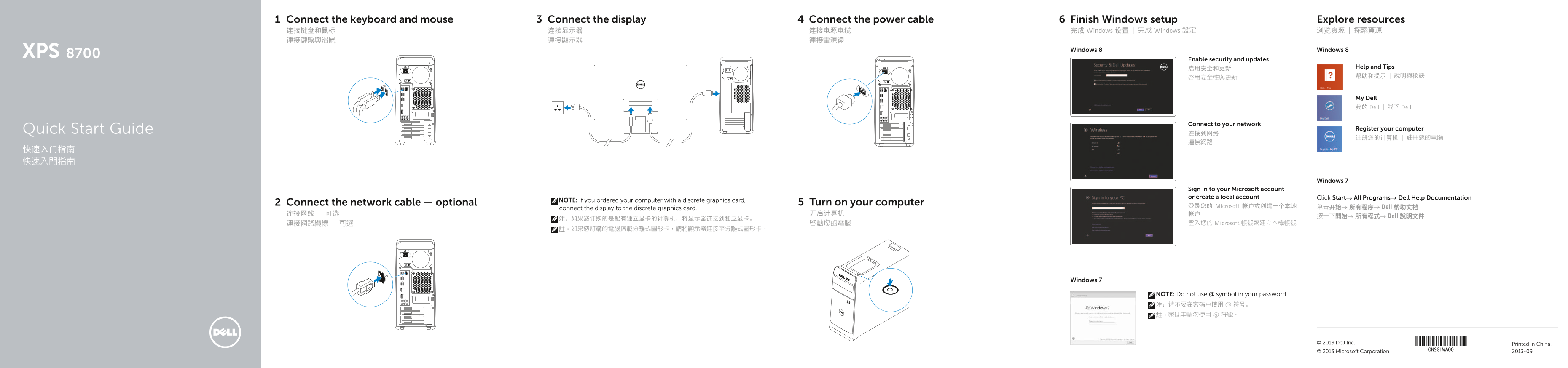
Page 1 Text Content
Connect the keyboard and mouse Connect the display Connect the power cable Finish Windows setup Explore resources 连接键盘和鼠标 连接显示器 连接电源电缆 完成 Windows 设置 | 完成 Windows 設定 浏览资源 | 探索資源 連接鍵盤與滑鼠 連接顯示器 連接電源線
Windows 8 Windows 8
Enable security and updates
启用安全和更新 Help and Tips 啟用安全性與更新 帮助和提示 | 說明與秘訣
My Dell 我的 Dell | 我的 Dell
Connect to your network
Quick Start Guide Register your computer
Windows 7
Sign in to your Microsoft account or create a local account Click Start→ All Programs→ Dell Help Documentation
NOTE: If you ordered your computer with a discrete graphics card,
Connect the network cable — optional Turn on your computer
登录您的 Microsoft 帐户或创建一个本地 单击开始→ 所有程序→ Dell 帮助文档
connect the display to the discrete graphics card.
按一下開始→ 所有程式→ Dell 說明文件
連接網路纜線 — 可選 啟動您的電腦 登入您的 Microsoft 帳號或建立本機帳號
Windows 7
NOTE: Do not use @ symbol in your password. 注:请不要在密码中使用 @ 符号。 註:密碼中請勿使用 @ 符號。
© 2013 Dell Inc. Printed in China. © 2013 Microsoft Corporation. 2013-09
Page Summary Contents For Dell XPS 8700 Quick User Guide - Windows 8
Manual Details
| Brand | Dell |
|---|---|
| Pages | 2 |
| File Size | 280.53 KB |
| Published | July 01, 2026 |
Enter the captcha to get the download link:

Frequently Asked Questions
如何连接显示器到独立显卡?
如果您订购的是配有独立显卡的计算机,请将显示器连接到独立显卡。
电脑具备哪些类型的端口和接口?
它拥有USB 3.0 (4个) 和 USB 2.0 (2个) 端口、HDMI端口、DisplayPort、音频端口(6个)、耳机端口等。
使用过程中哪些功能可以帮助用户维护或排查问题?
设备包括电源供应器诊断按钮和媒体卡读取器指示灯,便于检查状态。
新设置后如何获取更多资源和支持信息?
可以通过访问dell.com/support 或联系Dell官网了解产品支持、手册以及资源。