Dell XPS 8900 Quick User Guide - Windows 10
Summary
Dell XPS 8900 desktop Quick Start Guide with multilingual setup covering keyboard/mouse, network cable (optional), discrete graphics card display connection, power cable, Windows setup, Dell updates, security updates, network connection, and features for model D14M/D14M002 high-performance desktop.
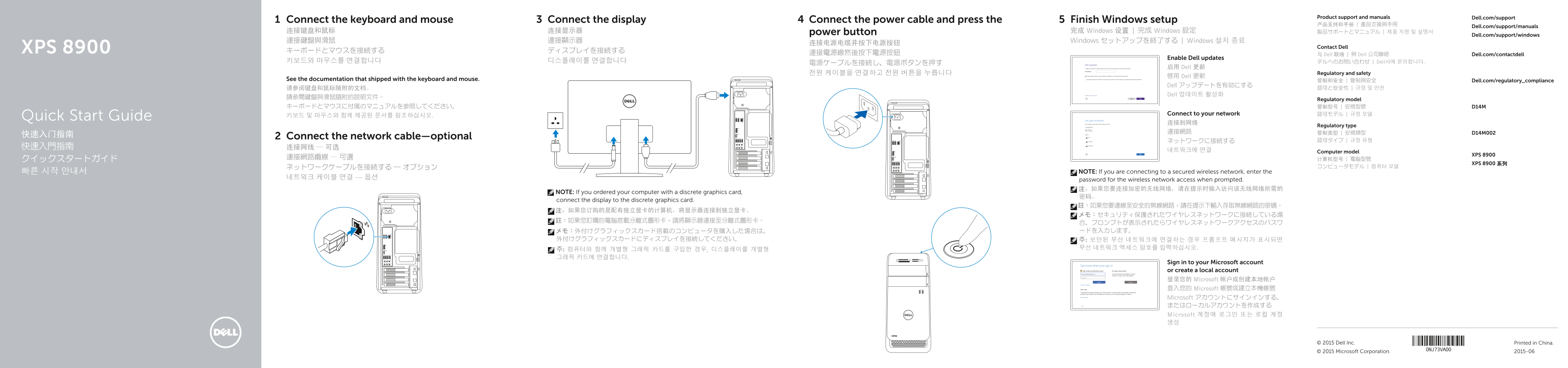
Page 1 Text Content
Product support and manuals Dell.com/support
Connect the display 4Connect the keyboard and mouse Connect the power cable and press the Finish Windows setup
Dell.com/support/manuals
连接键盘和鼠标 连接显示器 power button 完成 Windows 设置 | 完成 Windows 設定 製品サポートとマニュアル | 제품 지원 및 설명서
Dell.com/support/windows
連接鍵盤與滑鼠 連接顯示器 Windows セットアップを終了する | Windows 설치 종료
XPS 8900 Contact Dell
連接電源線然後按下電源按鈕 与 Dell 联络 | 與 Dell 公司聯絡 Dell.com/contactdell
Enable Dell updates
키보드와 마우스를 연결합니다 디스플레이를 연결합니다 デルへのお問い合わせ | Dell사에 문의합니다.
启用 Dell 更新
전원 케이블을 연결하고 전원 버튼을 누릅니다 Regulatory and safety
啟用 Dell 更新
See the documentation that shipped with the keyboard and mouse. 管制和安全 | 管制與安全 Dell.com/regulatory_compliance
Dell アップデートを有効にする
Dell 업데이트 활성화
Regulatory model
Connect to your network 認可モデル | 규정 모델
키보드 및 마우스와 함께 제공된 문서를 참조하십시오.Quick Start Guide
Regulatory type
快速入门指南 Connect the network cable—optional
네트워크에 연결 Computer model
XPS 8900
XPS 8900 系列
빠른 시작 안내서 NOTE: If you are connecting to a secured wireless network, enter the
password for the wireless network access when prompted. 注:如果您要连接加密的无线网络,请在提示时输入访问该无线网络所需的
NOTE: If you ordered your computer with a discrete graphics card,
connect the display to the discrete graphics card.
Sign in to your Microsoft account or create a local account 登录您的 Microsoft 帐户或创建本地帐户 登入您的 Microsoft 帳號或建立本機帳號 Microsoft アカウントにサインインする、 またはローカルアカウントを作成する Microsoft 계정에 로그인 또는 로컬 계정 생성
© 2015 Dell Inc. Printed in China.
© 2015 Microsoft Corporation. 2015-06
Page Summary Contents For Dell XPS 8900 Quick User Guide - Windows 10
Manual Details
| Brand | Dell |
|---|---|
| Pages | 2 |
| File Size | 656.00 KB |
| Published | July 03, 2026 |
Enter the captcha to get the download link:

Frequently Asked Questions
如何创建恢复介质?
在 Windows 搜索栏中输入 Recovery,点击 Create a recovery media,然后按照屏幕上的说明操作。
连接显示器应该接入哪个端口?
如果您订购的是配有独立显卡的计算机,将显示器连接到独立显卡。