# A B C D E F G H I J K L M N O P Q R S T U V W X Y Z

Dell Vostro 3450 Setup and Features Information Tech Sheet

Summary

Dell Vostro 3350/3450/3550/3750 Setup And Features Information (January 2011). This multilingual guide covers front and back views for all four Vostro models with detailed component labeling including camera, microphone, display, VGA/HDMI/USB/eSATA connectors, fingerprint reader, memory card reader, audio connectors, and status lights. Includes cooling vent safety warnings about airflow restriction risks.
📄 Preview 📖 Table of Contents Contents PAGE OF 16

Page 1 Text Content

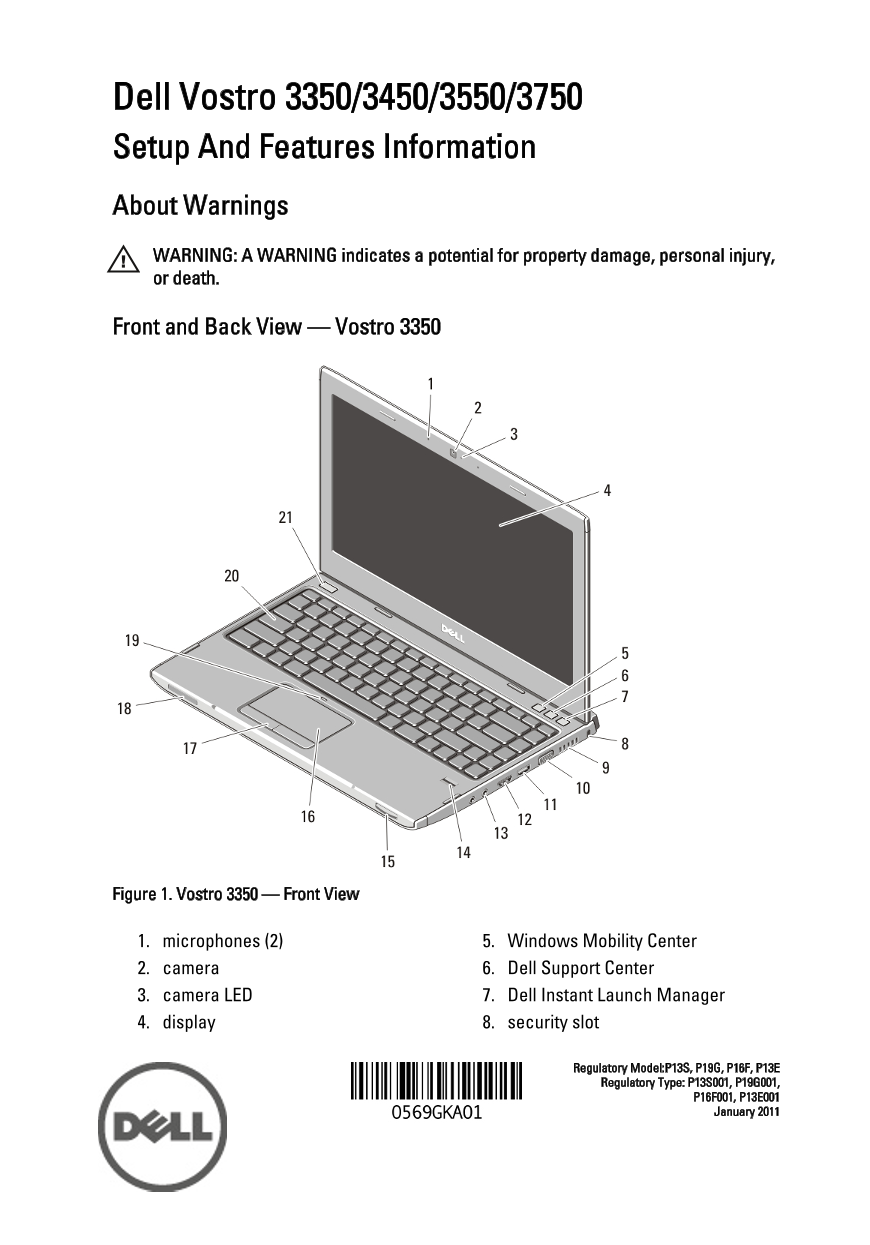
Dell Vostro 3350/3450/3550/3750 Setup And Features Information About Warnings WARNING: A WARNING indicates a potential for property damage, personal injury, or death. Front and Back View — Vostro 3350

Figure 1. Vostro 3350 — Front View

1. microphones (2) 5. Windows Mobility Center 2. camera 6. Dell Support Center 3. camera LED 7. Dell Instant Launch Manager 4. display 8. security slot

Regulatory Model:P13S, P19G, P16F, P13E Regulatory Type: P13S001, P19G001,

P16F001, P13E001 January 2011

Page Summary Contents For Dell Vostro 3450 Setup and Features Information Tech Sheet

Page 1 Dell Vostro 3350/3450/3550/3750 Setup And Features Information About Warnings WARNING: A WARNING indicates a potential for property damage, personal injury, or death. Front and Back View — Vostro 3350...
Page 2 9. cooling vents 16. touchpad 10. VGA connector 17. touchpad buttons (2) 11. HDMI connector 18. device status lights 12. e SATA/USB combo connector with 19. touchpad disable LED USB Power Share 20. ke...
Page 3 Front and Back View — Vostro 3450 Figure 3. Vostro 3450 — Front view 1. microphones (2) 10. optical drive/bay 2. camera 11. optical drive eject button 3. camera LED 12. fingerprint reader 4. display 1...
Page 4 Figure 4. Vostro 3450 — Back view 1. network connector 8. HDMI connector 2. USB 2.0 connector 9. e-SATA connector 3. battery 10. USB 2.0 connector 4. security cable slot 11. 8-in-1 Secure Digital (SD)...
Page 5 Front and Back View Figure 5. Vostro 3550 — Front View 1. microphones (2) 11. optical-drive eject button 2. camera 12. fingerprint reader 3. camera LED 13. 8-in-1 Secure Digital (SD) memory card reade...
Page 6 Figure 6. Vostro 3550 — Back View 1. security cable slot 7. USB 2.0 connector 2. network connector 8. cooling vents 3. USB 2.0 connector 9. HDMI connector 4. battery 10. e-SATA connector 5. VGA connec...
Page 7 Front and Back View Figure 7. Vostro 3750 — Front View 1. microphones (2) 11. optical-drive eject button 2. camera 12. fingerprint reader 3. camera LED 13. 8-in-1 Secure Digital (SD) memory card reade...
Page 8 Figure 8. Vostro 3750 — Back View 1. network connector 7. e-SATA connector 2. USB 2.0 connector 8. HDMI connector 3. battery 9. audio connectors 4. security cable slot 10. 8-in-1 Secure Digital (SD) m...
Page 9 WARNING: The AC adapter works with electrical outlets worldwide. However, power connectors and power strips vary among countries. Using an incompatible cable or improperly connecting the cable to the ...
Page 10 Figure 12. 1394 Connector 5. Open the computer display and press the power button to turn on the computer. Figure 13. Power Button NOTE: It is recommended that you turn on and shut down your computer ...
Page 11 Video Video controller and memory UMA Intel Graphics Media Accelerator HD Discrete AMD Radeon HD6470 GDDR5 - 512 MB (Vostro 3350 only) AMD Radeon HD6630 - 1 GB VRAM (Vostro 3450 and Vostro 3550) NVIDI...
Page 12 Battery 4-cell — 230.00 g (0.51 lb) 8-cell — 446.00 g (0.98 lb) Voltage 11.1 V Vostro 3450/3550 Type 6-cell "smart" lithium ion (2.6 AHr) 9-cell "smart" lithium ion (2.8 AHr) Dimen...
Page 13 Battery Width 6-cell/9-cell — 255.60 mm (10.06 inches) Weight 6-cell — 340.00 g (0.75 lb) 9-cell — 504.50 g (1.11 lb) Voltage 11.1 V Temperature range: Operating 0 °C to 35 °C (32 °F to 95 °F) Non-ope...
Page 14 AC Adapter 90 W — 22.60 mm (0.88 inch) 130 W — 25.40 mm (1.00 inch) Width 65 W — 137.20 mm (5.40 inches) 90 W — 147.00 mm (5.78 inches) 130 W — 154.70 mm (6.09 inches) Depth 65 W — 57.80 mm (2.27 inch...
Page 15 Physical Width 375.00 mm (14.76 inches) Depth 260.2 mm (10.24 inches) Weight (Minimum) 2.51 kg (5.55 lb) Vostro 3750 Height 27.00 mm to 35.00 mm (1.06 inches to 1.38 inches) Width 411.00 mm (16.18 inc...
Page 16 Information in this publication is subject to change without notice. © 2010 Dell Inc. All rights reserved. Reproduction of these materials in any manner whatsoever without the written permission of De...

Manual Details

Brand Dell
Pages 16
File Size 1.35 MB
Published July 02, 2026
4 views

Enter the captcha to get the download link:

captcha

Frequently Asked Questions

What should I know about proper airflow when using the computer?

Do not block or allow dust to accumulate in the air vents, and never store it running in a low-airflow environment like a closed briefcase.

Is fan noise normal, or does it indicate a problem?

No, turning on the fan when the computer gets hot is normal. Fan noise does not indicate a problem with the fan or the computer.

Which types of external connections and ports are available?

The device includes VGA, HDMI, USB 2.0/3.0 connectors, e-SATA, network connector, an audio connector set, and an SD memory card reader.