Dell Vostro 1440 Setup Guide and Feature Info Tech Sheet Owner's Manual
Summary
Setup and features information for Dell Vostro 1440, 1540, 1450, and 1550 laptops. This guide provides visual identification of front and back panel components, ports, connectors, and status indicators. It includes regulatory information, safety warnings about ventilation, and quick reference for hardware features across multiple Vostro models. Target users are small business owners, office workers, and end-users deploying or using Dell Vostro laptops.
Page 1 Text Content
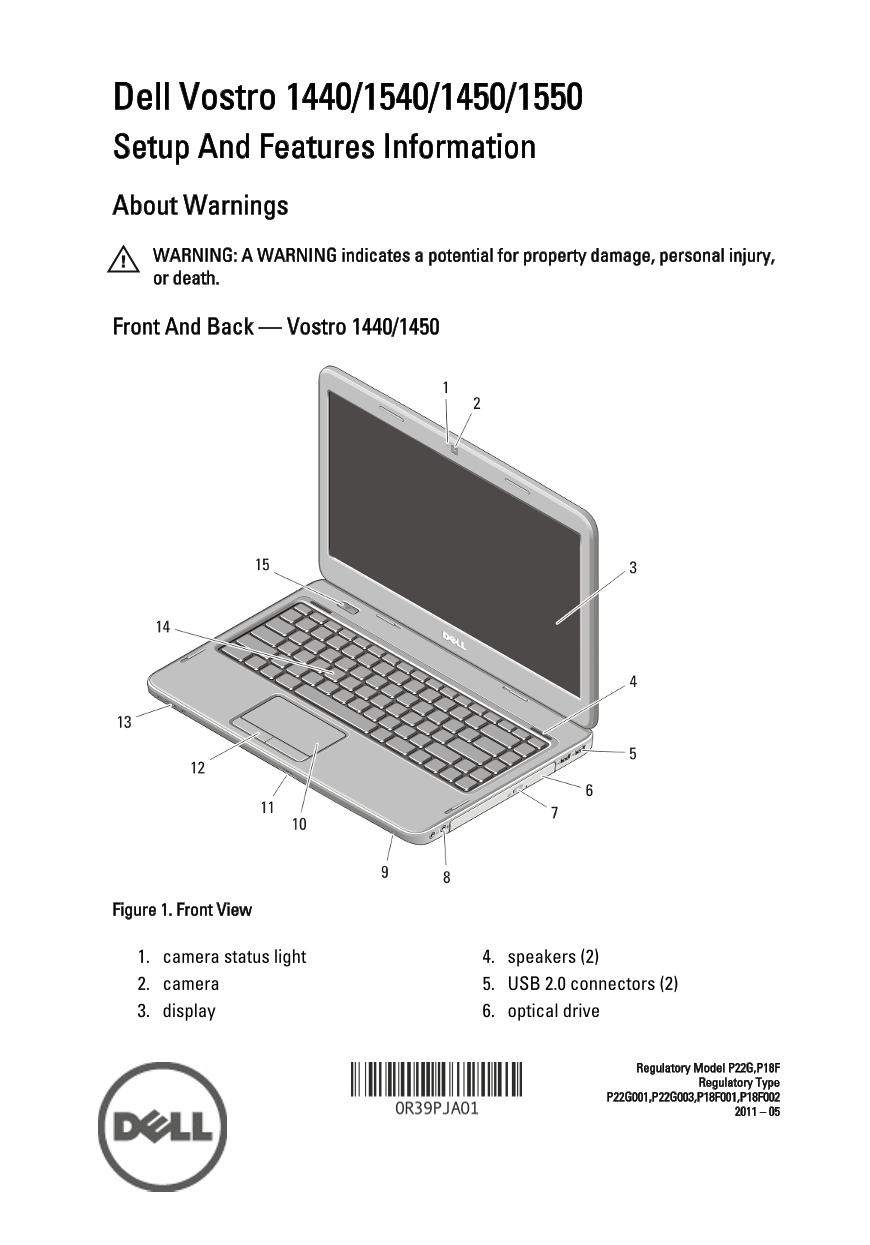
Dell Vostro 1440/1540/1450/1550 Setup And Features Information About Warnings WARNING: A WARNING indicates a potential for property damage, personal injury, or death. Front And Back — Vostro 1440/1450
Figure 1. Front View
1. camera status light 4. speakers (2) 2. camera 5. USB 2.0 connectors (2) 3. display 6. optical drive
Regulatory Model P22G,P18F
Regulatory Type
Page Summary Contents For Dell Vostro 1440 Setup Guide and Feature Info Tech Sheet Owner's Manual
Manual Details
| Brand | Dell |
|---|---|
| Pages | 9 |
| File Size | 848.72 KB |
| Published | June 29, 2026 |
Enter the captcha to get the download link:

Frequently Asked Questions
What do I do if the fan is noisy?
Fan noise is normal and does not indicate a problem with the fan or the computer.
How should I maintain proper airflow for this laptop?
Do not block, push objects into, or allow dust to accumulate in the air vents. Avoid storing it in low-airflow environments like closed briefcases while running.
What are the supported memory specifications?
The system supports DDR3 memory with two SODIMM slots; minimum is 1 GB and maximum is 8 GB.
How do I connect peripheral devices like a mouse or keyboard?
Connect them via the optional USB Connector (Figure 7).
Can I use this laptop in varying global power outlets?
The AC adapter works with electrical outlets worldwide, but be cautious of using incompatible cables which may cause damage.