Dell Vostro 1440 Technical Specification and Function Setup Guide
Summary
Setup and features guide for Dell Vostro 1440/1540/1450/1550 laptops in Chinese. Details front and rear views with component labeling for each model variant, including camera, optical drive, USB connectors, and status indicators. Provides quick setup instructions covering AC adapter connection, network cable attachment, USB device connection, and power-on procedures with safety warnings.
Page 1 Text Content
Dell Vostro 1440/1540/1450/1550 設定與功能資訊 關於警告 警告: 「警告」表示有可能會導致財產損失、人身傷害甚至死亡。
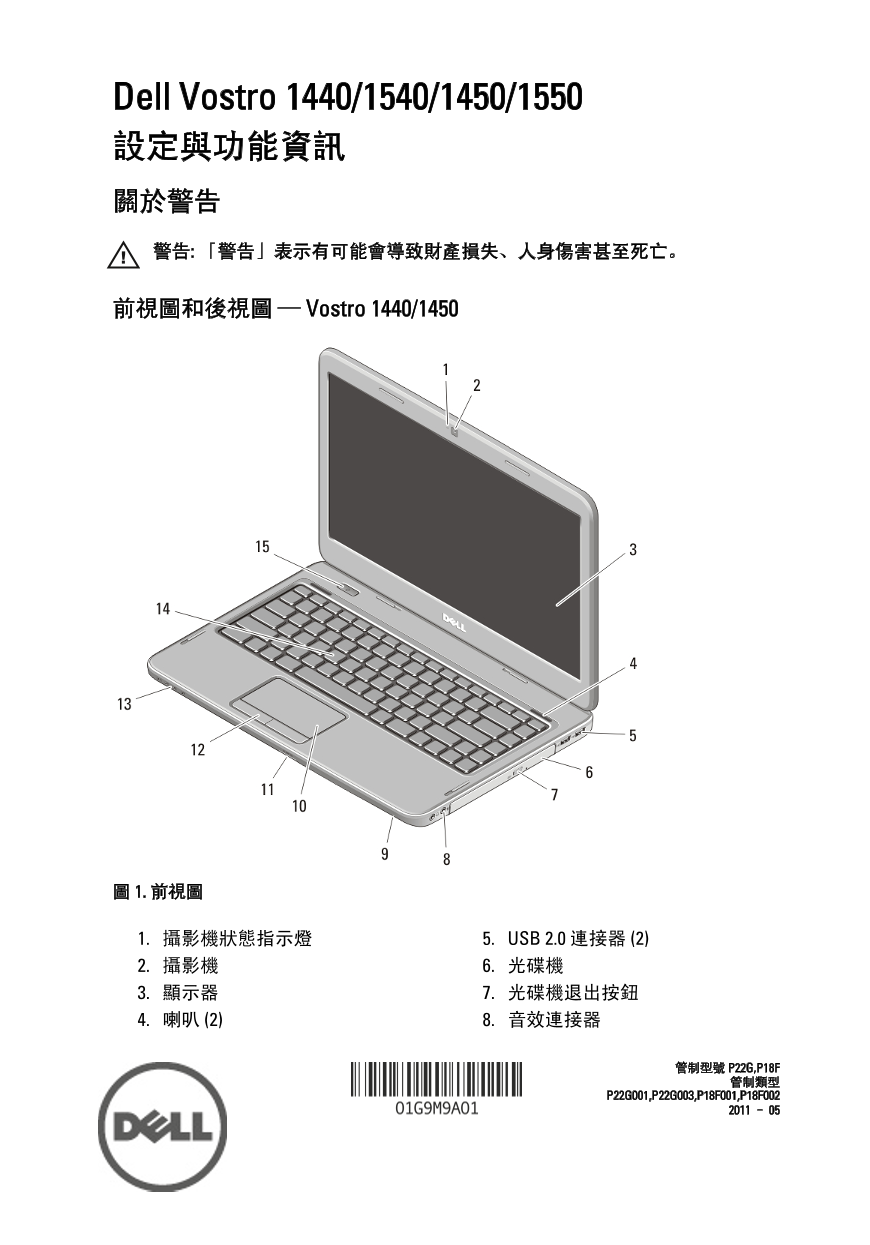
前視圖和後視圖 — Vostro 1440/1450
1. 攝影機狀態指示燈 5. USB 2.0 連接器 (2) 2. 攝影機 6. 光碟機 3. 顯示器 7. 光碟機退出按鈕 4. 喇叭 (2) 8. 音效連接器
Page Summary Contents For Dell Vostro 1440 Technical Specification and Function Setup Guide
Manual Details
| Brand | Dell |
|---|---|
| Pages | 10 |
| File Size | 930.68 KB |
| Published | July 02, 2026 |
Enter the captcha to get the download link:

Frequently Asked Questions
If I hear fan noise, does it mean the computer is broken?
No, when the computer generates heat, the fan will activate and emit noise; this is normal behavior.
Are there any specific warnings about ventilation or storage?
Do not block vents or push objects into them. Avoid storing the Dell computer in poorly circulated environments, as this can cause damage or fire.
What steps should I take when connecting external devices or cards?
It is recommended that you turn on and shut down your computer at least once before you install any cards or connect devices like printers.
Which visual connection ports are available on the model?
The unit includes both VGA connectors and HDMI connectors, in addition to USB 2.0 ports.