Dell Vostro 1014 Setup Tech Sheet User Guide
Summary
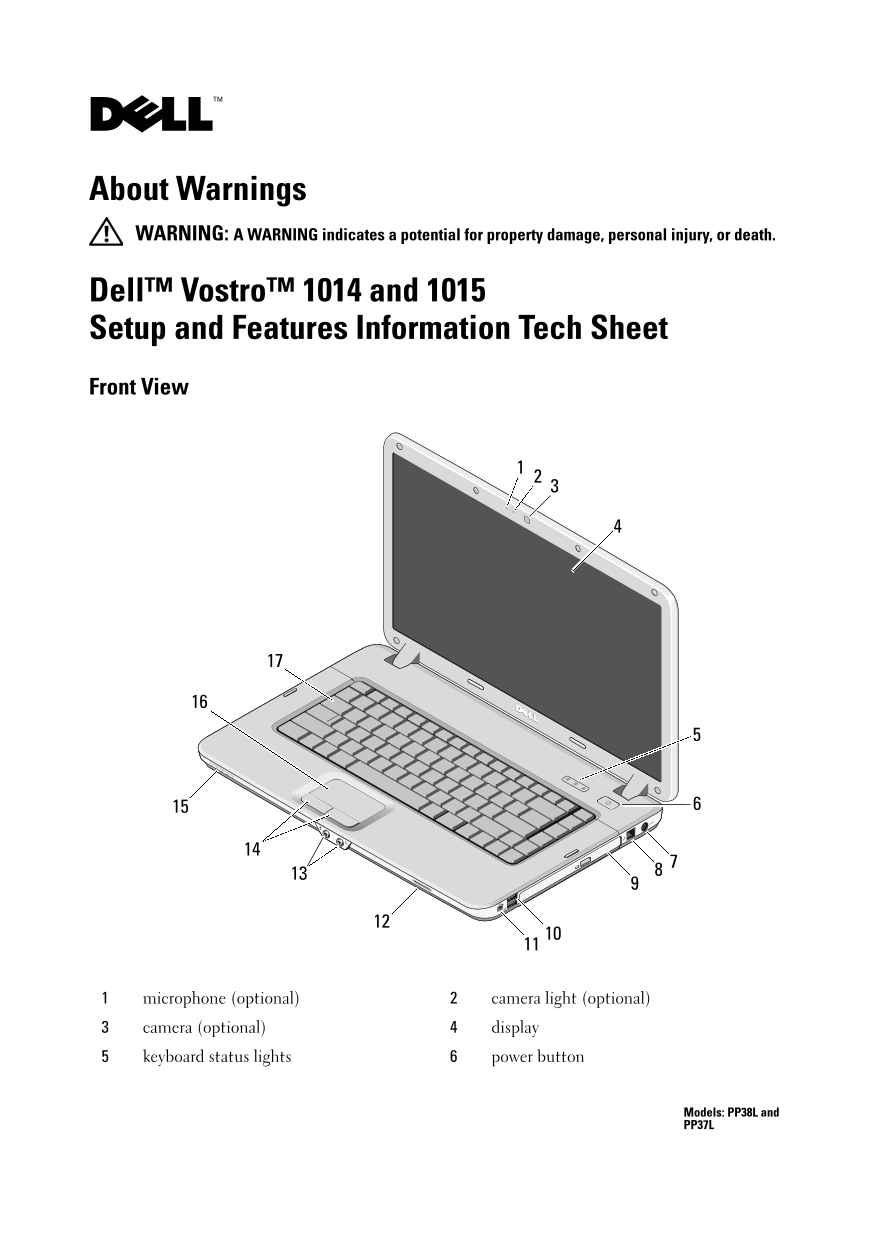
This is the Dell Vostro 1014 and 1015 Setup and Features Information Tech Sheet (Models PP38L and PP37L). It provides front and back view diagrams identifying all ports and components including microphone, camera, display, keyboard, touchpad, USB connectors, IEEE 1394 connector, memory card reader, audio connectors, VGA connector, network connector, and ExpressCard reader. The guide includes quick setup instructions and safety warnings. It is intended for small business users setting up their Vostro laptops.
Page 1 Text Content
C406Tcc0.fm Page 1 Monday, July 20, 2009 6:23 PM
About Warnings WARNING: A WARNING indicates a potential for property damage, personal injury, or death.
Dell™ Vostro™ 1014 and 1015 Setup and Features Information Tech Sheet Front View
microphone (optional) camera light (optional)
camera (optional) display
keyboard status lights 6 power button
Models: PP38L and PP37L
Page Summary Contents For Dell Vostro 1014 Setup Tech Sheet User Guide
Manual Details
| Brand | Dell |
|---|---|
| Pages | 7 |
| File Size | 442.04 KB |
| Published | June 29, 2026 |
Enter the captcha to get the download link:

Frequently Asked Questions
What should I do before connecting external cards or devices?
It is recommended that you turn on and shut down your computer at least once first.
Which connectors are available on the back of the unit?
Connectors include VGA, network (Ethernet), two USB ports, an ExpressCard reader, and audio connectors.
What are the environmental temperature requirements for proper operation?
The operating temperature range is 0° to 35°C (32° to 95°F).
Is there a warning about using foreign electrical outlets?
Yes, using an incompatible cable or improperly connecting the AC adapter can cause fire or equipment damage.