Dell Venue 10 7000 Quick User Guide
Summary
This Quick Start Guide for the Dell Venue 10 7000 Series Android tablet (Model T13G, Regulatory Type T13G001) provides setup instructions covering power cable connection, Android operating system setup, Google account sign-in, tablet registration, and network connectivity. It includes instructions for connecting and disconnecting the optional keyboard dock, inserting a microSD card, and aligning the tablet with the keyboard connectors. Designed for mobile professionals and consumers seeking an Android-based 2-in-1 tablet solution.
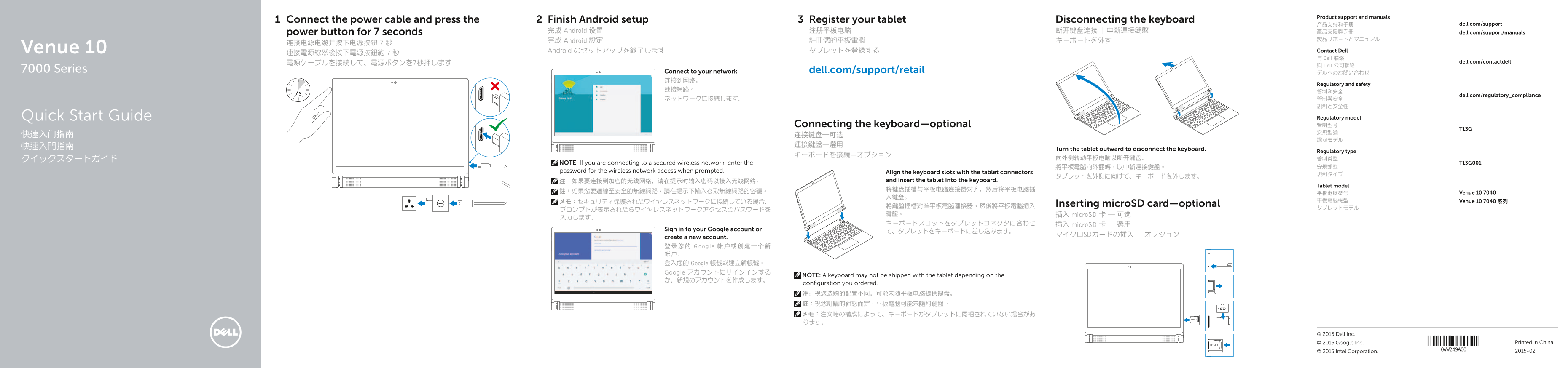
Page 1 Text Content
Product support and manuals
Connect the power cable and press the Finish Android setup Register your tablet Disconnecting the keyboard
产品支持和手册 dell.com/support
power button for 7 seconds 完成 Android 设置 注册平板电脑 断开键盘连接 | 中斷連接鍵盤 產品支援與手冊 dell.com/support/manuals
完成 Android 設定 註冊您的平板電腦 キーボートを外す
Venue 10 Android のセットアップを終了します タブレットを登録する Contact Dell
与 Dell 联络
電源ケーブルを接続して、電源ボタンを7秒押します dell.com/contactdell
與 Dell 公司聯絡
7000 Series Connect to your network. dell.com/support/retail
Regulatory and safety
dell.com/regulatory_compliance
Quick Start Guide Regulatory model Connecting the keyboard—optional 管制型号
快速入門指南 Turn the tablet outward to disconnect the keyboard.
Regulatory type
NOTE: If you are connecting to a secured wireless network, enter the T13G001
password for the wireless network access when prompted. Align the keyboard slots with the tablet connectors
注:如果要连接到加密的无线网络,请在提示时输入密码以接入无线网络。 and insert the tablet into the keyboard.
Tablet model
註:如果您要連線至安全的無線網路,請在提示下輸入存取無線網路的密碼。 平板电脑型号 Venue 10 7040
メモ:セキュリティ保護されたワイヤレスネットワークに接続している場合、 平板電腦機型 Venue 10 7040 系列
將鍵盤插槽對準平板電腦連接器,然後將平板電腦插入 Inserting micro SD card—optional
鍵盤。 插入 micro SD 卡 — 可选
キーボードスロットをタブレットコネクタに合わせ 插入 micro SD 卡 — 選用
Sign in to your Google account or
マイクロSDカードの挿入 — オプション
create a new account. 登录您的 Google 帐户或创建一个新 帐户。 登入您的 Google 帳號或建立新帳號。 Google アカウントにサインインする
NOTE: A keyboard may not be shipped with the tablet depending on the
configuration you ordered. 注:视您选购的配置不同,可能未随平板电脑提供键盘。 註:視您訂購的組態而定,平板電腦可能未隨附鍵盤。 メモ:注文時の構成によって、キーボードがタブレットに同梱されていない場合があ ります。
© 2015 Dell Inc.
© 2015 Google Inc. Printed in China. © 2015 Intel Corporation. 2015-02
Page Summary Contents For Dell Venue 10 7000 Quick User Guide
Manual Details
| Brand | Dell |
|---|---|
| Pages | 2 |
| File Size | 681.77 KB |
| Published | July 01, 2026 |
Enter the captcha to get the download link:

Frequently Asked Questions
How do I disconnect the keyboard?
Turn the tablet outward to disconnect the keyboard by aligning the keyboard slots with the tablet connectors and then inserting the tablet into the keyboard.
What do I do if I connect to a secure wireless network?
When prompted, you must enter the password for the wireless network access to proceed.
Where can I find pairing instructions for the keyboard?
Please refer to the User's Manual at dell.com/support/manuals for detailed pairing instructions.