Dell Venue 5056 Quick User Guide - Windows 10
Summary
Dell Venue 10 Pro 5056 tablet Quick Start Guide with multilingual setup covering power button hold, Windows setup, recovery drive creation, Dell app location, SupportAssist, computer registration, and regulatory information for models T16G/T16G001.
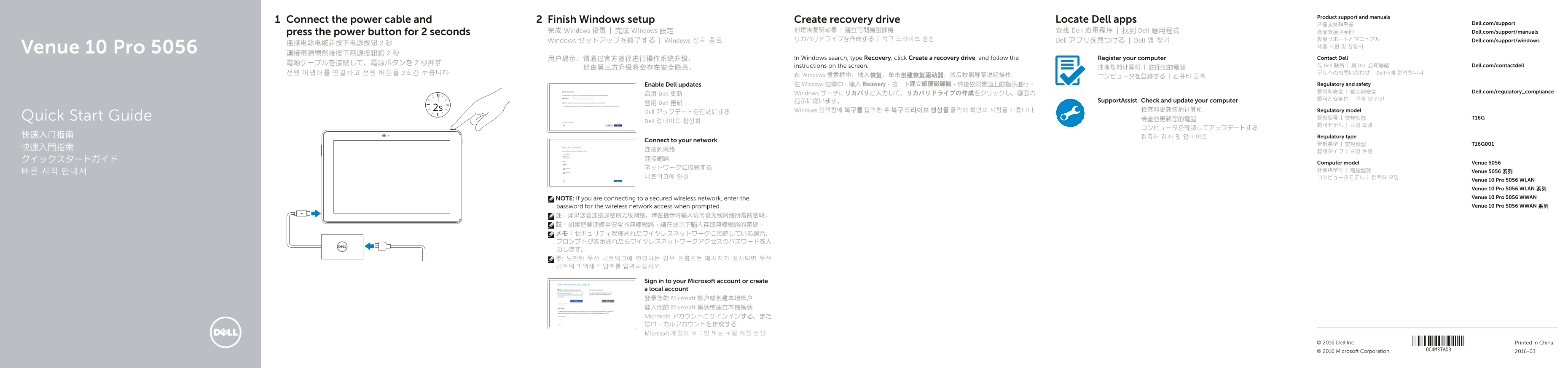
Page 1 Text Content
Product support and manuals
Connect the power cable and Finish Windows setup Create recovery drive Locate Dell apps
产品支持和手册 Dell.com/support
完成 Windows 设置 | 完成 Windows 設定 创建恢复驱动器 | 建立可開機磁碟機 查找 Dell 应用程序 | 找到 Dell 應用程式 產品支援與手冊 Dell.com/support/manuals
press the power button for 2 seconds
リカバリドライブを作成する | 복구 드라이브 생성 Dell アプリを見つける | Dell 앱 찾기 製品サポートとマニュアル Dell.com/support/windows
Windows セットアップを終了する | Windows 설치 종료
Venue 10 Pro 5056 連接電源線然後按下電源按鈕約 2 秒
用户提示:请通过官方途径进行操作系统升级, In Windows search, type Recovery, click Create a recovery drive, and follow the Register your computer Contact Dell
instructions on the screen. 与 Dell 联络 | 與 Dell 公司聯絡 Dell.com/contactdell
전원 어댑터를 연결하고 전원 버튼을 2초간 누릅니다 デルへのお問い合わせ | Dell사에 문의합니다
在 Windows 搜索框中,输入恢复,单击创建恢复驱动器,然后按照屏幕说明操作。 コンピュータを登録する | 컴퓨터 등록
Enable Dell updates 在 Windows 搜尋中,輸入 Recovery,按一下建立修復磁碟機,然後依照畫面上的指示進行。 Regulatory and safety 管制和安全 | 管制與安全 Dell.com/regulatory_compliance
启用 Dell 更新 Windows サーチにリカバリと入力して、リカバリドライブの作成をクリックし、画面の
指示に従います。 Support Assist Check and update your computer
啟用 Dell 更新
Windows 검색창에 복구를 입력한 후 복구 드라이브 생성을 클릭해 화면의 지침을 따릅니다. 检查和更新您的计算机 Regulatory model
Dell アップデートを有効にする
Quick Start Guide 檢查並更新您的電腦 管制型号 | 安規型號 T16G
Dell 업데이트 활성화
快速入门指南 컴퓨터 검사 및 업데이트 Regulatory type
Connect to your network
Computer model Venue 5056
计算机型号 | 電腦型號 Venue 5056 系列
Venue 10 Pro 5056 WLAN Venue 10 Pro 5056 WLAN 系列 NOTE: If you are connecting to a secured wireless network, enter the Venue 10 Pro 5056 WWAN password for the wireless network access when prompted. Venue 10 Pro 5056 WWAN 系列
Sign in to your Microsoft account or create a local account 登录您的 Microsoft 帐户或创建本地帐户 登入您的 Microsoft 帳號或建立本機帳號 Microsoft アカウントにサインインする、また はローカルアカウントを作成する Microsoft 계정에 로그인 또는 로컬 계정 생성
© 2016 Dell Inc. Printed in China. © 2016 Microsoft Corporation. 2016-03
Page Summary Contents For Dell Venue 5056 Quick User Guide - Windows 10
Manual Details
| Brand | Dell |
|---|---|
| Pages | 2 |
| File Size | 1.39 MB |
| Published | July 03, 2026 |
Enter the captcha to get the download link:

Frequently Asked Questions
如何为设备创建可恢复的系统副本?
在Windows搜索栏中输入Recovery,然后选择Create a recovery drive来创建恢复驱动器。
连接加密无线网络需要什么额外信息?
如果连接到安全的无线网络,必须在提示时输入访问该网络的密码。
设备支持哪些存储卡和通信模块?
设备有MicroSD卡槽、Micro-SIM卡插槽,并可用于移动宽带(mobile broadband) 连接。
更换操作系统或进行大型功能更新需要注意什么?
使用第三方方式升级系统可能会存在安全风险,建议通过官方途径操作。