Dell Venue 8 3840 Quick User Guide
Summary
This quick start guide provides setup instructions for the Dell Venue 8 tablet (models 3840, LTE/3840, HSPA+/3840). It covers initial steps including powering on the tablet, finishing Android setup, inserting a SIM card for cellular models, and inserting a microSD card for expanded storage. The guide describes the tablet's features including front and rear cameras, ambient light sensor, micro-USB charging port, volume buttons, speaker, and headphone jack. It also includes information about registering the tablet and accessing Dell support resources. Designed for consumers who need a compact Android tablet for entertainment, communication, and productivity on the go.
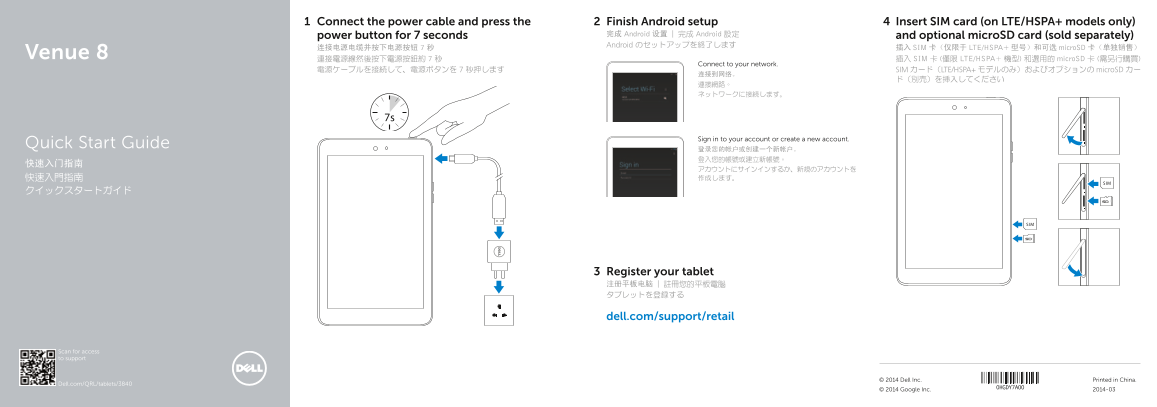
Page 1 Text Content
Connect the power cable and press the Finish Android setup Insert SIM card (on LTE/HSPA+ models only)
power button for 7 seconds 完成 Android 设置 | 完成 Android 設定 and optional micro SD card (sold separately) Android のセットアップを終了します
连接电源电缆并按下电源按钮 7 秒 插入 SIM 卡(仅限于 LTE/HSPA+ 型号)和可选 micro SD 卡(单独销售)
Venue 8 連接電源線然後按下電源按鈕約 7 秒 插入 SIM 卡 (僅限 LTE/HSPA+ 機型) 和選用的 micro SD 卡 (需另行購買)
Connect to your network.
電源ケーブルを接続して、電源ボタンを 7 秒押します SIM カード(LTE/HSPA+ モデルのみ)およびオプションの micro SD カー
Sign in to your account or create a new account.
Quick Start Guide
Register your tablet 注册平板电脑 | 註冊您的平板電腦 タブレットを登録する
dell.com/support/retail
Scan for access to support
© 2014 Dell Inc. Printed in China.
Dell.com/QRL/tablets/3840
© 2014 Google Inc. 2014-03
Page Summary Contents For Dell Venue 8 3840 Quick User Guide
Manual Details
| Brand | Dell |
|---|---|
| Pages | 2 |
| File Size | 323.89 KB |
| Published | June 18, 2026 |
Enter the captcha to get the download link:

Frequently Asked Questions
What is the first step in the setup process?
Connect the power cable and press the power button for 7 seconds.
What are the specifications of the SIM card slot?
The SIM card slot is located on the side and is only available on LTE/HSPA+ models.
Where is the microSD card slot located?
The microSD card slot is located on the front side of the tablet.
What ports and buttons are located on the right side?
The right side features the Micro-USB/charging port, battery-charging status light, volume buttons, microphone, and SIM card slot.
What are the dimensions of the device?
The device has a width of 1.69 inches, height of 8.53 inches, and depth of 0.29 inches.